AWS Device Farm meters the device. We price the company. That one difference decides who in your company ever sees the build.
Device Farm bills device minutes, or device slots for unmetered use (AWS's listed prices are below). VibeView charges for the organization: Business is $249 a month, 10 concurrent sessions, no member limit. So the question changes. On Device Farm you budget device minutes or slots; on VibeView the PM, the designer and the prospect each get a link, and their sessions draw on minutes the whole organization shares. If you are searching for an AWS Device Farm alternative, the problem may not be devices at all, but access.
See it before you weigh it. Open a VibeView share link and use a real build in your browser — no install, no account, no slot reserved for you. Then put your own build on the free tier: 2 sessions at once, 30 streaming minutes, $1 of usage credit, no card.
AWS Device Farm pricing, as AWS lists it
Here is how Device Farm charges today, from AWS's own pricing page, checked 29 October 2026. Prices are in US dollars.
| How you pay | Listed price | What it covers |
|---|---|---|
| Pay as you go | $0.17 per device minute | Phones and tablets. Device minutes count how many devices you use and how long your automated tests and remote access sessions run. |
| Free trial | 1,000 device minutes, once | A limited-time offer in place of the standard 250 device minutes. After that, $0.17 per device minute. |
| Unmetered device slots | $250 per slot per month | One slot is one device at a time, of any make or model. You buy slots per usage type (automated test or remote access) and per device family (Android or iOS). Cancelation takes effect at your next renewal date. |
| Private devices | From $200 a month | Physical devices kept for your account only, with the hardware and software you specify. AWS says to contact it for details. |
| Desktop browsers | $0.005 per instance minute | Browser tests on desktop, not mobile apps. |
Remote access vs automated testing. Pay-as-you-go minutes cover both at the same rate. Slots do not: each usage type and each device family is its own slot. Slots count devices in use at once, not people: unmetered remote access to Android and iOS, one device of each at a time, is two slots, $500 a month. Add unmetered automated tests on both and it is four slots, $1,000. Those totals are our arithmetic on AWS's listed rate.
On pay as you go, minutes add up per device. A ten-minute test run on ten phones is 100 device minutes, or $17. A thousand device minutes in a month is $170.
How VibeView charges instead
VibeView bills the organization, not the device. Each plan includes a monthly pool of streaming minutes that everyone in the organization shares, and a number of sessions that can run at once. There is no per-device or per-slot charge. iOS, Android, Apple TV, Android TV and Roku sessions all draw on the same minutes. Past the pool, minutes come out of usage credit, or you switch overage off and sessions stop instead.
For scale: Solo is $19 a month for 1,000 streaming minutes and 2 sessions at once. Business is $249 a month for 20,000 minutes and 10 at once. The current numbers for every plan are on the pricing page.
The two minutes are not the same thing. A Device Farm minute is time on a physical phone or tablet, and it runs your Appium and XCUITest suites. A VibeView minute is time on a cloud simulator or emulator, or on real Roku hardware, and runs VibeView's own tests. If you need physical phones, Device Farm is built for that. If you need a build in front of people on phones and TVs, each extra viewer costs minutes, not a slot.
AWS Device Farm alternatives: how VibeView compares
| What you are deciding | VibeView | AWS Device Farm |
|---|---|---|
| What does one more device running at the same time cost? | Nothing extra, up to 10 at once — Business is $249/mo for 10 concurrent sessions and no member limit; the organization shares 20,000 streaming minutes, then $0.02/min | $0.17 per device minute, or $250 per device slot per month unmetered; slots are bought per usage type (automated test or remote access) and per device family (Android or iOS), so unmetered remote access to both is two slots (October 2026) |
| Is the free option a tier or a trial? | A tier — free indefinitely, no card, 2 concurrent sessions and 30 streaming minutes that refill every month, in 5-minute sessions | A trial — a one-time 1,000 free device minutes, offered for a limited time instead of the standard 250 (October 2026) |
| Can you test TV apps? | Yes — Apple TV and Android TV beside phone and tablet, and Roku on real hardware | Not listed — their pricing covers two device families, Android and iOS |
| Can several people join and interact with the same live session at once? | Yes — the host invites guests by link and they join the running session live, to watch or to take the controls | Not in their documentation — a remote access session displays the single device you select when you start it, and more devices at once means more separate sessions |
| Can you drive a device in the browser and read the logs afterwards? | Yes — stream the session and interact with it; device debug logs stream too | Yes — remote access lets you swipe and gesture in real time, with video, screenshots and device, network and activity logs |
| Does your build server get an answer it understands? | Yes — pass or fail in JUnit or JSON, pinned to one build | Yes — a Jenkins CI plugin, plus a managed Appium endpoint added in November 2025 |
The first two rows are about money: how the bill moves as more devices run at once, and what you can use before paying anything. The third decides whether your TV app gets tested in the same place as your phone app.
What else you get with VibeView
A link anyone can open
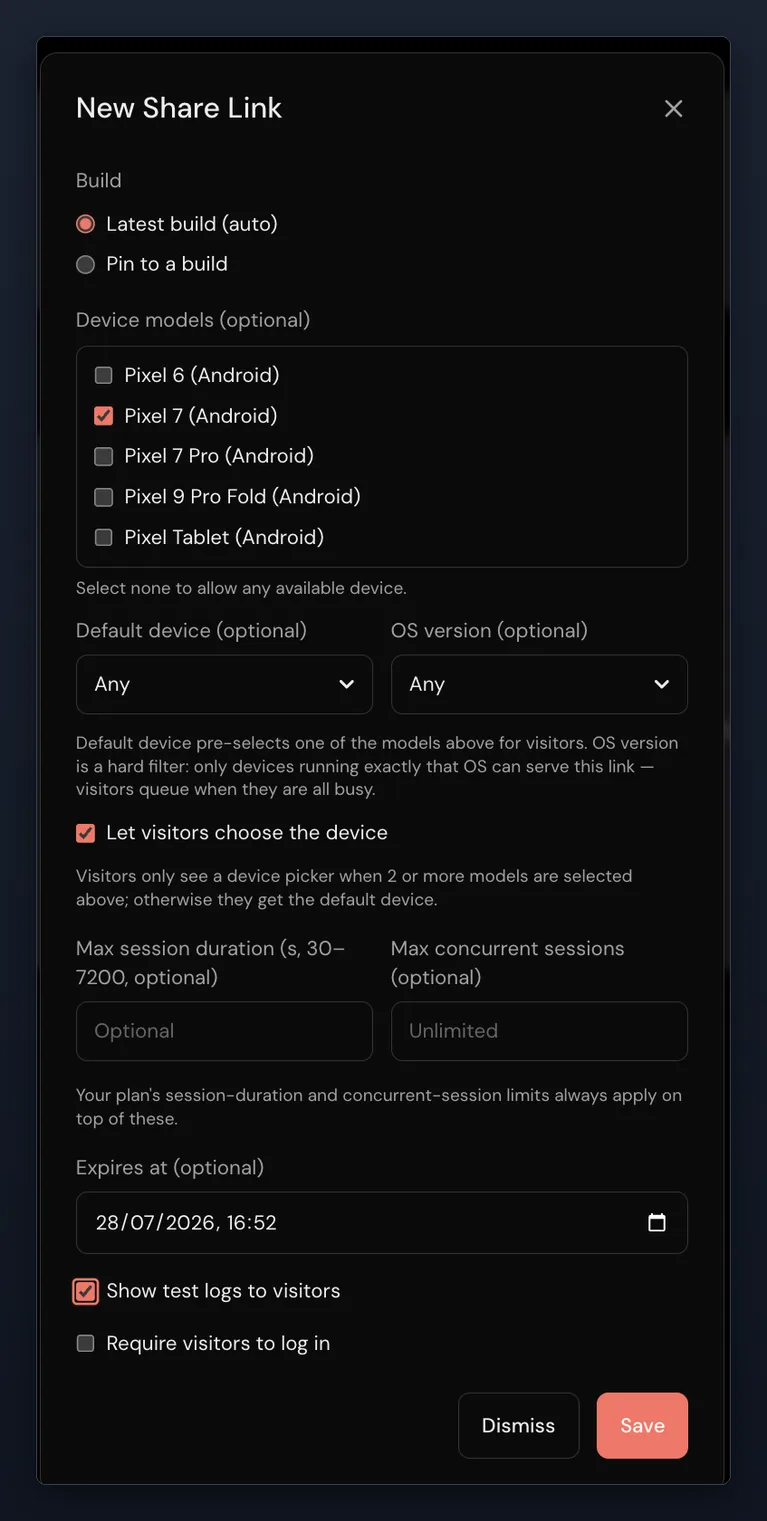
Send a running build to a PM, a support lead or a prospect. No install, no account, no seat. You choose the devices, the session length and when the link stops working.
Your docs, with the app in them
Put a running device in a docs page, a changelog or a pricing page with the SDK (1 domain on Team, unlimited domains on Business), so readers tap through the app where they read about it.
Your laptop, on a cloud phone
Point vibeview dev at your React Native app and the phone updates about a second after you save. That works for iPhone from Windows or Linux, with no Mac of your own.
Tests in plain language, agents at the wheel
Write a test as plain-language steps (AI, beta), or let your coding agent drive the device through MCP or the CLI. Recorded steps replay as recorded, and the AI takes over only when a screen no longer matches.
AI on your own key
Plain-language tests can run on your own Anthropic, OpenAI, Google or OpenRouter key, Free plan included, so model spend is billed by your provider rather than through VibeView.
TV, not an afterthought
Apple TV and Android TV sit beside phone and tablet, driven by real focus movement rather than guessed remote presses. Roku runs on real hardware.
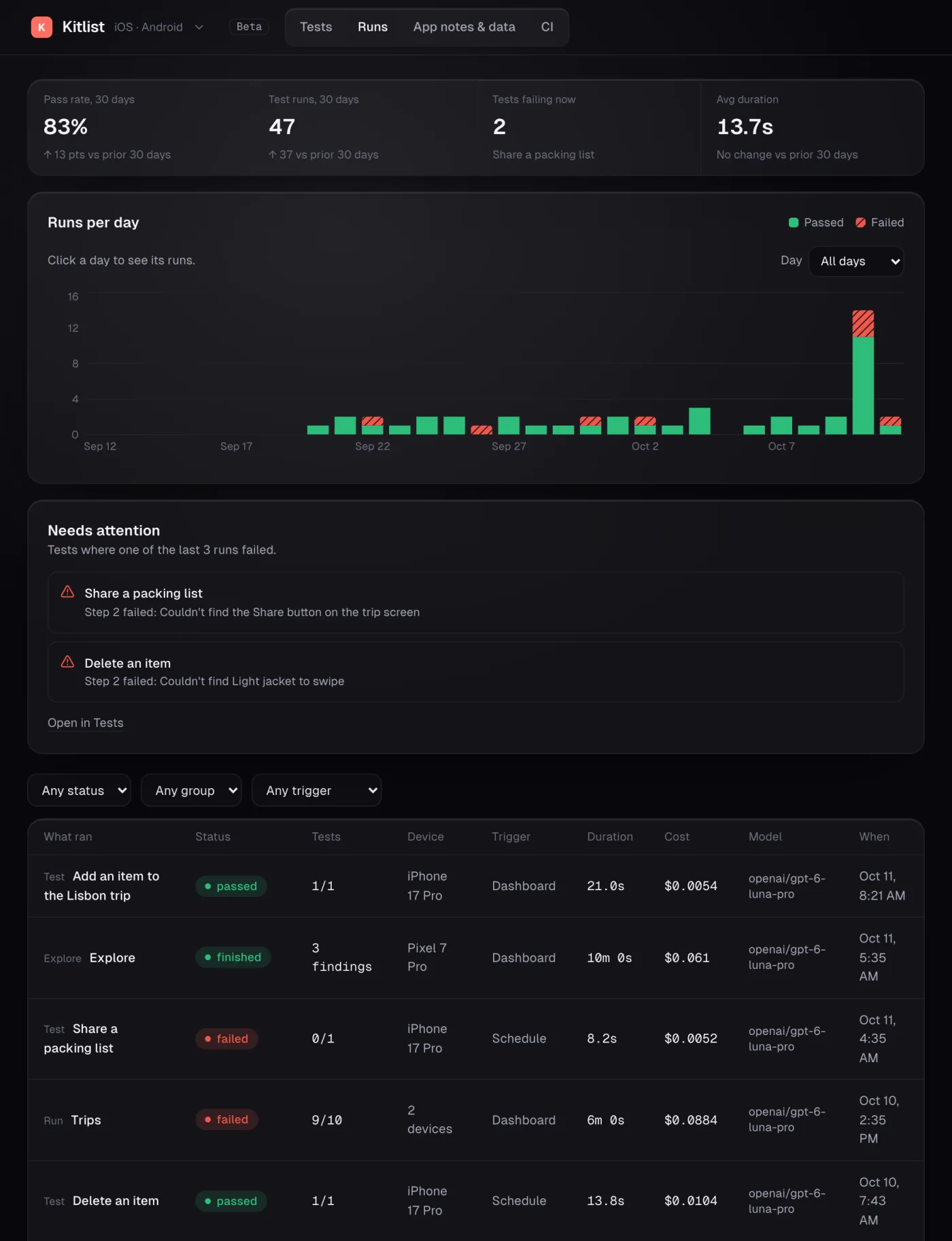
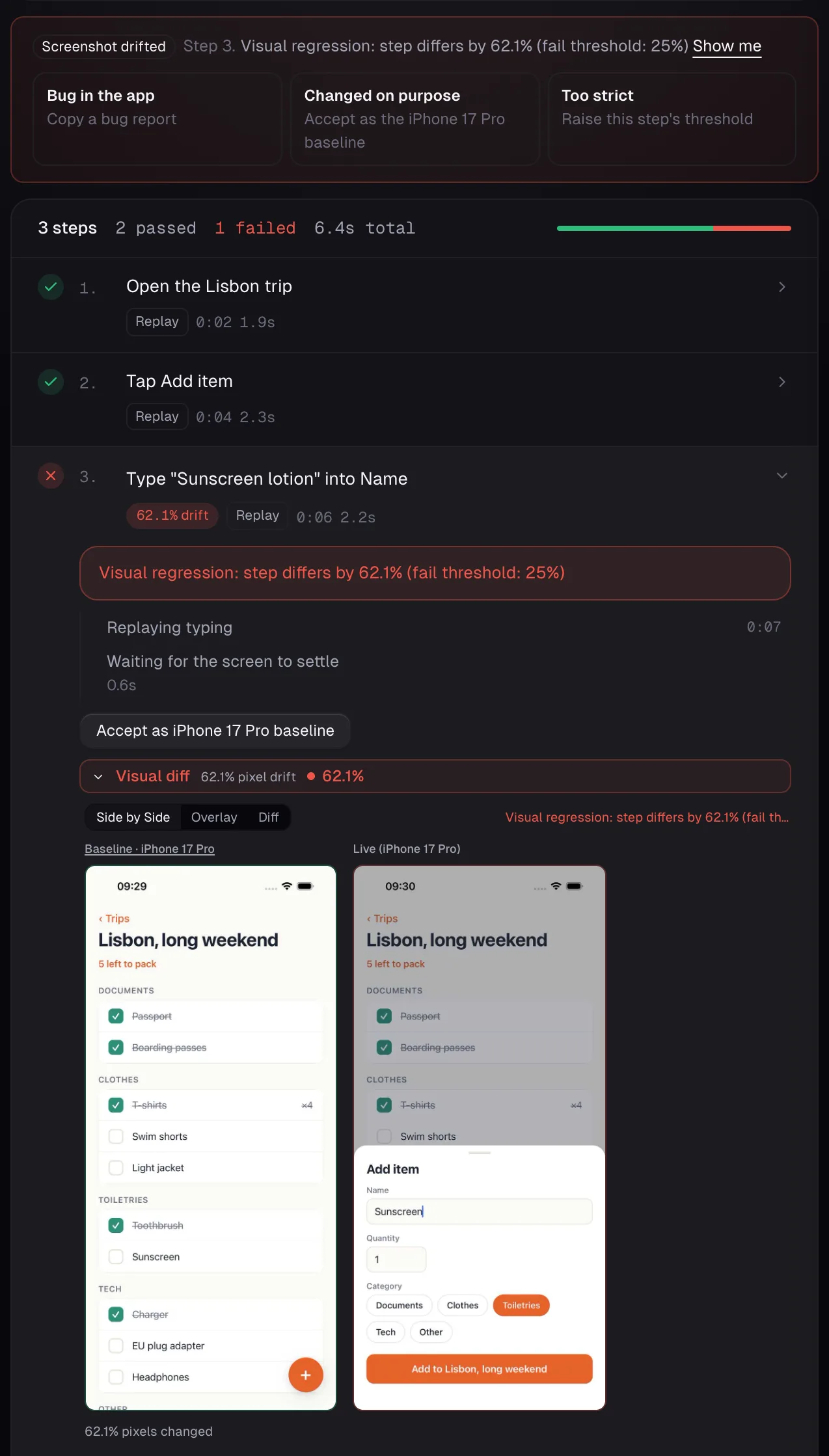
Set a fail threshold and the run stops at the step where the screen broke, not at the end. The screenshot check, on by default in every new group (warning at 30%), compares every step with its own baseline mid-run, with separate warn and fail thresholds, and a screen that changed on purpose becomes the new baseline in one click.
Answer the next "what does it look like?" with a link. Create a share link, pin it to your build, set it to expire tomorrow, and send it to whoever keeps asking what the change looks like.
VibeView runs simulators and emulators, not physical phones, and uses its own test format rather than running your Appium or XCTest tests.
Try it on your own build
AWS Device Farm vs VibeView comes down to one question you can answer today: when someone who is not an engineer asks what the change looks like, how long does it take to show them? Upload your build, create a link, time it.
2 sessions at once, 30 streaming minutes, $1 of usage credit, no card — see what the free tier includes. Or send us your workload and we will tell you plainly whether it fits.
Published 30 July 2026 · Updated 29 October 2026 · AWS Device Farm pricing verified 29 October 2026, capabilities 23 October 2026