Agentic development
An AI agent shipped an Expo app to TestFlight in 43 minutes
Rokas Kašinskas — Co-founder, VibeViewPublished 2026-09-15Updated 2026-10-25
Agentic development
I run VibeView, so read this with that in mind. But the point of the exercise was not to make the product look good. A week earlier I had asked an agent to build a demo app the same way and it hit five failures, two of them bugs in VibeView, and never reached a store. I fixed those, wrote down the rules for a clean re-run, and did it again with a fresh agent, a fresh app and an empty repository. This is the second run, exactly as it happened.
The agent got a one-page brief. The spec for the app: Kitlist, a packing checklist for trips, three screens, a fixed set of accessibility ids, seed data. The rules: work only in an empty folder, use the vibeview CLI and the public docs as the only source of truth about VibeView, never touch the VibeView source, keep a timestamped run log, and stop immediately on anything that looked like a VibeView bug rather than working around it. Anything that broke in its own project, it had to fix and write down.
The machine was a Mac, but nothing on it was used except Node and Metro. The vibeview CLI was logged in. Two things existed before the run because they are store-side setup, not app work: an App Store Connect API key stored with vibeview credentials asc-key add and a Google Play service account stored with vibeview credentials play-key add. The Play Console app existed. The App Store Connect app record did not exist yet, and that gap produced the most useful moment of the run.
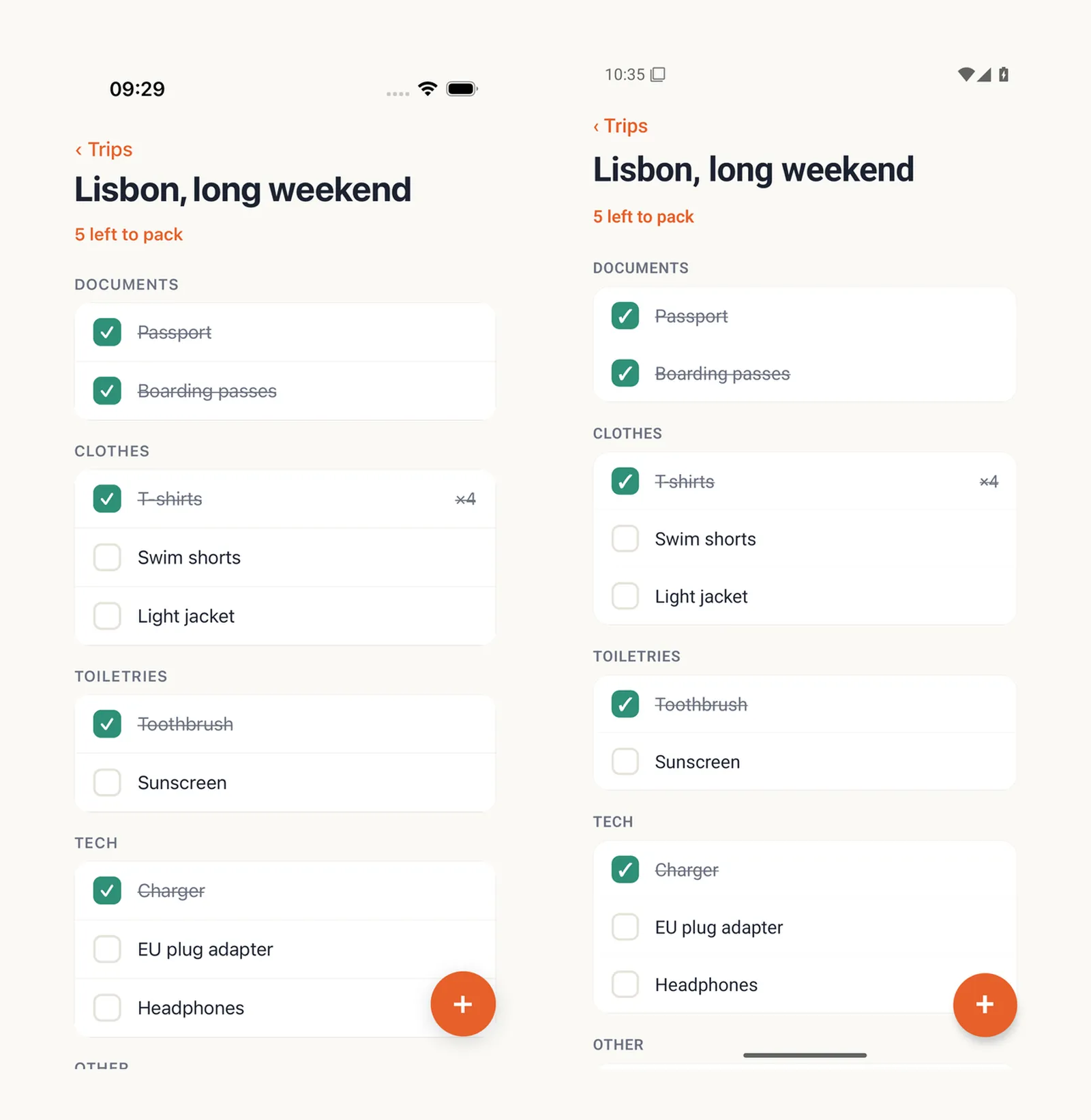
Nine minutes from create-expo-app to a pushed repository. Expo SDK 57, TypeScript, Expo Router, AsyncStorage, an icon set generated with a small Python script, and a testID on every control. The agent hit two React Native 0.86 API changes (StatusBar no longer takes backgroundColor; StyleSheet.absoluteFillObject is gone), fixed them, ran expo-doctor to a clean 21 of 21, and confirmed with a curl against Metro that the JavaScript actually bundled before asking anyone to build it.
The agent wrote vibeview.json from the cloud builds doc’s managed-Expo example, then:
vibeview build --cloud --platform all --jsonBoth builds failed in about 20 seconds. The agent read the logs with vibeview builds logs <id>:
npm error code ERESOLVE
npm error While resolving: react-dom@19.3.0
npm error Found: react@19.2.3
Its own project, and a good one. The laptop’s npm 11 had installed react-dom@19.3.0 next to Expo’s pinned react@19.2.3 with only a warning; the builder’s npm 10 treats that as a hard conflict in npm ci. The agent pinned react-dom to the SDK version, reproduced the fix locally with npx -y npm@10.8.2 ci, committed, and rebuilt. Two minutes after the first attempt:
android  08ufq2pa4k  succeeded  7m13s
ios      8yyi3ky011  succeeded  7m28s
Both builds created the app records in VibeView from the binaries themselves, name, package id and icon included, and the CLI wrote the app ids back into vibeview.json. Nothing was typed.
Every cloud build in this run cost nothing: all six fit inside the organization’s monthly build allowance. The streaming came to about nine minutes across two sessions.
This is the part I care about most. A coding agent can write a screen; it usually cannot see whether the screen works. VibeView’s agent skill gives it a loop for that: start a session, read the UI tree, act on element references, read the observation that every action returns.
vibeview dev --detach --json --platform ios
# {"event":"session_ready","session_id":"f256955b-…","url":"https://vibeview.io/sandbox/f256955b-…"}
vibeview ui-tree --session f256955b-…
vibeview find "trip.row.lisbon" --session f256955b-…   # → @e3
vibeview tap @e3 --session f256955b-…
The brief listed five assertions. The agent ran all five on an iPhone 17 Pro, iOS 26.4, reading the tree after each step:
6 / 11. Passed.5 left to pack. Passed.4 left to pack; tapping again goes back to 5. Passed, the diff in the response was literally - "5 left to pack" + "4 left to pack".6 left to pack. Passed.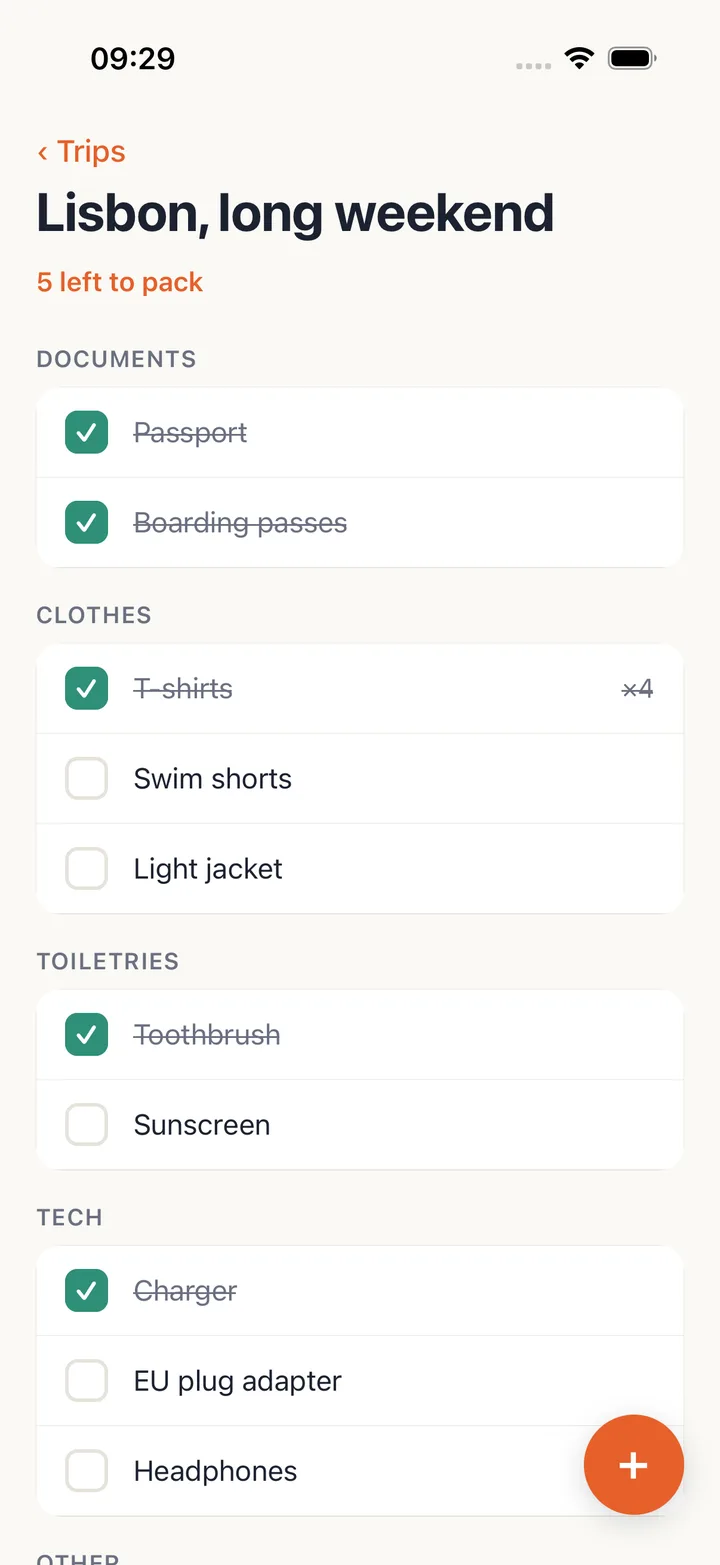
The second attempt on assertion 5 is worth telling. To relaunch the app the agent pressed home and opened the kitlist:// deep link, which on iOS shows a system prompt, “Open in Kitlist?”. It tapped the prompt’s Open button with an ordinary tap. The tree afterwards showed the new item persisted, but also Light jacket ticked, which nobody had asked for. The agent worked out from the element rectangles that the Open button sat over the Light jacket row and the tap had reached the app underneath, noted that the skill tells it to use alert accept for system alerts, reverted the toggle, and redid the step properly:
vibeview alert get --session f256955b-…          # "Open in “Kitlist”?"
vibeview alert accept --button Open --session f256955b-…
It also lost the word ” lotion” once while typing, when an iOS keyboard tip was being dismissed, retyped it, and could not reproduce it. Both went into the log as its own mistakes. Neither was an app bug. The alert mistake was still worth a product change: a tap on a system alert’s button now goes through the alert path automatically, so the touch can no longer reach the app underneath. Re-run that evening on the same prompt, the tap reported it had been routed through the alert and Light jacket stayed untouched. Seven minutes on the iPhone, then vibeview dev-stop.
Two minutes. All five assertions passed first time on a Pixel 7 Pro, Android 15, including the relaunch.
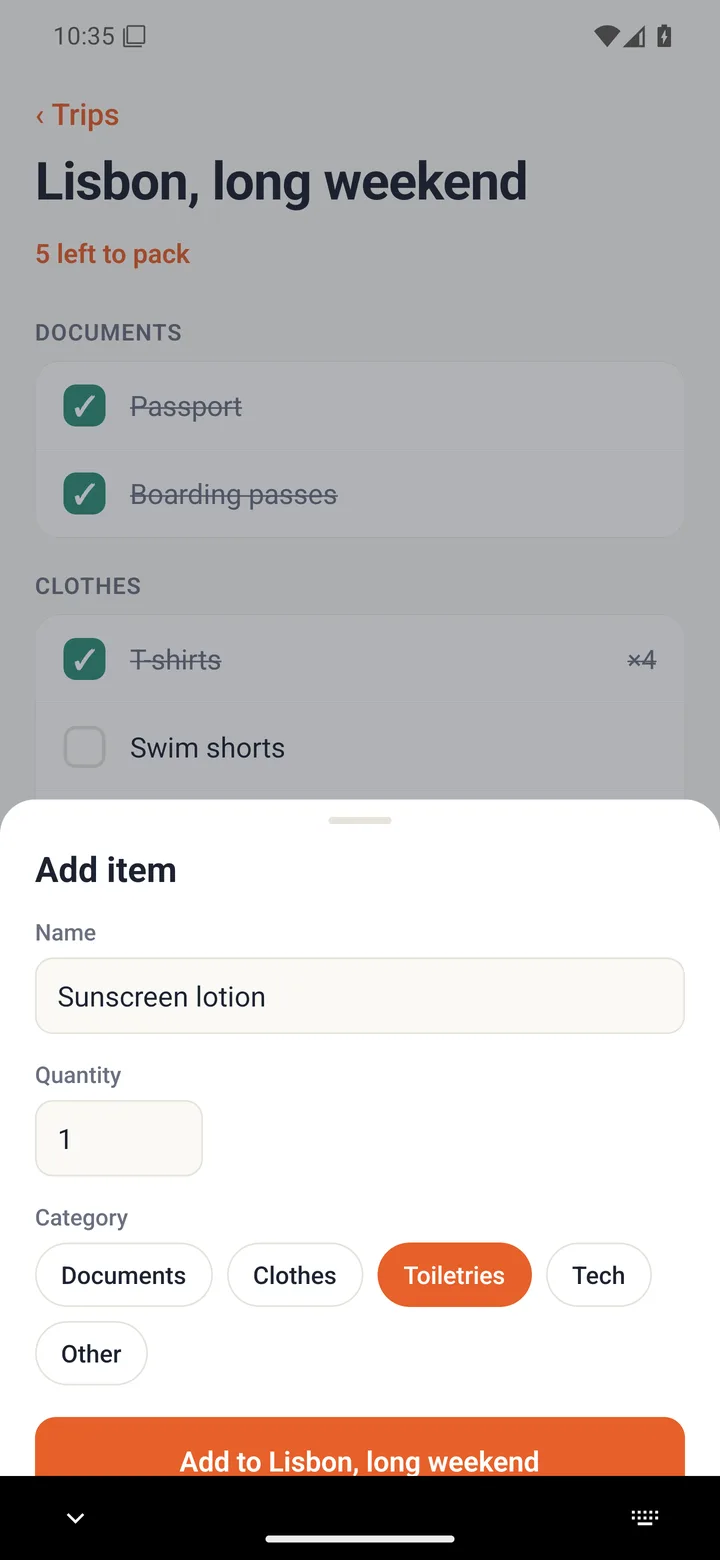
One thing the log flagged was ours, not the agent’s: on Android the UI tree did not expose the React Native testIDs, so find "trip.row.lisbon" found nothing and the agent navigated by the labels the tree printed instead. The id was in the tree all along; the layer that renders it for the agent only read the spoken label. Fixed the same afternoon and confirmed on a Pixel that evening: find "trip.row.lisbon" now resolves on Android exactly as it does on iOS.
Before generating credentials the agent asked both stores whether they were ready:
vibeview submit --check --platform ios --bundle-id io.vibeview.kitlist
vibeview submit --check --platform android --package io.vibeview.kitlist
An hour earlier, while the agent was still writing the app, that first command had printed this to me:
✗ Apple doesn't know this app yet (io.vibeview.kitlist) — create the app record in
  App Store Connect (My Apps → New App) with this bundle identifier first
That is the one thing in the entire run no API key can do. Apple’s API cannot create an app record, and Google’s cannot create a Play app. I clicked through App Store Connect while the builds ran, and by the time the agent reached this step both checks came back green:
✓ App Store Connect knows io.vibeview.kitlist ("Kitlist Trips") — ready for TestFlight uploads
✓ Google Play knows io.vibeview.kitlist and the service account … can open edits — ready for Play track uploads
The previous run had died exactly here, at the upload, after the production build was already done. The check is new, and this run is why it exists.
vibeview credentials generate --platform ios --name kitlist --app kitlist-v0fzwwy9
vibeview credentials generate --platform android --name kitlist --app kitlist-1ubmjj2b
The iOS one reused the team’s existing distribution certificate and issued a new App Store provisioning profile through the App Store Connect API, in three seconds, with no Mac and no Keychain. The Android one produced an upload keystore and stored it for production builds, printing its passwords once.
A managed Expo project has no native project files to put signing configuration in, so the agent wrote two small config plugins: one appends a guarded signingConfigs.release block to the generated Gradle file, exactly as the app signing doc describes; the other sets manual signing on the app target at prebuild time, because passing a provisioning profile on the xcodebuild command line would apply it to every CocoaPods target too, which the same doc warns about. It tested both plugins locally with fake values before spending a build on them. Then:
vibeview build --cloud --production --platform all --jsonios x8j8299kn8 succeeded 4m53s Kitlist.ipa 15.1 MB build 1
android 7x1oxdkut4 succeeded 7m50s app-release.aab 68.8 MB build 1First try on both. The build numbers came from VibeView’s per-app counter, mapped into app.config.js from an environment variable, so the next production build gets 2 without anyone editing a file.
vibeview submit --platform ios --latestReading build metadata from Kitlist.ipa
Authenticating with App Store Connect
Creating build upload for io.vibeview.kitlist 1.0.0 (1) [IOS]
Uploading Kitlist.ipa (15109184 bytes)
Waiting for Apple to accept the upload
Upload accepted — Apple is processing the build; it appears in TestFlight in ~10-15 minutes
✓ succeeded (134.3s)By the time I looked, the build was in TestFlight, ready to submit to testers.
Since this run (October 2026). vibeview submit now follows the build after the upload. It can send the build to your TestFlight groups with What to Test notes and answer Apple’s export compliance question. For external groups, it sends the build to Beta App Review, Apple’s check before external testers can install it. It can also wait for the result and exit with a code your pipeline can read (CLI 0.55.0 or later):
vibeview submit --platform ios --latest --group "QA team" --what-to-test "Try the new trip list" --wait-distributionTestFlight distribution in the docs covers each step.
vibeview submit --platform android --latest --track internalOpening a Play edit for io.vibeview.kitlist
Uploading app-release.aab (68764776 bytes)
Assigning the release to the 'internal' track
Committing the edit
Release is live on the 'internal' track
✓ succeeded (60.1s)Our own documentation said a brand-new Play app needs one manual upload through the console before the API will accept anything. The brief told the agent to expect that refusal and stop for me. Google accepted the first-ever upload for this app through the API, as a completed internal-track release, and the release was available to internal testers when I looked. The doc was corrected the same afternoon. If your Play app exists and the service account is invited with release access, there is no manual step.
Everything else in this article was the agent, on its own, from one brief. It opened no pull requests against VibeView because nothing broke on our side. The previous run had two.
The signed artifacts themselves were never run: an App Store .ipa cannot be installed on a simulator, and an .aab is not directly installable anywhere. Camera, push delivery, and performance on physical hardware are outside what a simulator can show, so a hardware pass before a real release still stands. VibeView also streams Apple TV, Android TV and Roku devices; this run did not touch them.
| Wall clock | 43 minutes (08:09 to 08:52 UTC) |
| Waiting on cloud builds | about 24 minutes |
| Cloud builds | 6: 2 failed on one lockfile conflict, 4 succeeded |
| Device sessions | 2, about 9 minutes of streaming |
| Assertions on the device | 10 of 10, none needed an app fix |
| App fixes after verification | 0 |
| Store submissions | 2 of 2 accepted, first attempt |
| Cost | $0 in builds, $0 in AI credit |
Claude Code, running the vibeview CLI in a shell. The same verbs are available as MCP tools from vibeview mcp for clients without a shell. The workflow it followed is the public agent skill, installable with vibeview agent-setup or npx skills add vibeview/skills.
Given. The brief specified the screens, the palette, the accessibility ids and the seed data, so that the five assertions were precise and the run was about building, verifying and shipping, not about taste.
No. The brief forbade it, and its only sources about VibeView were the CLI’s help, the agent skill and the public docs, the same as any customer. The run log records nothing it could not have done from outside.
The same commands apply. The parts specific to this app were the two Expo config plugins for signing, which a bare React Native project does not need because it has native project files to edit directly.
Nothing in the run used macOS. Cloud builds ran on VibeView’s builders, the devices were streamed, and the credentials came from the App Store Connect API. A Linux or Windows machine with Node would have done the same.
Install the CLI, run vibeview agent-setup, and ask your agent to implement a change and verify it on the device. The free tier covers the streaming minutes this run used; cloud builds are billed by the minute, and build minutes beyond your plan’s monthly allowance bill usage credit (the pricing page has each plan’s allowance). If you want the full path, Kitlist is a working vibeview.json, two signing plugins and a README that walks the same verification flow by hand.
Published 15 September 2026 · Every command and figure above is taken from the run log of 15 September 2026
Open a live iOS simulator, Android emulator, Apple TV, Android TV or Roku in your browser.
Start free