Rokas Kašinskas — Co-founder, VibeViewPublished 2026-10-11Updated 2026-10-13
AI-driven tests have one big advantage: they don’t break when a button moves. They also have one big cost. If the AI has to read the screen and decide what to tap at every step, every run costs the same as the first, and a test that runs on three devices every night costs that three times over, every night.
Most of those decisions don’t need making again. If the AI found the Save button yesterday and the screen hasn’t changed, today’s run can just tap it.
Learn once, replay after that
When a test run passes, VibeView keeps what the AI did at each step as that step’s learned path. The next run replays it the same way a recorded test replays your own taps: fast, and with no AI call.
If the app has changed and a learned path no longer fits, the run doesn’t fail because of it. The AI takes over that one step, finds the new way through, and the rest of the test keeps replaying.
The run page shows how the work was split, for example “3 replayed · 2 by AI”, and how much AI spend the replayed steps saved compared with the run that learned them. That figure is what those steps actually cost when they were learned, not a guess.
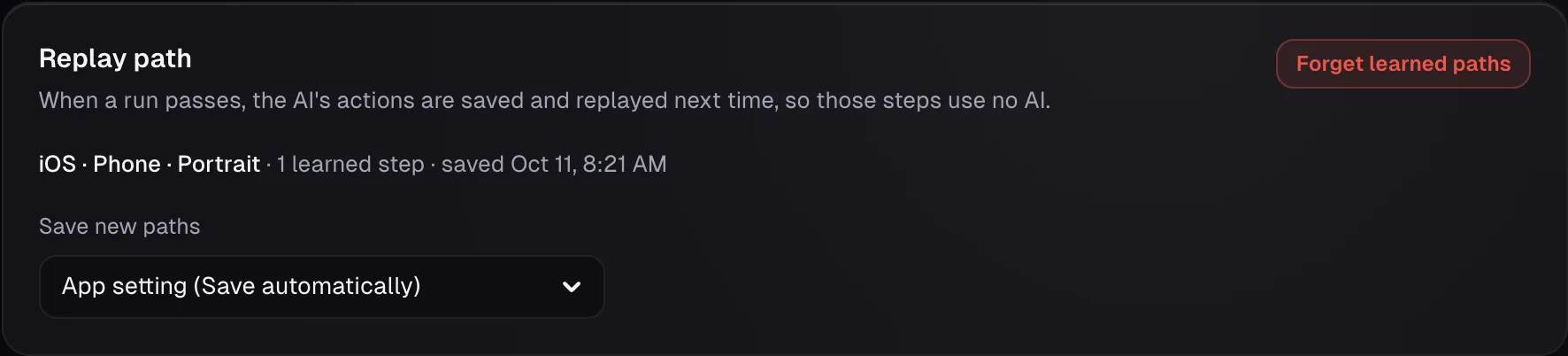
The Replay path card on a test page lists what has been learned for each kind of device.
Only good runs teach it
A path is saved only when it can be trusted:
The whole run passed, checks included.
Your recordings win. If you recorded a step yourself, that recording is what replays. A learned path never replaces it.
Each kind of device learns its own. A path learned on an iPhone in portrait is used on iPhones in portrait. An iPad, or the same phone in landscape, learns its own.
Passwords stay out. Test data is saved by name, such as {{password}}, never the value, so each run types its own.
TV apps learn too. On Apple TV, Android TV and Roku, the remote presses are saved with the element that had focus, and replay moves focus back to the same element.
A few actions are always left to the AI, such as scrolling until something appears, dragging, or answering a system alert. After a passing run, the run page lists any step that wasn’t learned and why.
When your app changes on purpose
If a run passes by a different route than the saved one, the run page shows that step and lets you decide:
Save the new route replays it from now on.
Keep the old path keeps replaying the old one.
This is a bug keeps the old path, because the change wasn’t meant to happen.
You choose how hands-on to be with Save new paths on the test’s Replay path card: Save automatically (the default), Ask me first or Never. Set it once for the whole app under App notes & data, and override it for any test. Forget learned paths clears a test’s paths, and the next passing run learns fresh ones.
Choose how much AI each run uses
Under Advanced in the Run dialog:
Smart (the default) replays recorded and learned steps and calls the AI only where something changed or a step has nothing to replay yet. Checks always use the AI.
No AI only replays and never uses usage credit. A step with nothing to replay is reported as not checked, and a changed screen fails the step. It suits a nightly run once your tests have learned their paths.
AI only ignores saved paths and lets the AI drive every step. Use it after a big redesign to find the new routes.
The same choice works in CI, so a pipeline run can be guaranteed never to call a model:
vibeview run-test <test-id> --mode replay
Good to know
The first run uses the AI (beta). A test you described or imported has nothing to replay yet.
Editing a step’s text forgets that step’s path, because the step now means something else.
Frequently asked questions
Does a learned path replace my recording?
No. A step you recorded always replays your recording.
Do checks still cost AI?
Yes. In a Smart run, Verify steps always use the AI. In a No AI run they are reported as not
checked.
Can I stop paths from being saved?
Yes. Set Save new paths to Never on a test’s Replay path card, or for the whole app under App
notes & data. Learned paths are then neither saved nor replayed.