Agentic development · Roku
AI agent builds a Roku channel, tests it on a real Roku
Rokas Kašinskas — Co-founder, VibeViewPublished 2026-09-17Updated 2026-10-25
Agentic development · Roku
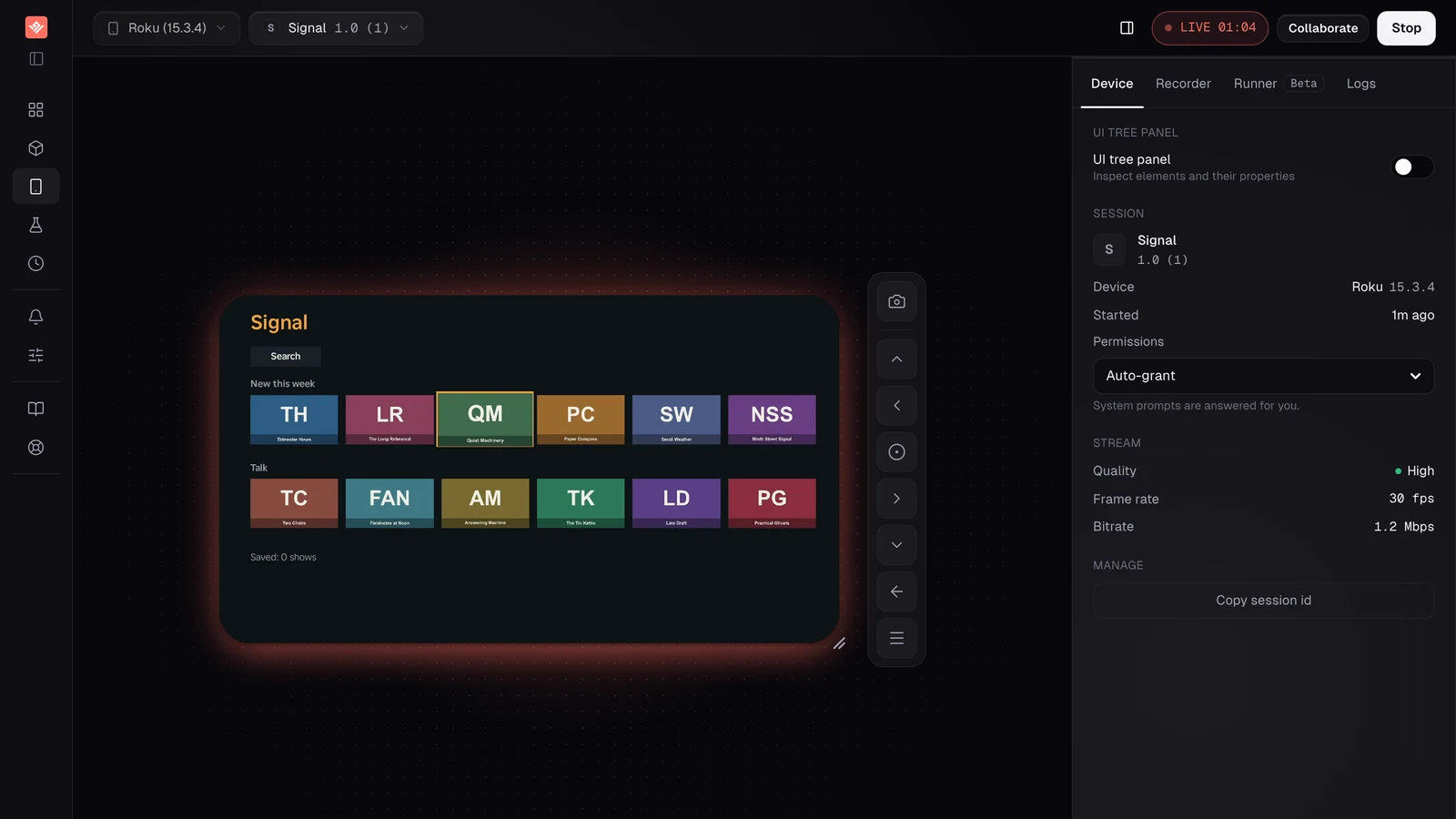
Two earlier runs took an agent from nothing to TestFlight on a phone and to both TV stores on Apple TV and Android TV. Roku is different in kind. A Roku session on VibeView is not a simulator or an emulator: it streams a physical Roku device, sideloads your channel onto it, and confines the session to that channel. So the question this time was narrower and, I think, more interesting: can an agent that has never seen the hardware build for it, using a real Roku it can only reach through a CLI?
The other difference is what Roku does not have here. There are no cloud builds for it, because a channel is a zip of source files and needs no compiler. There is no store submission, because Roku’s channel store has no equivalent of the App Store Connect API that VibeView uses for TestFlight. And at the time of this run the AI test runner did not support Roku sessions; it does now. What existed was streaming, remote control, text entry, the UI tree, and a live reload loop from the terminal. That is what the agent had.
The agent got a one-page brief and an empty public repository. The app: Signal, a podcast guide with two rows of show tiles, a detail screen with Play and a Save toggle, and a Search screen built on Roku’s own MiniKeyboard, filtering the shows as you type. A stable SceneGraph id on every control. Focus had to be SceneGraph’s own focus, never a hand-rolled highlight, because the device’s UI tree is what reports focus and the run depends on it.
The rules were the same as the two earlier runs. The vibeview CLI, the agent skill and the public docs are the only source of truth about VibeView. Never touch VibeView’s source. Keep a timestamped log. Fix your own project’s problems and write them down. Stop at once on anything that looks like a VibeView bug, and keep a separate list of small gaps that did not block you. Nothing existed before the run except an empty repository and a VibeView account. The Roku is ours, already streaming; the agent never touched it, and neither would you.
Nine minutes. The agent read the Roku section of the TV testing doc, the CLI doc’s Roku loop, the agent-control doc and Roku’s own manifest reference, and wrote its decisions down before writing code. The one that shaped everything: tiles and buttons are custom focusable Group components that hold real SceneGraph focus, not a RowList or MarkupGrid. That is a limit on our side worth being plain about. A Roku reports focus on a list node, not on the tile inside it, and the Roku itself is VibeView’s only window into a running channel, so an agent cannot see which tile of a RowList is selected. A conventional channel streams, takes the remote and reloads exactly the same; what it cannot do yet is prove which tile has focus. The brief asked for exactly that proof, so the agent built its own tiles. Up and down between rows land on the tile last focused in the target row. Saved shows live in the registry. Twelve shows with fictional names, twelve tile images, the icons and splash screens Roku’s manifest requires, all generated by a Python script and committed.
Packaging is one line in vibeview.json:
{
  "defaultPlatform": "roku",
  "platforms": {
    "roku": {
      "build": {
        "command": "mkdir -p out && rm -f out/signal.zip && zip -qr -X out/signal.zip manifest source components images data",
        "artifact": "out/signal.zip"
      }
    }
  }
}
That shape still works. Today the CLI writes the same command as the channel’s development build profile, under build.profiles.development.
The first two attempts went nowhere. vibeview dev --platform roku opened a picker, “Which uploaded app is your debug build?”, listing one existing Roku app in the org, with no way to say “build mine”. --build, documented as “build and upload first”, opened the same picker before building anything. The agent cancelled both, logged the behaviour as a gap (fixed since: dev now builds when a build command is configured and nothing is uploaded), and used the standalone command:
vibeview build --platform roku✓ built and uploaded Signal
signal-59tfspif [roku]Half a second, and the app id was written into vibeview.json. Then:
vibeview dev --platform roku --no-openStarting a roku dev session for signal-59tfspif...
Watch and interact: https://vibeview.io/sandbox/f179ca79-…
Press r to reload the channel, q or Ctrl-C to end the session.The agent ran this in a pseudo-terminal so that r and q were real keypresses, and used every other verb with --session <id>.
vibeview screenshot --out shots/01-launch.png
vibeview ui-tree
The tree was fine: 36 elements, tile.tidewater-hours [focused], Saved: 0 shows. The screenshot was not.
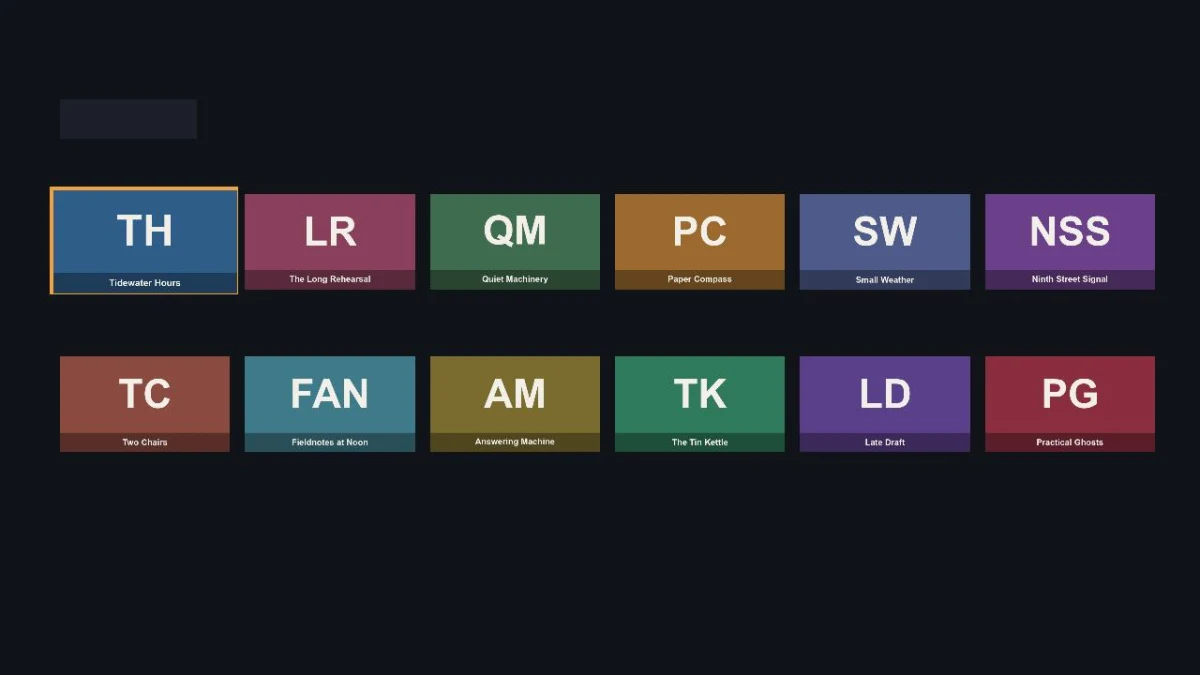
Every Label was invisible. The agent had given each one a Font child node with a font: system-font URI, which renders nothing on the device. It moved the font to the Label’s font attribute and set the size in init(), saved, and pressed r:
reloaded in 5.2sFive seconds from the keypress to the channel restarting on the Roku with all its text. That number held for the whole run.
The brief asked for three real edits through the reload loop, one with the r key and the rest with --watch. The agent changed the heading colour (r, 5.1 s), then started a second session with --watch and added a thirteenth show. The watcher saw the data file and about twenty regenerated images change, waited its two-second quiet period, and reloaded: 7.3 seconds from the last save to the channel restarting, no key pressed.
The screenshot after that reload showed the seventh tile cut off at the right edge of the screen. So the third edit was a real one: rows became clipped groups with an inner strip that slides so the focused tile stays inside a 1752 px window. Another 7.3 seconds, then six press right in a row, each answered with a diff of what changed in the tree, and on the seventh the strip moved.
vibeview ui-tree
vibeview press right
vibeview press down
vibeview find "tile.answering-machine"
vibeview tap-focused @e28
vibeview focus @e51
vibeview press select
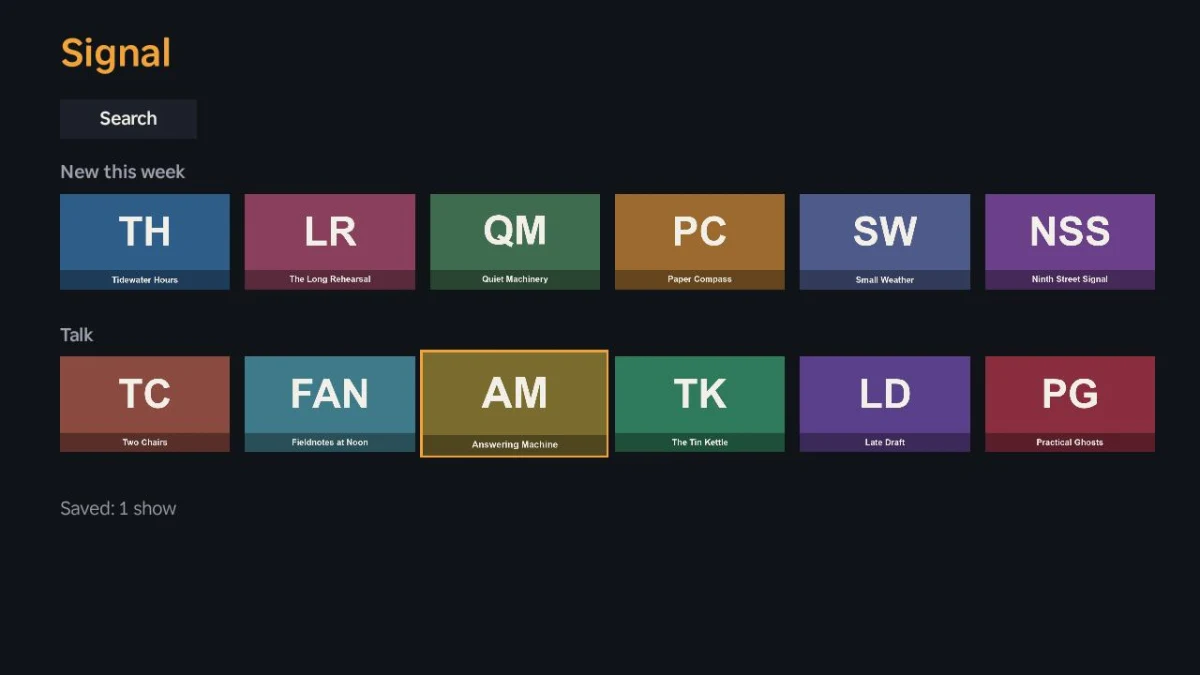
Launch focus and count, right, down, open a tile from another row, move focus to Save and toggle it: five in a row, each read back from the tree, - "Save" / + "Saved". Then:
vibeview press back --session 742c9ec5-…ok (press_button)
screen unchangedThe tree still showed Detail with Save focused. The agent retried once with --json, got "action":"button_pressed" and "kind":"unchanged", and reasoned it through in the log: the same key handler had taken right and OK seconds earlier, a handled Back closes Detail, an unhandled Back exits the channel and VibeView relaunches it, and “screen unchanged” matches neither. Only a key that never arrived does. It could not confirm from inside the channel, because at the time the channel’s console output was not available on Roku. So it wrote the issue up, ended the session at 12:13, and stopped.
It was right. On Roku, Back was being acknowledged and never sent to the device. The fix took twenty minutes, went live at 12:34, and the agent was told to continue.
Fresh session. Assertions one to five again, and this time press back came back with UI Tree changed (+38 added, -10 removed), Saved: 1 show, and tile.answering-machine [focused].
Then Search. Two press up reached the Search button, press select opened the keyboard with its a key focused, and:
vibeview type "ti"ok (type_text)
type_text may not have applied as expected. Typed 'ti' but focused field value is ''.A false alarm, and the agent said so: the warning was reading the focused element, which on Roku is a keyboard key, not the text box (fixed since). The tree showed search.input reading ti and the results holding exactly the four titles that contain it. The typed characters went straight into the Roku’s own keyboard, which no other TV platform here does.
The screenshot showed the next project bug: the MiniKeyboard is 584 by 704 pixels and sat on top of the results. The agent moved the results beside it and reloaded (5.4 s). Then it found that press down from the keyboard moves inside the keyboard, so select typed a g instead of opening a result. It gave the keyboard’s right edge and bottom row an exit into the results and reloaded again (5.0 s).
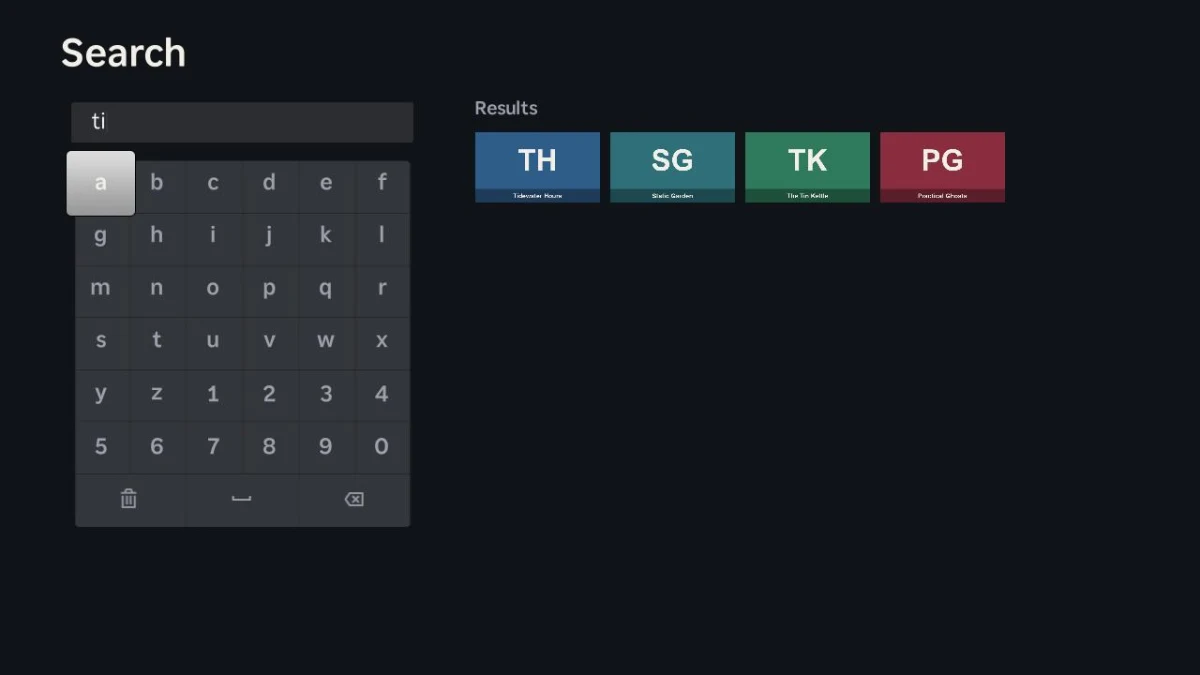
The last two assertions went through on the first try: focus walked from a keyboard key into the results on its own, select opened Detail, two press back returned to Search with the text kept and then to Home with the Search button focused, and Play showed Now playing: Answering Machine for five seconds before the tree lost it again.
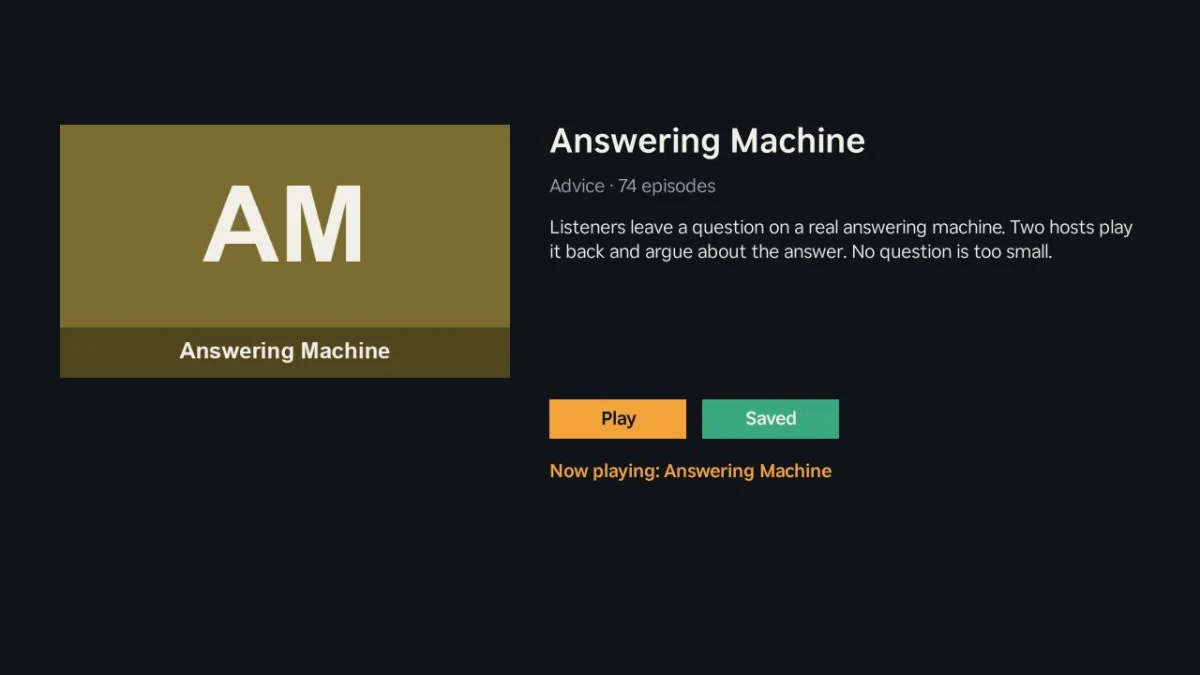
One more thing the log caught. A press back on Home is unhandled by the channel, so the channel exits. Two seconds later the tree showed a fresh Home, with the Saved count intact, because VibeView brings a confined session’s channel back on its own. The agent noted it as something the docs should say in one sentence, so nobody reads a fresh Home as a crash.
Finally a short session in the background, to confirm an agent can run the whole loop without a terminal. Then the README, a push, and the run summary.
Created the empty GitHub repository. Fixed the one VibeView bug and rolled it out, which took 21 minutes while the agent waited. That is the complete list. The Roku, its set-up and its connection to VibeView are ours, the same as for every account.
Nothing in the brief was left unverified, but the brief was narrower than the earlier runs. No cloud build ran, because Roku has none; the zip the agent uploaded is the artifact. No store submission was attempted, because VibeView has no path to Roku’s channel store. No automated test was recorded or run, because the AI test runner did not support Roku sessions at the time. That one is closed too: recording, replay, AI test runs and CI group runs now work on Roku. And the channel’s console output was not available to the agent during this run, so a channel that crashed on launch would have been diagnosed from screenshots and the tree alone. That one is closed: since the run, a Roku session’s console, crash backtraces included, reaches vibeview logs and the Logs tab like the logs of any other platform.
One real bug, fixed while it waited. Beyond that it left a list of rough edges, the kind you only find by using a product the way a stranger would, and that list is why I keep doing these runs. Since then every item on it is closed. Channel logs now reach the CLI and the Logs tab on Roku. The app picker no longer gets in the way of a project that already knows how to build itself. An agent can reload a channel from the background or over MCP without a terminal, and a background session is announced only once the channel is actually on the device. The UI tree names custom components for what they are, and typing into the Roku keyboard no longer draws a false warning. The story above is the run as it happened, rough edges included.
| Agent time | 27 minutes (11:53 to 12:41 UTC, less the 21-minute pause) |
| Wall clock | 48 minutes |
| Cloud builds | none, Roku has no build step |
| Roku sessions | 4, about 14 minutes of streaming |
| Reloads | 7, between 5.0 and 7.3 seconds from save to restart |
| Assertions | 7 of 7 |
| Project bugs found on the device | 4: invisible text, a cut-off tile, keyboard over results, keyboard swallowing the d-pad |
| VibeView bugs found | 1, fixed during the run |
| Rough edges logged | 15, all closed since |
| Cost | $0 in builds, $0 in AI credit |
No. Roku now runs its own Roku Cloud Emulator, in pilot, but this was not it: the agent’s channel ran on a physical Roku that VibeView streams to the browser and to the CLI. Everything in the screenshots above is the hardware your viewers own.
No. The Roku is VibeView’s, already set up and connected. You upload your channel as a zip, or
point vibeview dev at your project, and the channel is put on the device at the start of each
session and removed at the end.
Yes for everything in this story except one thing. Streaming, the remote, typing, screenshots, the UI tree, logs and the reload loop do not care how a channel is built. At the time of the run VibeView could not tell which tile inside a list had focus, because the Roku reports focus on the list itself, which is why Signal’s controls hold focus themselves. Since then VibeView reports the focused tile inside a RowList or MarkupGrid and reaches tiles by their title. A channel that draws its own highlight without moving the device’s focus needs the VibeView Roku plugin for that.
Because the brief told it to, and because a run that works around a product gap proves nothing. It logged the command, the raw response and the documented behaviour it expected, then waited. The gap was real, the fix shipped in 21 minutes, and the resumed agent verified it on the next press.
No. VibeView submits iOS and tvOS builds to TestFlight, and Android and Android TV builds to Google Play or the Amazon Appstore (Fire TV and Fire tablets), but Roku’s channel store has no upload API it can use. Package the zip and submit it through Roku’s developer dashboard yourself.
No. vibeview dev --platform roku is a terminal loop for people: save a file, press r, and
the channel restarts on the Roku about five seconds later, or pass --watch and skip the
keypress. The agent used it exactly as a developer would.
Install the CLI, put a packaging command in vibeview.json, and run vibeview dev --platform roku from your channel’s directory. The free tier takes no card: two concurrent sessions and 30 streaming minutes a month in sessions of up to five minutes, which is more than this whole run used. Signal is a working vibeview.json, a channel small enough to read in one sitting, and a README that walks the seven assertions by hand. The Roku platform page lists exactly what works and what does not.
Published 17 September 2026 · Every command and figure above is taken from the run log of the same day
Open a live iOS simulator, Android emulator, Apple TV, Android TV or Roku in your browser.
Start free