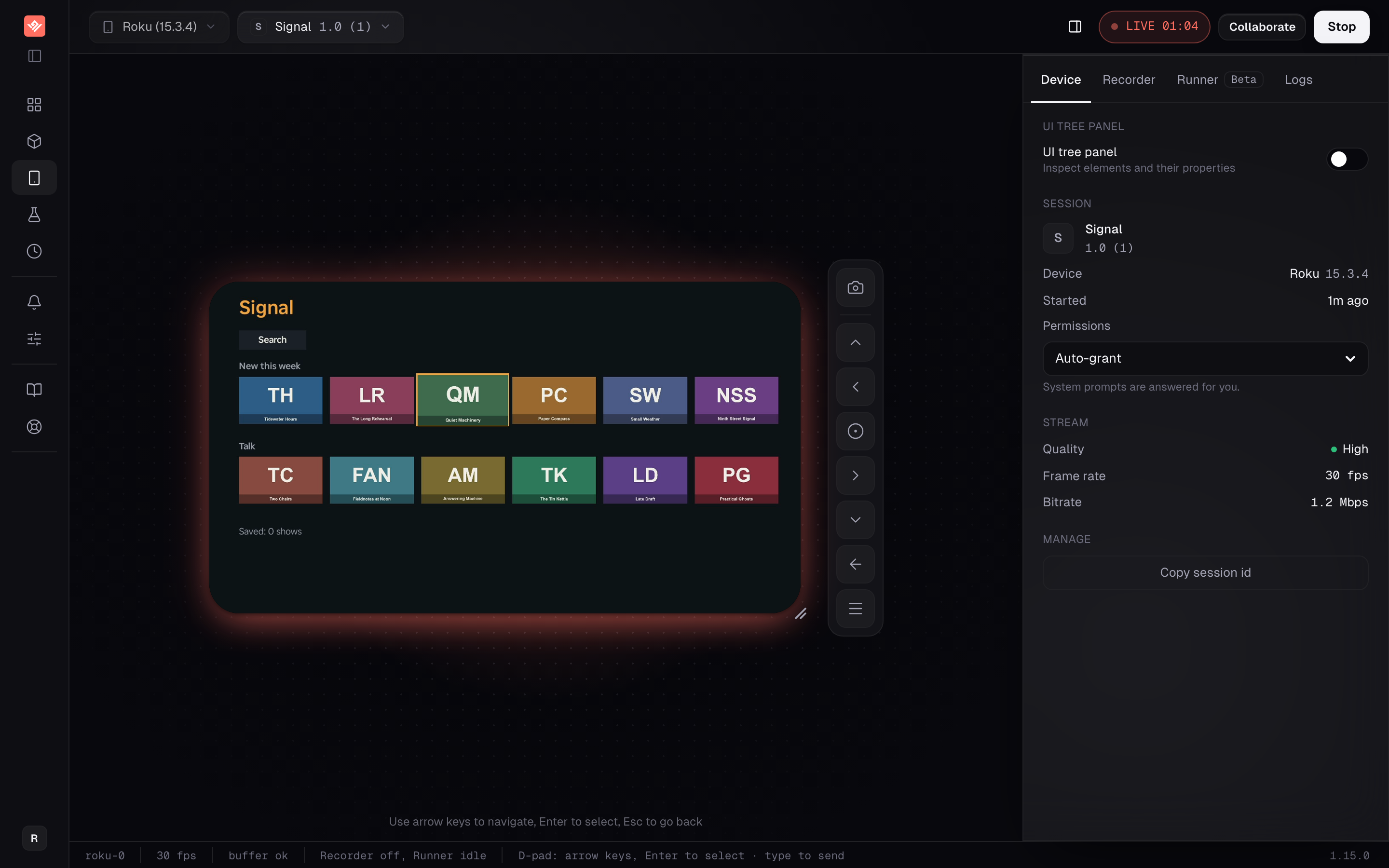
A physical Roku, streamed to your browser: remote, typing, the UI tree, the channel console and test runs all work.
Roku app testing works differently here, and the differences run in both directions.
The good one first: a Roku session streams a real physical device to your browser — the same hardware your viewers own, not an approximation of it. Roku now offers virtual devices of its own, the Roku Cloud Emulator, and says they are for functional testing and CI rather than hardware or performance validation. On every other platform we support, you are driving a simulator. Here you are not. (Weighing the two? VibeView vs the Roku Cloud Emulator goes row by row, and every Roku emulator option covers the rest.)
The honest one second: a physical device is a shared device. Sessions queue when it is busy, and the channel is installed fresh for every session, so nothing it stored carries over. Read the limits section before you plan around this.
Who this is for
Teams who need people to reach a real Roku without one being on their desk — a developer reloading a channel from Windows, a QA engineer in another country, a support agent reproducing a viewer's bug, a producer reviewing a build. Upload the channel's sideload package and the session installs it. Record a flow once and it replays in test runs and in CI.
What works today
Real hardware, not a simulator
Sessions stream a physical Roku device. Playback, performance and platform behaviour are the real thing, because the device is the real thing.
The full remote, from your keyboard
Arrow keys move the d-pad, Enter is OK, Escape is back. No remote to borrow and no device to be sitting next to.
Typing that just works
When a Roku on-screen keyboard has focus, printable keys go straight to it and Backspace deletes. There is no separate typing mode to enter first.
Your coding agent can drive it
The VibeView skill and MCP server work on Roku: the agent reads the UI tree with focus marked, presses the remote, walks focus to a named element, types, reads the console and reloads the channel after every edit.
The channel's console, live
Everything the channel prints, why it exited, and the error and backtrace when it stops — in the browser, in vibeview logs and in the agent's logs tool.
Share it with a link, or embed it
Send a client or tester a link and they play your channel on the Roku in their browser, with no Roku of their own. Or embed the live channel on your site. Every visitor gets a fresh copy.
Hear the channel
Turn on device audio in the sandbox and hear what the channel plays, from the Roku itself, alongside the picture.
Recording, replay and AI test runs (beta)
Record a flow with the remote and replay it, run it as an AI test, or run your Roku groups from CI. Each recorded press remembers the element that had focus, so a recording survives a row gaining an item.
UI tree inspection
Inspect the elements the device reports while you work. Coordinates are best-effort, so treat highlighted positions as approximate rather than exact.
Remote
The full remote, from your keyboard.
Arrow keys, Enter and EscapeArrow keys move the d-pad, Enter is OK, Escape is back. No remote to borrow and no
device to be sitting next to.
Typing that just worksWhen a Roku on-screen keyboard has focus, printable keys go straight to it and
Backspace deletes. There is no typing mode to enter first.
Confined to your appSystem and home navigation is blocked, and if the device leaves the app it is
brought back automatically.
A shared physical device has a failure mode a simulator does not: someone navigates to the home screen, opens a different channel, and the next person to connect finds the device somewhere unexpected.
Roku sessions are confined to the app under test. System and home navigation is blocked, and if the device leaves the app for any reason, the app is brought back automatically. The device you hand to a colleague is the device they get.
The limits
Custom focus highlights replay by key presses. Some channels draw their own highlight without telling the device which item is selected. On those screens replay presses the recorded keys in order, unless the channel is built with the VibeView Roku plugin.
No cloud builds or store submission. A channel is a zip of source files: package it yourself, or let vibeview dev --platform roku do it, and upload the zip.
Approximate coordinates. UI tree inspection works, but element positions are best-effort. Use it to understand structure, not to measure layout.
A physical device is a shared device. Sessions queue when the device is busy, every session starts from a channel you uploaded rather than from an empty device, and the channel is installed fresh each time — which takes a few seconds, and means nothing the channel stored survives between sessions.
What it is genuinely good at
Underneath the test tooling is something specific: remote access to real Roku hardware, with reliable control and a view of the UI tree, from a browser anywhere.
That solves a real problem. Roku devices are cheap but physical, and a distributed team ends up with one device on one desk in one city. Reproducing a viewer's bug means asking the person who owns that desk. Streaming the device removes the desk from the equation without pretending a virtual device would have caught the bug — because on this page, the device is the one your viewers own.
If you want the interaction model in detail first, TV testing covers the d-pad, focus and text-entry behaviour across all three TV platforms, and the UI Tree Inspector page covers what the inspector shows and how fresh its data is.
Frequently asked questions
Is this a Roku emulator?
No, and that matters. A Roku session here streams a real, physical Roku device to your browser. Roku now runs its own Roku Cloud Emulator — virtual players and TVs, in early pilot, which Roku says are built for functional testing and CI rather than hardware or performance validation. Everything you see here is running on the hardware your viewers own, which is the opposite of our iOS, Android and Apple TV support, where the devices are simulators.
Can my coding agent drive the Roku?
Yes. The VibeView skill and MCP server work on Roku sessions: an agent in Claude Code, Cursor, Codex or any MCP client reads the UI tree with the focused element marked, presses the remote, walks focus to a named element, types into an on-screen keyboard with the text read back, reads the channel's console, and reloads the channel after each edit with dev_reload.
How is this different from the Roku Cloud Emulator?
The Roku Cloud Emulator is a virtual Roku, in early pilot for select developer accounts, driven through a raw API of remote keys and device ports. VibeView is a physical Roku, open on every plan today, with agent tools built in — UI tree with focus, focus walk, typing with read-back, screenshots, console and reload — plus recording, replay, AI test runs (beta), live collaboration, and iPhone, Android, Apple TV and Android TV in the same tool. The full comparison is on our Roku Cloud Emulator alternative page.
Can I upload my channel to a Roku device?
Yes. Upload the channel's sideload .zip package under Apps, click Play, and the session installs it on the device. Every Roku session starts from a channel you uploaded, and the channel is removed when the session ends and installed fresh for the next one, so each run begins from a first-launch state.
Can I run automated tests against Roku?
Yes. Recording, replay and AI test runs (beta) work on Roku sessions the same way they do on Apple TV and Android TV, and vibeview run-suites --platform roku runs your Roku groups in CI. Each remote press you record remembers the element that had focus. Channels that draw their own focus highlight replay by key presses unless you build them with the VibeView Roku plugin, which lets replay find each item by a stable id. The Roku test automation guide walks through recording, replay and CI.
How do I control the device?
The same keyboard model as our other TV platforms. Arrow keys move the d-pad, Enter is OK, Escape is back. Text entry works directly — when a Roku on-screen keyboard has focus, printable keys go straight to it and Backspace deletes, with no separate typing mode to switch into.
Can I share my channel with someone who doesn't have a Roku?
Yes. Create a share link from the app's Share tab and send it: they play the channel on a physical Roku in their browser, with no Roku, no access code and no account, and each visitor gets a fresh copy. Share links work on every plan. To put the channel on your own site instead, create an embed key (Team and Business).
Can a session wander off into the Roku home screen?
No. Sessions are confined to the app under test: system and home navigation is blocked, and if the device leaves the app for any reason it is brought back automatically. A shared device does not end up parked on someone else's channel.
Are the UI tree coordinates accurate?
Treat them as approximate. UI tree inspection works on Roku sessions, but element coordinates are best-effort, so a highlighted position tells you roughly where an element is rather than exactly.