iPhone simulator online: iOS 27 in your browser, no Mac
Use an iPhone or iPad simulator in your browser from Windows or Linux, including iPhones on iOS 27. Upload a build or connect your React Native app to test it.
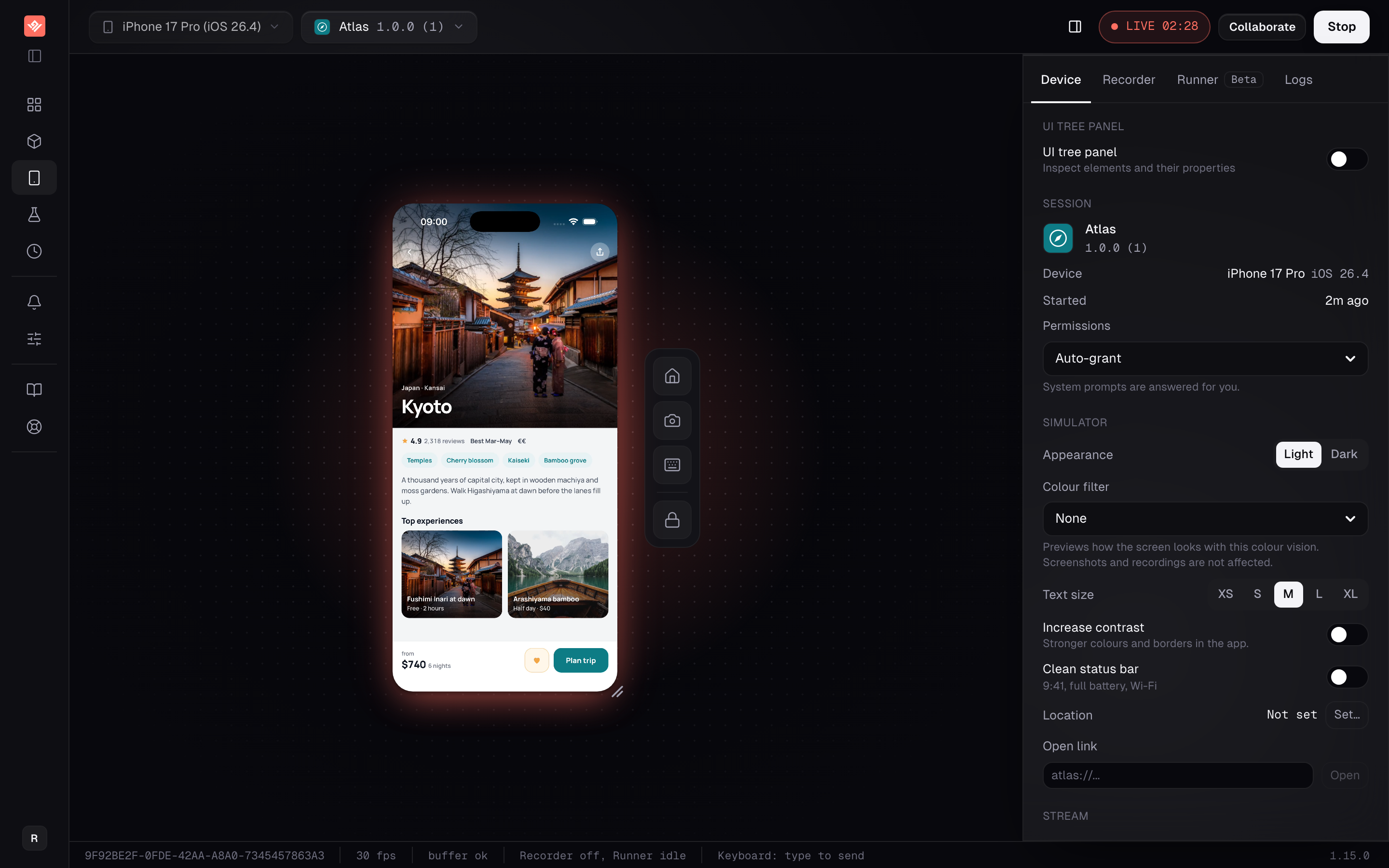
An iPhone simulator, streaming into a browser tab.
An iOS simulator needs macOS hardware underneath it. VibeView runs that hardware, streams the device into your browser at 30 frames a second, and sends your taps back — so the machine on your desk can be a Windows laptop or a Linux workstation and still drive a live iPhone.
The device picker runs from older iOS releases through iOS 27, and includes Apple's foldable iPhone Duo simulator on the iOS 27.1 beta runtime, which you can fold and unfold from the browser without installing Xcode 27.1.
Two ways in. Upload a simulator build and open a session. Or, if you work in React Native, point the VibeView CLI at the Metro bundler already running in your project and develop against the cloud device directly.
Who this is for
Developers building iOS apps on Windows or Linux, and mixed teams where the Macs are outnumbered by the people who need to see the build. If your whole team has Macs and never shows the app to anyone outside it, a local simulator is faster and free — use that.
Run iOS 27 without installing Xcode 27
Pick an iPhone on iOS 27 in the device picker and it opens in your browser. There is no Xcode 27 to install and no Mac to own. Each section of the picker lists the newest OS first, and its search field takes an OS version, so typing 27 narrows the list.
A build you already have is enough to start. An app built with an older SDK keeps that SDK's behavior when it runs on iOS 27, so you see how your current app looks there.
To build against the iOS 27 SDK itself, a cloud build can use Xcode 27.1 instead of the default, Xcode 26.5. One catch: iOS 27 won't launch an app built with that SDK unless it uses the scene-based life cycle (UIScene), as Apple's TN3187 explains. VibeView flags a build that iOS 27 won't open, and the UIScene fix guide covers each framework.
What you get
A live device, not a screenshot
Tap, swipe, type and use your own keyboard against a running iPhone or iPad. Sessions start on a free device immediately, or queue and start on their own when one frees up.
Hot reload from your local project
The CLI connects a cloud simulator to your local Metro bundler. Save a file and Fast Refresh lands on the device in about a second — no Mac in the loop.
A link anyone can open
Send a URL and the recipient uses your app in their browser. No install, no account, no Xcode. Pin it to a build or let it follow your latest, and revoke it when you are done.
Tests that survive a moved button
Recorded steps replay exactly; an AI agent picks up only the steps where the screen actually changed. Visual regression, on by default for new groups, compares every step against a baseline held per device; switch it off or change its thresholds per group.
Developing against a cloud simulator
This is the part that has no local equivalent when you have no Mac. Upload a debug build once. From then on, live development runs your latest JavaScript on the cloud device against the bundler on your own machine — you only rebuild and re-upload when you add or change a native dependency. Everyday code and asset edits never need a new upload.
It works for tvOS too, so an Apple TV app gets the same loop.
iPad simulator online
iPads have their own section in the device picker, iOS Tablets, just after the iPhones. It lists the iPad models and iOS versions on offer today, newest OS first. From a terminal, vibeview list-devices --type ios --category tablet --models prints them too. Apple calls the iPad's system iPadOS; the picker lists its versions as iOS numbers, the same as for an iPhone.
Its own frame. Each iPad appears inside its own model's frame, with the screen's rounded corners.
Both orientations. From the bar under the device, Rotate switches it between portrait and landscape. Orientation in the Device tab does the same. A test run starts it in portrait, so a test that needs landscape records the rotation as a step.
Your own keyboard. Type straight into the focused field. On iOS 18 and later, editing shortcuts such as Cmd+C, Cmd+V and Cmd+Z (Ctrl on Windows and Linux) reach the iPad too, and the on-screen keyboard stays hidden.
iPad-only builds. When a build supports only iPad, the picker grays out the iPhones and says why, so nobody opens it on the wrong device.
A simulator build, not a device one A .app bundle, on its own or compressed to .zip, .tar.gz or .tgz, up to 500 MB. An .ipa is a device build and is rejected at upload.
The dialog names the formats Drop the file in and the upload reads the build, so the app arrives with its name, icon and bundle id already filled in.
Or let the CLI do it A cloud build lands in your library on its own, and there is nothing on your machine to upload.
Tap, swipe and type Use your own keyboard against a running iPhone or iPad. The control rig sits beside the device for the buttons a browser has no key for.
The Device tab Device and OS, permissions, orientation and the app under test, all named — so a bug report says which iPhone rather than "my simulator".
The UI tree, live Inspect the elements the running app reports while you use it, which is also what a test step addresses.
Record by using the device A flow becomes a test of numbered plain-English steps. Replay runs those steps directly.
An agent only where it is needed A step goes to the AI agent only when the screen no longer matches, so one design change costs one step instead of a red suite.
Visual regression per step Each step is compared against its own baseline, held per device, with separate warn and fail thresholds.
If your pipeline only produces an .ipa today, that is one extra build target — preparing your build has the command per framework.
To put the device inside your own site rather than send a link, an embed key gives you an iframe you can lock to your domains. Embedding needs Team or above.
If the worry is an unreleased build sitting on someone else's machines, the controls are: builds are scoped to your organization, members hold roles rather than shared access, changes are written to an audit log, and every share link and embed key is revocable on the spot. Ask us directly about your procurement requirements rather than taking a marketing page's word for it.
Runs go through the CLI in CI, with JSON or JUnit output and exit codes. AI test authoring is beta, and a run can use No AI, with no agent involved at all.
What this does not do
Simulators, not hardware. There is no physical device cloud here. Camera capture, Bluetooth peripherals, NFC, cellular conditions, GPU performance and OEM firmware bugs are not testable on a simulator, and no amount of streaming changes that. Use a real-device service for those and keep a hardware pass before release — simulator vs physical device testing sets out exactly which bugs fall on which side.
No network capture yet. The Network Logs tab exists but does not capture traffic — no intercept proxy, no HAR export. If a bug lives in a request body, you are debugging it elsewhere. Device logs do stream.
No importer for Appium, XCUITest, Espresso or Detox suites. Tests are recorded or written in our own format (Maestro flows do import). A mature Appium, XCUITest, Espresso or Detox investment does not migrate, and that is a genuine reason to stay where you are.
What it costs
Pricing is per organization, not per seat — one pool of sessions and credit for everyone in the organization. Streaming is metered on every plan, with overage billed at $0.06 a minute on Free or $0.02 on paid plans against usage credit, and overage can be switched off so sessions hard-stop instead of billing. AI runs can go through your own provider key, which takes model cost off our bill entirely.
The free tier is a tier rather than a trial: 2 concurrent sessions, 30 streaming minutes a month, $1 of credit that refills monthly, for one person, no card. Know the limit before you start — each free session ends after 5 minutes, so those 30 minutes come in 5-minute slices. Embedding needs Team.
Start on the free tier and put your own build on a device, or read getting started for the step-by-step version first.
Frequently asked questions
Can I use an iOS simulator on Windows or Linux?
Not locally — the simulator runtime needs macOS hardware underneath it. VibeView runs that hardware and streams the device to your browser, so the machine on your desk only needs a browser. You upload a simulator build, or point the VibeView CLI at the Metro bundler already running in your React Native project.
Is a simulator good enough to trust?
For layout, navigation, state, permissions dialogs and most regressions, yes. For anything touching real hardware — camera capture, Bluetooth peripherals, NFC, cellular conditions, GPU performance — no. A simulator cannot tell you about silicon it does not have. Plan a pass on physical devices before you ship, whatever else you use.
We already have Macs. What does this add?
The people who need to see the build usually do not have one. A reviewer, a PM, a support agent or a prospect can open a link and use the app in a browser with no install and no account. It also means a CI-built simulator artifact is something anyone in the company can open, rather than something only the iOS team can run.
Can I upload the .ipa our CI already produces?
No. An .ipa is a device build and will not install on a simulator — the upload is rejected with a message saying so. You need a build compiled against the simulator SDK: a .app bundle, uploaded as-is or compressed to .zip, .tar.gz or .tgz, up to 500 MB. For most projects that is one extra CI target, not a rewrite.
What does the free tier actually give me?
You get 2 concurrent sessions, 30 streaming minutes a month, $1 of usage credit that refills each calendar month, for one person, and no credit card. The catch worth knowing before you start: each free session ends after 5 minutes of wall clock, so those 30 minutes are spent in 5-minute slices. Embedding a device in your own site needs Team or above.
Can I run this in CI?
Yes. The CLI runs a single test or a whole group and emits human, JSON or JUnit output, with exit codes for the pipeline to branch on. Runs can be pinned to a specific build, and results can post back as GitHub commit statuses, webhooks or Slack messages.
Can I run an iOS 27 simulator online, including the iPhone Duo?
Yes. The device picker includes iPhones on iOS 27, and Apple's foldable iPhone Duo on the iOS 27.1 beta runtime, which you can fold to a preset or an exact hinge angle from the browser or the CLI. Which models and runtimes are live changes over time, so check the picker for the current list.
Is there an iPad simulator I can use online?
Yes. Pick an iPad from the iOS Tablets section of the device picker and use it in your browser, from Windows, Linux or a Mac. It rotates between portrait and landscape, and you can type on it with your own keyboard. A build that supports only iPad runs only on iPads. The models and iOS versions on offer change over time; the picker always shows the current list.