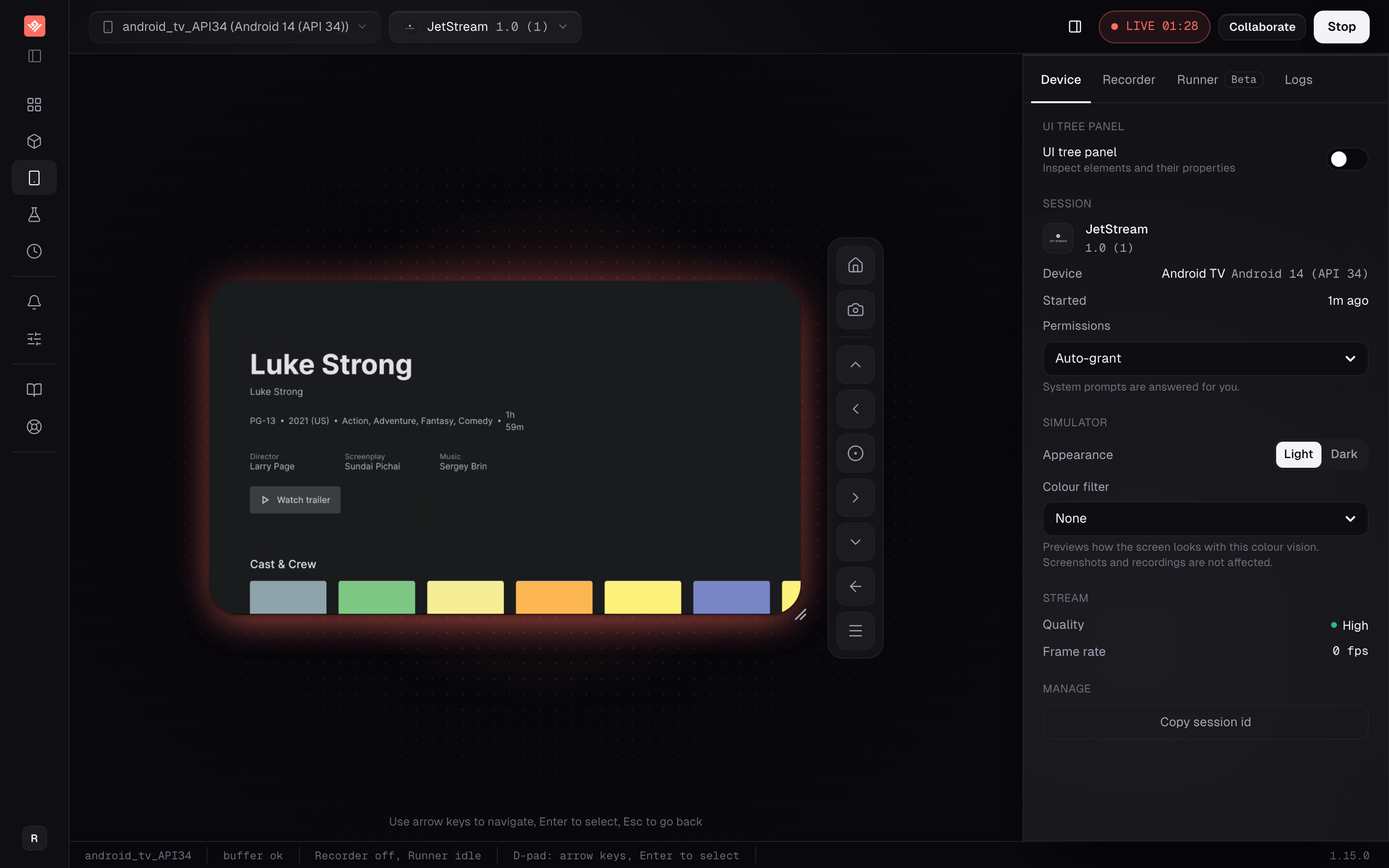
An Android TV emulator, driven from your keyboard.
A TV app has no touch. Everything happens through a focus cursor moving between tiles, and every interaction is a direction and a select. That one difference is why phone tooling does badly here, and it is what this is built around.
VibeView runs an Android TV emulator in the cloud and streams it to your browser. Arrow keys drive the d-pad, Enter selects, Escape goes back.
Who this is for
Teams shipping a Leanback or react-native-tvos app who need more than one person able to see it, and who are tired of TV tests that break whenever a row moves. If you have a TV emulator running locally and nobody else needs access, keep it.
What you get
Real d-pad control
Arrow keys, Enter and Escape drive the device from any browser. Touch is disabled on TV sessions, because a TV app has no touch model to receive it.
Tests that survive a new row
Recordings capture which element held focus at each press, not just the keycode. Replay navigates back to that element and confirms focus landed before continuing.
One APK, no TV variant
Upload a regular APK. TV apps are detected from the manifest and appear as Android TV in your app list, alongside your phone builds.
A gate in your pipeline
The CLI runs TV groups and returns JSON or JUnit with exit codes. Results come back as GitHub commit statuses, webhooks or Slack messages, pinned to a build.
Focus · d-pad
Real d-pad control.
Arrow keys, Enter and Escape Your keyboard drives the d-pad from any browser. Touch is disabled on TV sessions, because a TV app has no touch model to receive it.
Focus, not a press count A recording captures which element held focus at each press, so a shelf that gained a row does not invalidate the test.
The UI tree, live Inspect the element tree of the running app while you navigate it, which is what a focus step addresses.
No separate TV artefact Upload a regular debug APK from a normal Gradle build. TV apps are detected from the manifest and appear as Android TV in your app list.
Keep x86 and x86_64 native code TV-targeted builds often filter ABIs down to ARM. Include both x86 and x86_64 so the app runs on every Android TV device. The upload checks this: a build only some devices can run is marked Some devices (native code), and one no device can run is refused.
Alongside your phone builds One library holds both, so the TV build is not a separate place to look.
A link a content partner can open Your TV app plays on a live device in someone’s browser, with no install and no account. Pick the build, set an expiry and a session cap, revoke it whenever.
Runs keep their evidence Every run is kept with its status, duration, cost and the model that drove it, with the screenshots attached.
A gate in your pipeline The CLI returns JSON or JUnit with exit codes, and results post back as GitHub commit statuses, webhooks or Slack messages.
Most TV automation replays key presses. Four rights and a select is a correct description of your app only while nothing moves. Add a row above, remove a tile, reorder a shelf — the same five presses now land somewhere else, and the test either fails for the wrong reason or, worse, passes having activated the wrong thing.
VibeView records the element that held focus at each press. On replay it navigates focus to that element and verifies it actually arrived before going on. A shelf that gained a row does not break the run, because the destination was never a coordinate or a count of presses.
When a target genuinely cannot be reached, the step falls back to the recorded d-pad keycode and is marked unverified, with the reason recorded — so you can tell a real regression from an unreachable element rather than guessing at a red run.
The same applies to AI-driven runs, which get two focus tools instead of blind d-pad chaining: one moves focus to an element and selects it, the other moves focus without selecting so a step can check state first.
Tests do not cross form factors
A test written against your phone app will not drive your TV app. The steps address elements by accessibility id or text label, which carries across platforms — but only between matching form factors: phone to phone, TV to TV. Plan for TV tests of their own. Copying phone tests across is not a shortcut anyone gets.
One thing catches TV teams specifically: TV-targeted builds often filter ABIs down to ARM for set-top hardware, and not every Android TV device here runs ARM-only native code. Include both x86 and x86_64 if your app ships native libraries. The upload checks this: a build only some devices can run is marked Some devices (native code) and the other devices are greyed out, and one that no device can run is refused — see preparing your build.
React Native TV teams also get live development: a cloud TV device connected to the Metro bundler on your machine, with Fast Refresh landing about a second after you save.
What this does not do
Your app has to expose focus. Focus-verified replay reads focus from the device's accessibility layer. react-native-tvos and Leanback native-focus apps surface it; an app that tracks focus only inside its own JavaScript does not, and those steps fall back to plain d-pad presses and are marked unverified. This is an app-architecture limit and no amount of tooling fixes it from outside.
No Play Services on Android TV. Unlike our phone and tablet devices, Play Services is absent here, so a TV app that requires it at startup may not run at all. There is no Play Store on any device — apps come from your own library.
Emulators, not set-top boxes. Real remote hardware, HDMI behaviour, OEM firmware quirks and GPU performance on an actual TV stick are not testable on an emulator. Keep a pass on physical hardware before release. Roku is the exception — those sessions stream a physical Roku, with channel upload, agent control and test runs.
No network capture, no Espresso or Appium import. The Network Logs tab does not capture traffic yet. And tests are recorded or written in our own format, so an existing Espresso or Appium TV suite does not migrate.
Available TV models come from the emulator set installed on our workers rather than a fixed published catalogue, so check the device picker for what is live now.
What it costs
Pricing is per organization rather than per seat, so everyone in the organization shares one pool of sessions and credit. Streaming is metered on every plan, overage bills at $0.06 a minute on Free or $0.02 on paid plans against usage credit, and overage can be switched off so sessions stop instead of billing. AI runs can go through your own provider key, which takes model cost off our bill entirely.
The free tier is a tier, not a trial: 2 concurrent sessions, 30 streaming minutes a month, $1 of credit refilling monthly, for one person, no card. Each free session ends after 5 minutes, which is tight for TV work where a single navigation pass can take a while.
Upload your TV APK on the free tier and drive it with the arrow keys, or read TV testing for the focus model in full.
With your keyboard. Arrow keys move the d-pad, Enter is select, Escape is back. Touch is disabled on TV sessions — clicking the video does nothing, because a TV app has no touch model to receive it. Key forwarding pauses while your cursor is in a text field elsewhere on the page, so you can still type into the interface around the stream.
Why do my recorded TV tests break when the layout changes?
Because most tools replay the key presses rather than the destination. Four rights and a select is only correct while nothing moves; add a row and the same keys land somewhere else. VibeView records which element held focus at each press and navigates back to that element on replay, verifying focus arrived before continuing.
Does this work with any Android TV app?
Focus-verified replay needs your app to expose focus to the device's accessibility layer, which react-native-tvos and Leanback native-focus apps do. An app that tracks focus only inside its own JavaScript never surfaces it, so replay falls back to plain d-pad presses and marks those steps unverified. That is an app-architecture limit, not something the platform can work around.
Is Google Play Services available on Android TV devices?
No. Play Services is absent on Android TV here, so a TV app that requires it at startup may not run. This differs from phone and tablet devices, where Play-Services-backed features such as Firebase, Maps and Google Sign-In do work. There is no Play Store on any device — apps install from your own library.
Do I need a separate build for TV?
No separate format. Upload a regular APK and TV apps are detected from the manifest, appearing as Android TV in your app list. The one thing to check is architecture. TV-targeted builds often filter ABIs down to ARM, and not every Android TV device here runs ARM-only native code, so if your app ships native libraries, include both x86 and x86_64.
Can I test a Google TV or Fire TV app?
Yes, with the same APK. Google says every app built for Android TV works on Google TV devices, and a Fire OS app is an Android app, so both run as Android TV apps here. The device identifies itself as Android TV, so an app that checks for Google TV or Fire TV takes its Android TV path. Google Play Services and Amazon services (Appstore, in-app purchasing, Login with Amazon) are not available. Fire TV apps built for Vega OS are not supported.
Can TV tests run in CI?
Yes. The CLI runs a single test or a whole group against a TV device and returns human, JSON or JUnit output with exit codes. Runs pin to a specific build, and results post back as GitHub commit statuses, webhooks or Slack messages.