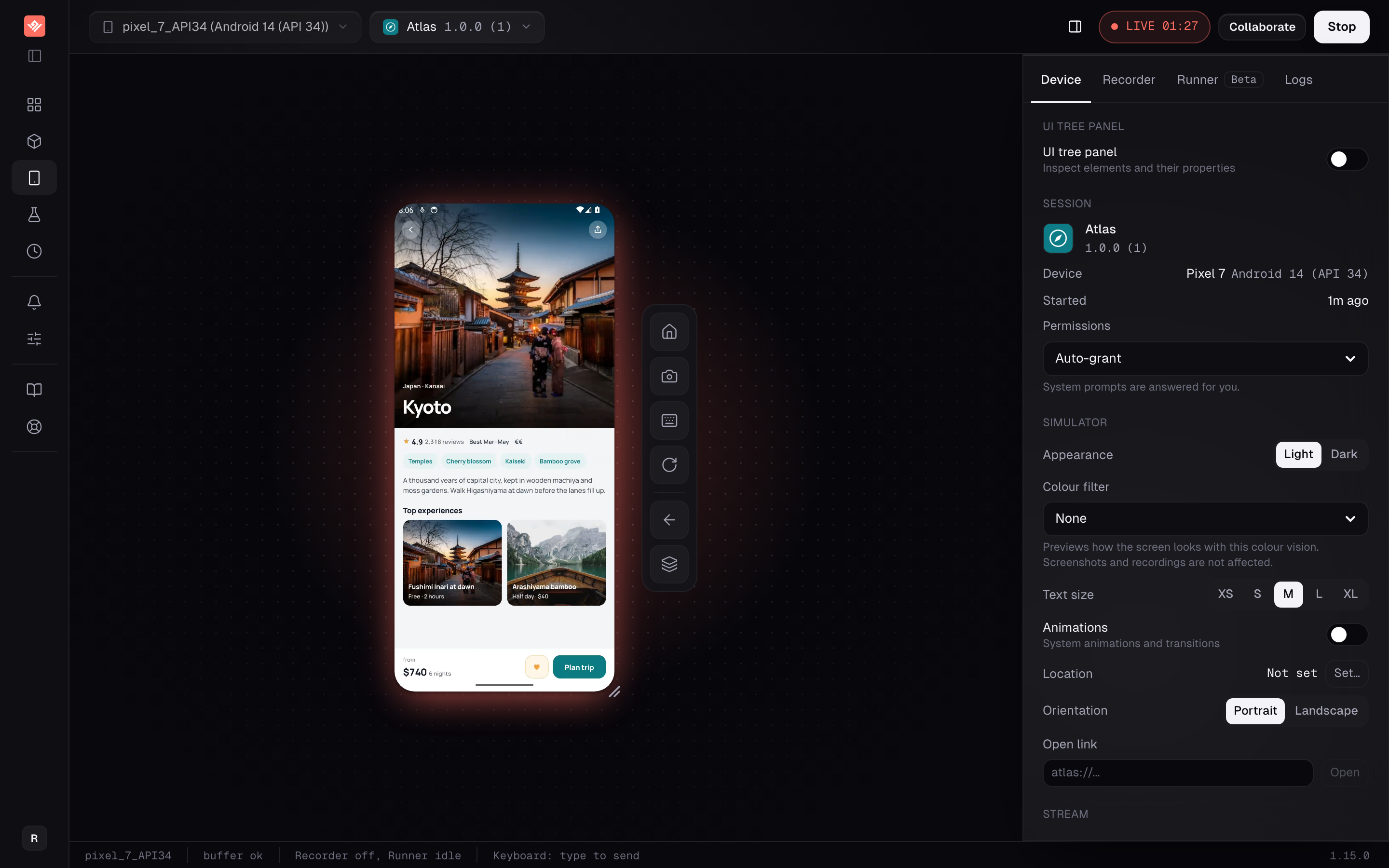
You can already run an Android emulator on your laptop, free, on any operating system. That is not the problem.
The problem is the second one. And the twentieth. And the one you need to hand to a customer who has no toolchain, the one you want running inside your documentation, and the one that has to fail a pull request at two in the morning. A local emulator is a single-player tool. VibeView runs them in the cloud and gives every one of them a URL.
Who this is for
QA teams with no device lab, and teams whose Android build needs to be reachable by people who do not build Android. If you are one developer testing one app on one machine, keep your local emulator — it is faster and costs nothing.
What you get
More than one at a time
Run 2 concurrent sessions on Free, 4 on Team and 10 on Business, shared across everyone in the organization. Pick a device group and start, or queue and start automatically when one frees up.
Tests that survive a moved button
Recorded steps replay exactly, and an agent picks up only the steps where the screen actually changed. One design change costs one step instead of a red suite.
A device anyone can open
Send a URL and the recipient uses your app in their browser, with no install and no account. Or embed the device in your own site behind a domain-locked iframe.
A gate in your pipeline
The CLI runs a group of tests and returns JSON or JUnit with exit codes. Results come back as GitHub commit statuses, webhooks or Slack messages, pinned to the build that produced them.
Live device
Running more than one.
Every session names its device The app under test, the exact device and the OS level, so a bug report says "Pixel 7, Android API 34" rather than "my emulator".
A pool, not a machine Identical devices are pooled, so you pick a kind of device and start — or queue and start automatically when one frees up.
The Device tab and the UI tree Permissions, orientation and the live element tree of the running app, beside the device rather than somewhere else.
Record by using the device A flow becomes a test of numbered plain-English steps, and replay runs those steps directly.
Stops at the step that changed Visual regression compares each step against its own baseline, held per device model, with separate warn and fail thresholds.
No AI if you want it AI test authoring is beta, and a run can use No AI: it only replays, with no agent involved at all.
AI test authoring is beta. A run can use No AI, with no agent involved.
To put the device inside your own pages instead of sending a share link, an embed key gives you an iframe you can lock to your domains. Embedding needs Team or above.
If the concern is an unreleased build living on someone else's machines: builds are scoped to your organization, members hold roles rather than shared access, changes are written to an audit log, and every link and key is revocable on the spot. Ask us about your procurement requirements directly rather than trusting a marketing page.
In your pipeline
Runs are kept with their status, duration, cost and the model that drove them, so a failure three weeks ago is still there with its evidence attached.
React Native teams get one more loop: live development connects a cloud emulator to the Metro bundler on your own machine, so Fast Refresh lands on the device about a second after you save.
Getting your build in
For a walkthrough using the Atlas sample or your own build, see how to run an APK online. It covers upload, compatibility checks, and sharing the result.
Upload a debug APK straight from a normal Gradle build — debug builds are signed with the debug keystore, so there is no release signing to arrange. Android TV apps are detected from the manifest; upload the same .apk. See preparing your build for the details.
What this does not do
Emulators, not hardware. There is no physical device cloud here. Camera capture, Bluetooth peripherals, NFC, cellular conditions, GPU performance and OEM firmware bugs are not testable on an emulator. Use a real-device service for those and keep a hardware pass before release — simulator vs physical device testing sets out exactly which bugs fall on which side.
Include x86_64. An APK whose native libraries are built only for ARM runs only on the devices that can translate ARM code, and can still crash at launch there. Standard debug builds include every ABI, so this bites only when your build filters them. The upload checks it and greys out the devices the build can't run on.
No Play Store, and a TV caveat. Apps come from your own library. Play-Services features like Firebase, Maps and Google Sign-In work on phone and tablet — but Play Services is absent on Android TV devices, so a TV app that needs it at startup may not run.
No .aab, no network capture, no Appium or Espresso import. App bundles need converting to a universal APK first. The Network Logs tab does not capture traffic yet, so a bug in a request body is one you debug elsewhere. And tests are recorded or written in our format (Maestro flows do import) — a mature Appium, Espresso or Detox investment does not migrate.
What it costs
Pricing is per organization rather than per seat, so everyone in the organization shares one pool of sessions and credit. Streaming is metered on every plan, overage bills at $0.06 a minute on Free or $0.02 on paid plans against usage credit, and overage can be switched off so sessions hard-stop instead of billing. AI runs can go through your own provider key, which takes model cost off our bill entirely.
The free tier is a tier, not a trial: 2 concurrent sessions, 30 streaming minutes a month, $1 of credit refilling monthly, for one person, no card. Know the catch first — each free session ends after 5 minutes, so those 30 minutes come in 5-minute slices, and running several devices at once is exactly what Free is least suited to.
Upload an APK on the free tier and open 2 devices at once, or read CI testing if the pipeline is the reason you are here.
Frequently asked questions
We already run emulators locally. What does this add?
One emulator on one laptop is not the problem this solves. Running several at once against a build, handing a live device to someone who has no Android toolchain, putting a device inside your documentation, and failing a pull request on a UI change are. If none of those describe you, a local emulator is faster and free, and you should keep using it.
Can I upload the .aab our release pipeline produces?
Not directly. Convert the bundle to a universal APK with bundletool first, then upload that. A debug APK from a normal Gradle build uploads as-is, since debug builds are signed with the debug keystore and need no release signing setup.
My app installs but crashes the moment it launches. Why?
Almost always a missing x86_64 slice. Our Android emulators run x86_64 native code, and only some of them can also run ARM code, through translation that can crash at launch. Standard debug builds include every ABI; this bites when a build filters them. The upload checks it: a build only some devices can run is marked Some devices (native code) and the devices it can't run on are greyed out in the device picker, and one no device can run is refused.
Is the Play Store available?
No. Apps install from your own library, not from the Play Store. Play-Services-backed features — Firebase push and Crashlytics, Google Maps SDK, Google Sign-In — do work on Android phone and tablet devices. On Android TV devices Play Services is not available, so a TV app that requires it at startup may not run.
Won't AI-driven tests be flaky?
Runs replay your recorded steps exactly and only hand a step to an agent when the screen no longer matches. You can also run with No AI: it only replays, with no agent in the loop. The agent targets elements by reference rather than screen coordinates, so a layout shift does not silently tap the wrong control.
Can this run in CI?
Yes. The CLI runs a single test or a whole group and emits human, JSON or JUnit output with exit codes to branch on. Runs can be pinned to a specific build, and results post back as GitHub commit statuses, webhooks or Slack messages.