Android app testing
Open an APK online and test the app in your browser
Rokas Kašinskas — Co-founder, VibeViewPublished 2026-09-13Updated 2026-09-13
Android app testing
This is useful when a teammate sends you an Android build to review, or when you want to check a native app from a computer without an Android toolchain. The browser controls an Android emulator; it does not convert the APK into a website.
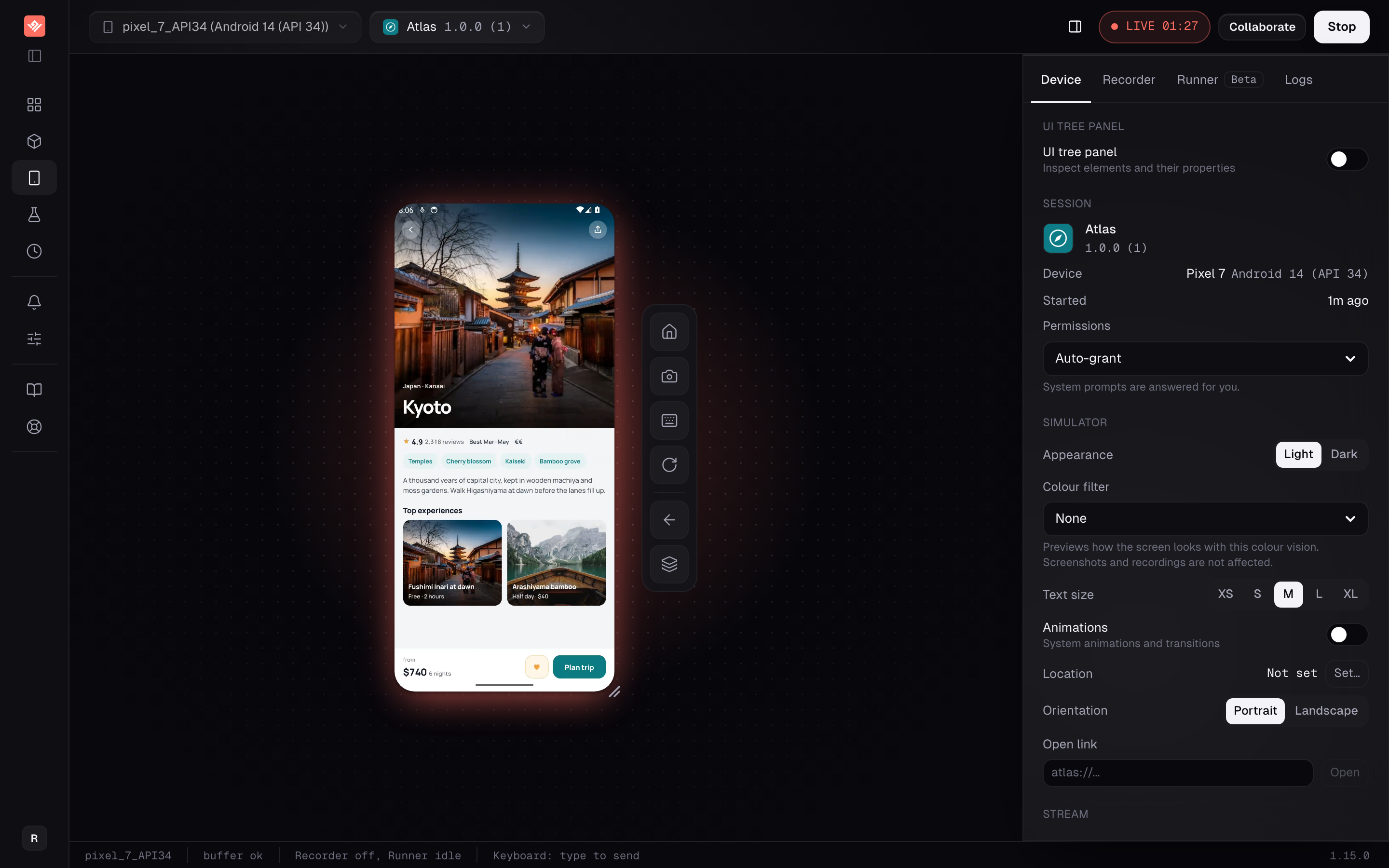
If your organization’s Apps list includes Atlas with a Sample badge, choose its Android entry and click Play. On the Devices page, select an available Android phone and click Start session.
The sample lets you check the browser controls before preparing a build. Once you are comfortable with tapping and scrolling, repeat the workflow with your own app. Samples can be deleted, so an organization that removed Atlas can start with an APK instead.
| What you have | What to do |
|---|---|
An installable .apk | Upload it directly. |
A Play Store .aab bundle | Produce an APK before uploading. |
| A React Native debug APK | Connect Metro for development, or build with bundled JavaScript for an independent preview. |
| An APK with native libraries only for ARM phones | Build an emulator-compatible APK including x86_64. |
For a standard Android project, run the Gradle wrapper from the directory containing it:
./gradlew assembleDebugOn Windows Command Prompt, use:
gradlew.bat assembleDebugA conventional app module writes app/build/outputs/apk/debug/app-debug.apk; flavors and custom module names change that path. React Native projects normally keep the Android Gradle project inside android/. Follow Preparing Your App Build for other frameworks and app-bundle conversion.
Android supports installing APKs on emulators; Google’s emulator installation guide describes the local equivalent. With VibeView, the upload and browser session replace the local installation step.
.apk, add a build note if useful, and click Upload. The current upload limit is 500 MB.The app name and selected device appear above the stream. To review a particular version, open the app and use the play button for that version in Build history, rather than assuming the latest upload is still the one you intended to review.
Choose a starting screen and an expected result. For a travel app such as Atlas, a review might cover opening a destination, reading its details, and finding the trip-planning action. For a checkout app, it might be adding an item and reaching the order summary.
Tap controls in the stream and scroll below the first screen. Tap into a text field before typing with your keyboard. Use Android’s Back control to check the return path, and use Screenshot to save the state associated with a finding.
Record the build version, device, steps, and observed result with each issue. “Back closes the app from the order summary” gives the developer something to reproduce; “navigation feels broken” does not.
Open the app’s Share tab and create a link. Pin it to the reviewed build when discussing a specific change. Recipients open the link and tap to start; they need a VibeView login only if you require one in the link settings.
For React Native or Expo, verify that the preview runs with your local Metro process stopped before sending a link intended for independent use. Shared sessions use your organization’s streaming allowance. The sharing documentation covers duration, concurrency, and access options.
For a demo that belongs inside a web page, follow Embed an interactive mobile app demo.
The upload is refused for incompatible native libraries, or some devices are greyed out. Check the APK’s ABIs. VibeView’s handheld Android emulators run x86_64 native code, and only some can also run ARM code. Rebuild with the x86_64 slice included; changing the filename will not change compatibility.
The APK is actually an app bundle. .aab is a publishing format. Produce an installable APK using your build pipeline or the bundletool workflow in the build-preparation docs.
The app waits for a JavaScript server. Connect its matching source project with Live Development, or produce an APK with bundled JavaScript.
Can I use this to validate phone performance? A remote emulator helps with app behavior and UI checks. It does not establish battery usage, camera behavior, or performance on physical Android hardware.
See Android emulator capabilities and current streaming allowances before planning a longer testing session.
Can I run an APK online without installing anything?
Yes. The emulator runs on a server and streams to your browser; nothing installs on your computer or phone. You need the .apk file and a VibeView account.
Can I upload an .aab app bundle?
No. An .aab is a publishing format for Google Play, not an installable app. Build an APK from the same source, or convert the bundle with bundletool as described in Preparing Your App Build.
Why does my APK install on my phone but not here?
Almost always native libraries. Phones are ARM; these emulators run x86_64 code. An APK that ships only arm64-v8a libraries runs only on the emulators that can translate ARM code, and can crash at launch there. Rebuild with the x86_64 ABI included.
Can I run an APK from the Play Store or a game I downloaded? This is a tool for apps you are building or reviewing, not a way to play Android apps on a PC. You can upload any APK you have the right to test, but the free tier’s five-minute sessions and the absence of the Play Store on the emulators make it a poor fit for consumer apps.
Does this work for Android TV apps? Yes. Upload the TV APK the same way; it is detected from the manifest and offered on Android TV emulators with remote-control input. See how to test Android TV D-pad navigation.
The free tier takes no card: two concurrent sessions and 30 streaming minutes a month, in sessions of up to five minutes. That is enough to upload the APK a teammate just sent you and find out whether the flow works before anyone installs Android Studio.
Open a live iOS simulator, Android emulator, Apple TV, Android TV or Roku in your browser.
Start free