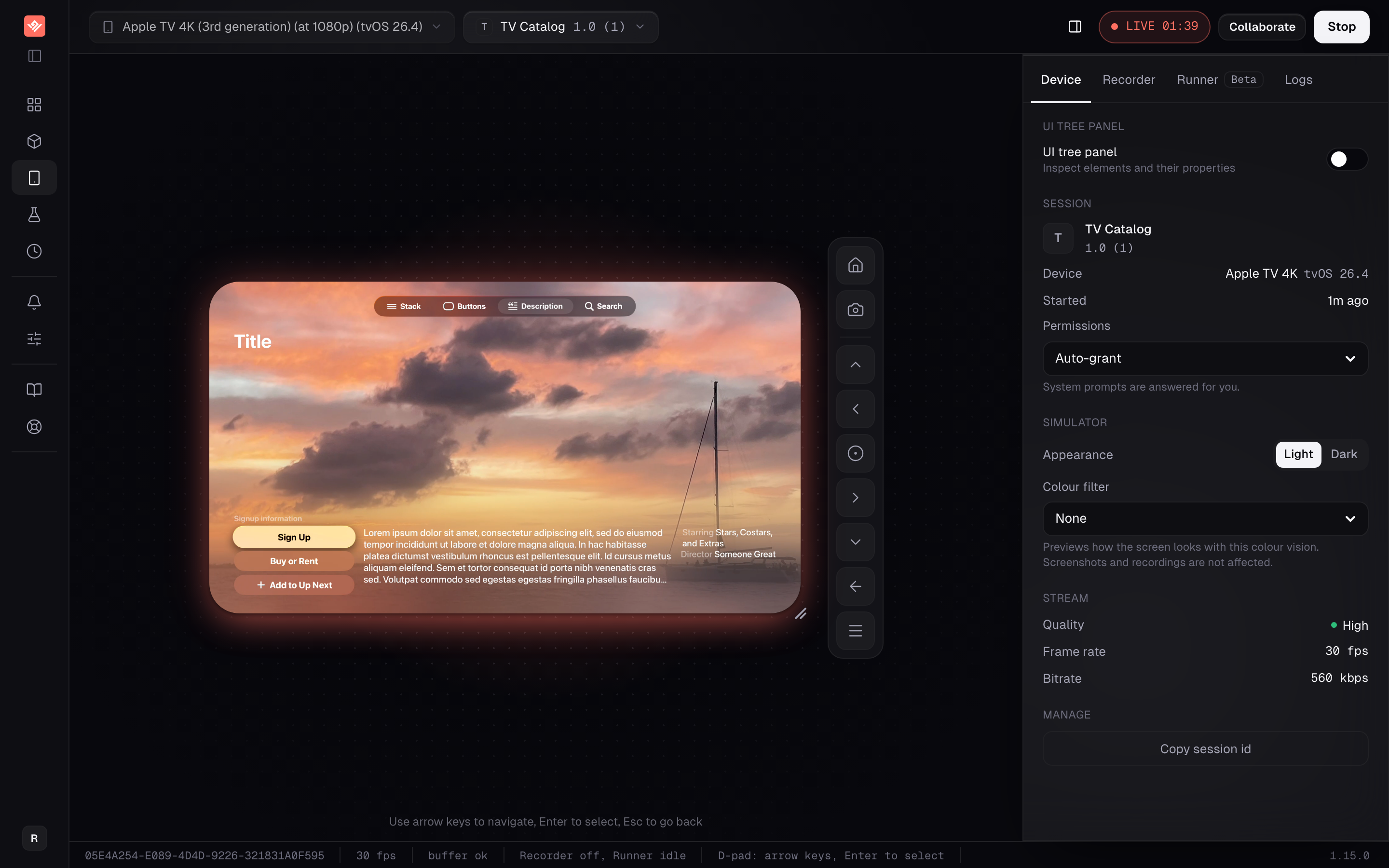
Run an Apple TV simulator in the browser with d-pad control. Record focus-verified tvOS tests that survive a moved tile, and run them in CI from one build.
A tvOS app has no touch and no pointer. There is a focus highlight, a direction, and a select — and that is the entire input model. Tooling built for phones handles it badly, which is why TV tests have a reputation for breaking.
VibeView runs an Apple TV simulator in the cloud and streams it to your browser. Arrow keys move focus, Enter selects, Escape goes back.
If you searched for an Apple TV emulator, this is the closest thing that exists. Apple publishes no emulator, only the tvOS simulator that ships with Xcode, and that simulator is what runs here.
Who this is for
Teams shipping a tvOS app who need more than the one person with the simulator on their Mac to be able to use it, and who want TV tests that does not fall over when a shelf gains a tile. If you are one developer with Xcode open and nobody else needs access, your local simulator is faster.
What you get
Focus control from any browser
Arrow keys, Enter and Escape drive the device. Touch is disabled on TV sessions, because a tvOS app has no touch model to receive it.
Tests that survive a moved tile
Recordings capture which element held focus at each press, not just the direction. Replay returns to that element and confirms focus landed before continuing.
Focus read from the platform
tvOS reports focus through its own automation layer, so a step asks the element whether it has focus rather than inferring it from what moved on screen.
A gate in your pipeline
The CLI runs tvOS groups and returns JSON or JUnit with exit codes. Results come back as GitHub commit statuses, webhooks or Slack messages, pinned to a build.
Focus · d-pad
Focus control from any browser.
Arrow keys, Enter and Escape Your keyboard drives the remote. Touch is disabled on TV sessions, because a tvOS app has no touch model to receive it.
Focus read from the platform tvOS reports focus through its own automation layer, so a step asks the element whether it has focus rather than inferring it from what moved.
The UI tree, live Inspect the element tree of the running app while you navigate it, which is what a focus step addresses.
A tvOS simulator bundle The same artefact shape as an iOS simulator build, produced with the tvOS simulator SDK: a .app bundle, uploaded compressed.
arm64 required Our simulators run on Apple silicon, so the bundle needs an arm64 slice. A device .ipa is rejected outright.
No Mac needed to build it VibeView cloud builds make the tvOS simulator bundle for React Native and native Xcode projects, or a developer or CI runner on a Mac builds it. Everyone after that only needs a browser.
A link a content partner can open Your tvOS app plays on a live device in someone else’s browser, with no install, no account and no TestFlight build to ship them.
You set the terms Which build it serves, an expiry, a session cap — and you can revoke it whenever.
Runs keep their evidence Every run is kept with its status, duration, cost and the model that drove it, so a failure three weeks ago is still there.
Most TV automation replays remote presses. Three rights and a select is a correct description of your app only while nothing moves. Add a row above the shelf, reorder the tiles, ship a new promo slot — the same presses now land somewhere else, and the run either fails for a reason that has nothing to do with the bug you were looking for, or passes having selected the wrong thing.
VibeView records the element that held focus at each press. On replay it navigates focus back to that element and verifies it arrived before continuing. The destination was never a count of presses, so a new tile does not invalidate the test.
This is where tvOS has a genuine advantage over Android TV. Focus on Apple TV comes from the platform's own automation layer, which exposes the element tree and the live focus state of the running app. There is nothing for your app to opt into and nothing to instrument. On Android TV the equivalent depends on the app surfacing focus to the accessibility layer, and apps that track focus only in their own code never do. That whole category of failure is absent here.
AI-driven runs get the same benefit through two focus tools: one moves focus to an element and selects it, the other moves focus without selecting so a step can check state first — instead of chaining direction presses and hoping.
Tests do not cross form factors
A test written against your iPhone app will not drive your tvOS app. Steps address elements by accessibility id or text label, which carries across platforms — but only between matching form factors: phone to phone, TV to TV. Budget for TV tests of their own. Nobody gets to copy the phone ones across.
Two things to check on the build: the bundle needs an arm64 slice, because our simulators run on Apple silicon, and a device .ipa is rejected outright. See preparing your build for the exact command.
Runs, meanwhile, are kept with their status, duration, cost and the model that drove them.
React Native TV teams also get live development: a cloud Apple TV connected to the Metro bundler on your own machine, with Fast Refresh landing about a second after you save.
What this does not do
Simulators, not an Apple TV box. A real Siri Remote, HDMI behaviour, actual set-top performance and hardware-specific bugs are not testable on a simulator. Keep a pass on real hardware before release; simulator vs real device testing covers where the line falls.
Cloud builds cover React Native and native projects. VibeView cloud builds compile the tvOS simulator bundle for React Native and native Xcode projects. Flutter doesn't support Apple TV, and other frameworks may need a developer's Mac or a CI runner to produce the bundle.
No .ipa, and arm64 required. Device builds are rejected at upload, and a simulator bundle without an arm64 slice will not run on our hardware.
No network capture, no XCUITest import. The Network Logs tab does not capture traffic yet, so a bug living in a request body is one you debug elsewhere. Tests are recorded or written in our own format, so an existing XCUITest suite does not migrate — that is a real switching cost.
Available Apple TV models come from the simulator set installed on our workers rather than a fixed published list, so check the device picker for what is live now.
What it costs
Pricing is per organization rather than per seat, so everyone in the organization shares one pool of sessions and credit. Streaming is metered on every plan, overage bills at $0.06 a minute on Free or $0.02 on paid plans against usage credit, and overage can be switched off so sessions stop instead of billing. AI runs can go through your own provider key, which takes model cost off our bill entirely.
The free tier is a tier, not a trial: 2 concurrent sessions, 30 streaming minutes a month, $1 of credit refilling monthly, for one person, no card. Each free session ends after 5 minutes, which is tight for TV work where one navigation pass can eat most of that.
Upload your tvOS build on the free tier and drive it with the arrow keys, or read TV testing for the focus model in full.
Frequently asked questions
How do I control an Apple TV simulator in a browser?
With your keyboard. Arrow keys move focus, Enter selects, Escape goes back. Touch is disabled on TV sessions — clicking the video does nothing, because a tvOS app has no touch model to receive it. Key forwarding pauses while your cursor sits in a text field elsewhere on the page.
Why do recorded tvOS tests break when the layout changes?
Because most tools replay the remote presses rather than the destination. Three rights and a select describes your app only until a tile is added. VibeView records which element held focus at each press and navigates back to that element on replay, confirming focus arrived before continuing.
Is focus tracking reliable on tvOS?
More so than on Android TV, and for a structural reason. tvOS exposes focus through the platform's own automation layer, so we read focus state from the element itself rather than inferring it. Android TV depends on the app surfacing focus to the accessibility layer, which not every app does. On Apple TV that class of problem does not arise.
Can I upload the .ipa our pipeline produces?
No. An .ipa is a device build and will not install on a simulator. You need a build compiled against the tvOS simulator SDK — a .app bundle, compressed to .zip, .tar.gz or .tgz, up to 500 MB. It must include an arm64 slice, since our simulators run on Apple silicon.
Do I need a Mac to use this?
No. Running and testing the app needs only a browser, on Windows or Linux included. VibeView cloud builds can make the tvOS simulator build for React Native and native Xcode projects, so you don't need a Mac for that either; a developer's Mac or a CI runner works too. Once the build is in, everyone else only needs a URL.
Can tvOS tests run in CI?
Yes. The CLI runs a single test or a whole group against an Apple TV device and returns human, JSON or JUnit output with exit codes. Runs pin to a specific build, and results post back as GitHub commit statuses, webhooks or Slack messages.