iPhone Duo · Xcode 27.1
Build for iPhone Duo with Xcode 27.1, no Mac needed
Rokas Kašinskas — Co-founder, VibeViewPublished 2026-10-19Updated 2026-10-20
iPhone Duo · Xcode 27.1
On the iPhone Duo’s inner screen, iOS treats your app according to the SDK it was built with:
So to see your own app as Duo owners will, you need a build made with Xcode 27.1. Xcode 27.1 needs macOS 26.6 or later (Apple), and since the 27.1 beta it has run only on an Apple silicon Mac (MacRumors). If your Mac is older, is Intel, or you work on Windows or Linux, that used to be the end of it.
VibeView’s cloud builds compile iOS and Apple TV apps on VibeView’s Macs. They still use Xcode 26.5 by default, so existing projects build exactly as before. A project can now opt in to Xcode 27.1, a stable release, per platform or per run. Beta releases of Xcode are not offered. You then open it on VibeView’s Duo in your browser, so neither the build nor the device needs a Mac.
Before you switch: iOS apps built with the iOS 27 SDK must use the scene-based app life cycle
(UIScene), or they don’t launch on iOS 27. Upgrade your framework and adopt it: Capacitor 8.5
or later then npx cap migrate; Flutter 3.41 or later, which migrates automatically only when
AppDelegate isn’t customised; React Native 0.88, where an existing app moves its entry point
to a scene delegate; Expo SDK 58, whose prebuild generates it while a hand-managed ios/
folder follows Expo’s migration guide. SwiftUI apps, including the Kotlin Multiplatform template,
already use scenes; a UIKit app adds a scene delegate. Xcode 27.1 also needs a minimum deployment
target of iOS 15.0 or later. VibeView flags a build that iOS 27 won’t launch, and Cloud
Builds has the details. If you already
see “UIScene life cycle is required”, fix it for your
framework. The default build stays on Xcode 26.5,
so nothing changes until you opt in.
You need a VibeView account, the VibeView CLI, 0.51.0 or later for build profiles (npm install -g vibeview, then vibeview login), and a project that already builds in the cloud. If it doesn’t yet, vibeview build --cloud asks for the build command and artifact on first run, and Cloud Builds has ready-made commands for React Native, Expo, Flutter, Capacitor and native projects.
Ask for Xcode 27.1. Add "xcode": "27.1" to the iOS build block in vibeview.json:
{
  "platforms": {
    "ios": {
      "build": {
        "xcode": "27.1",
        "profiles": {
          "development": { "command": "...", "artifact": "..." }
        }
      }
    }
  }
}
Keep your existing profiles. Set at this level, xcode applies to every profile; a single profile can set its own xcode instead. To try it once without changing the file, skip this and pass the flag in the next step instead.
Run the cloud build.
vibeview build --cloud --platform iosor, for this run only, vibeview build --cloud --platform ios --xcode 27.1. The flag wins over the build block, which makes it handy in CI. The build log starts with the Xcode version and the iOS SDK your app was compiled against, and the build’s page in the dashboard shows the Xcode version too, so you can confirm it used 27.1.
Open it on the iPhone Duo. In the dashboard, open Devices, pick your app in the App picker, then pick iPhone Duo (iOS 27.1); it carries a Foldable badge. Click Start session. The Duo starts closed, on its cover screen.
Unfold it. Click Open in the bar under the device, or use the Device tab: pick a posture, or turn on Set by angle and drag to any angle from 0 to 180 degrees. The stream switches to the inner screen, and your app fills it.
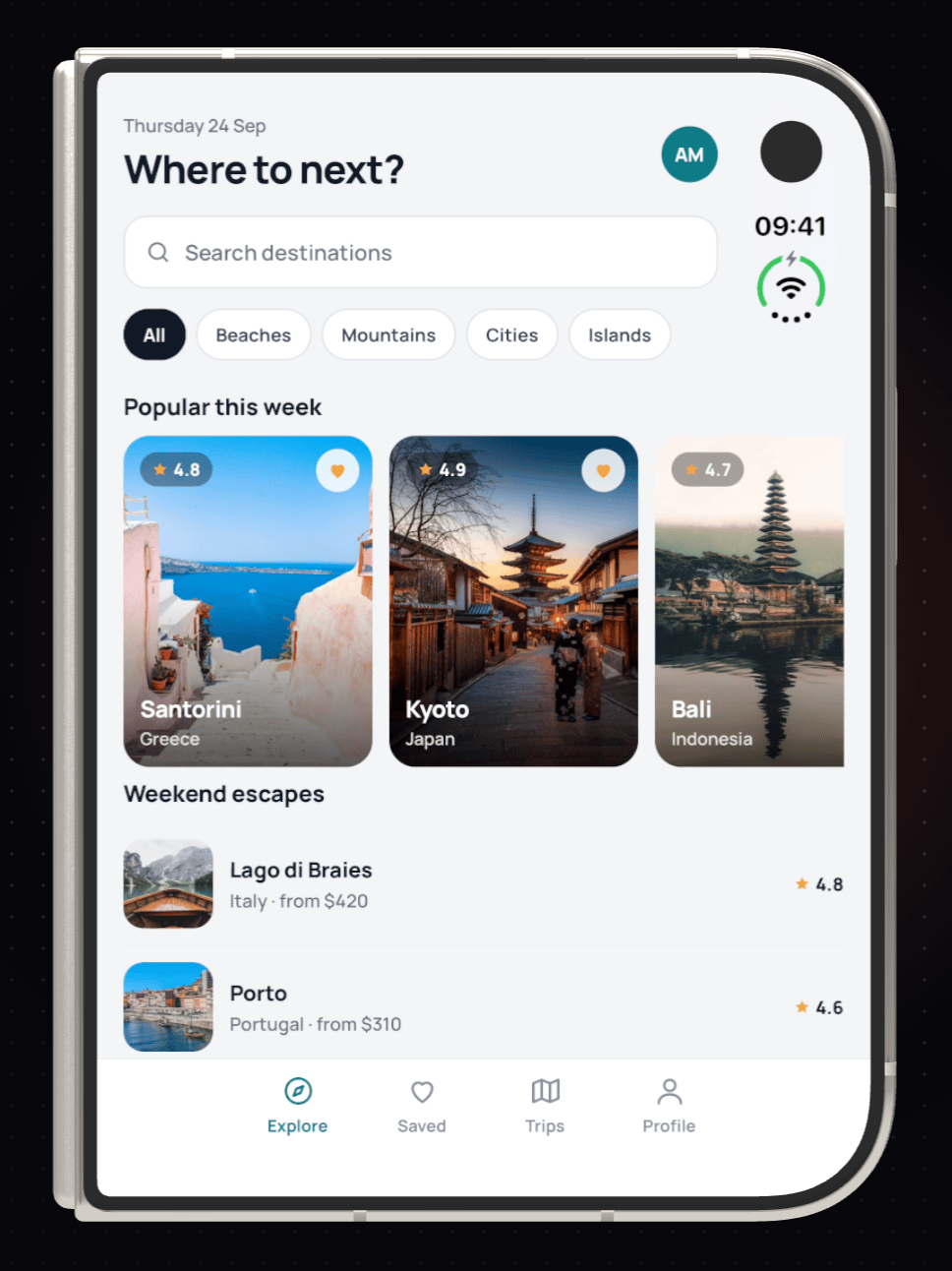
If the inner screen still shows your app in a phone-sized window, check the build log’s SDK line: the build may have used the default Xcode. Devices shows a short note on the inner screen when it can tell your build used an older SDK.
xcode works the same way in a tvOS build block. It applies to iOS and tvOS only; an Android or Android TV build block that sets it is an error. A version that isn’t available is refused when you start the build, before anything is charged, and the error lists the versions you can pick. A local vibeview build ignores it and uses the Xcode selected on your own Mac.
To build both ways in CI, keep the default in vibeview.json and add --xcode 27.1 in a separate job. Every build’s log names the Xcode and SDK it used, so the two are easy to tell apart.
With the 27.1 SDK build running, the Duo is worth checking in more than one posture: Closed, Partial and Open, plus exact angles in between, in any rotation. Set the iPhone Duo hinge angle from CLI, CI or an agent folds it from a script or a coding agent. An AI agent made a first-class iPhone Duo app shows the layout work that follows, and the iPhone Duo simulator page covers sharing a session and agent control. If you also have a Mac that runs Xcode 27.1 and the Duo is missing there, see iPhone Duo simulator not showing.
xcode line.Yes. Add "xcode": "27.1" to your iOS build block and run vibeview build --cloud from
Windows, Linux or any Mac. The build runs on VibeView’s Macs with Xcode 27.1, and you open it on
VibeView’s iPhone Duo simulator in your browser.
Xcode 26.5 unless you ask for another version. Xcode 27.1 is also available, through xcode in
the build block or --xcode on the command. Beta releases of Xcode are not offered.
It was built with an SDK older than iOS 27.0, so iOS runs it in compatibility mode. Rebuild it with Xcode 27.1 to fill the inner screen and see the fold.
It can, if the app doesn’t use the scene-based life cycle (UIScene): iOS 27 won’t launch an iOS
app built with the iOS 27 SDK without it. Upgrading your framework isn’t enough on its own; the
app has to adopt it: Capacitor 8.5 or later and then npx cap migrate; Flutter 3.41 or later,
which migrates the app when you build only if its AppDelegate isn’t customised; React Native
0.88, where an existing app moves its entry point to a scene delegate; Expo SDK 58, whose
prebuild generates it (a hand-managed ios/ folder follows Expo’s migration guide). SwiftUI
apps already use scenes. Xcode 27.1 also needs a minimum deployment target of iOS 15.0. Your
default builds stay on Xcode 26.5 until you opt in.
Open a live iOS simulator, Android emulator, Apple TV, Android TV or Roku in your browser.
Start free