Agentic development · iPhone Duo
An AI agent makes Atlas a first-class iPhone Duo app
Rokas Kašinskas — Co-founder, VibeViewPublished 2026-09-24Updated 2026-09-24
Agentic development · iPhone Duo
I run VibeView, so read this with that in mind. Atlas is our demo app: a small travel app with an Explore tab, a destination page, Saved, Trips and Profile. Until this run it was a portrait-only phone app that had no idea a fold exists. A companion run took the Kitlist sample app through the same exercise with no native code, window size only and stable Expo SDK 57 (an AI agent adds iPhone Duo support to an Expo app). This one is our showcase app: the brief set a design bar, not just a layout that fits, and the agent wrote a native module to find the fold.
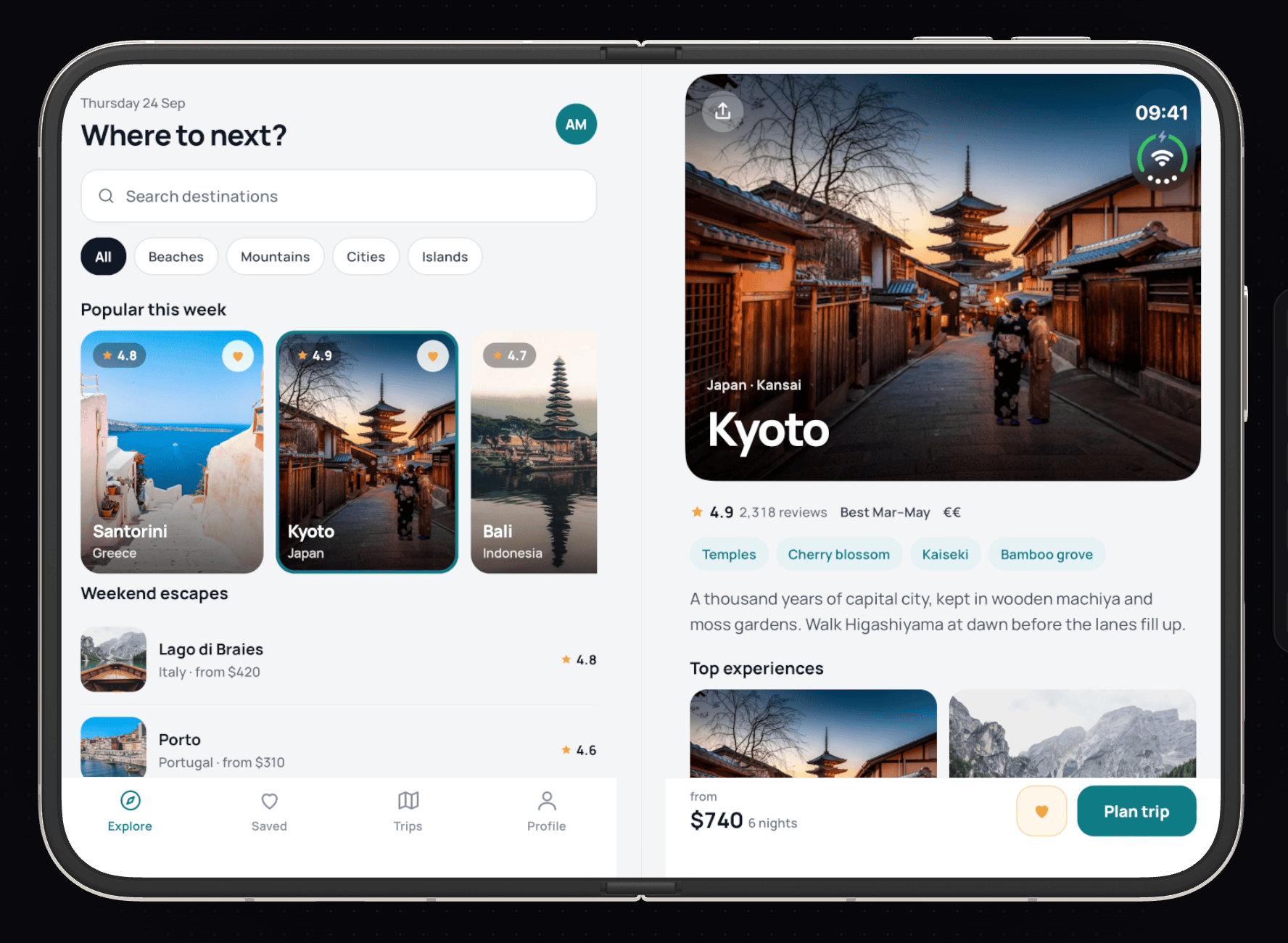
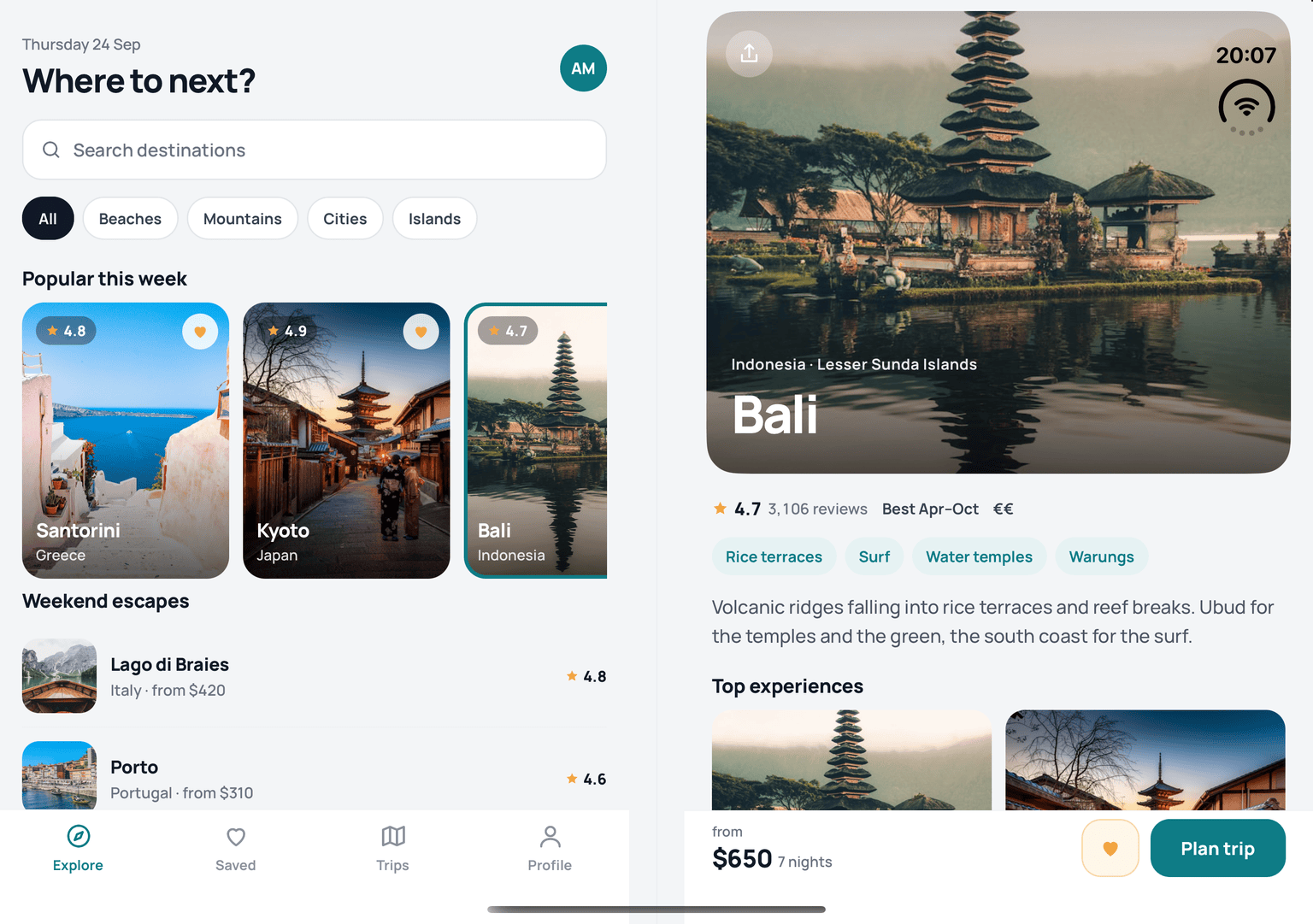
This run was not like the earlier ones, where an agent got a stranger’s brief and nothing else. I wrote this brief myself and put what I already knew into it: the Duo’s two displays (a 1398×2034 px cover and a 2007×2853 px inner screen), a hinge from 0° to 180° with closed, partly folded and open postures, and rotation. Then the bar it had to meet: on the inner screen, open or partly folded, two panes, with Explore on the left and the selected destination on the right, Kyoto by default. Nothing under the hinge and no letterboxing. The cover screen keeps the phone app. Rotation handled sensibly. Transitions keep state. “The visual quality matters more than breadth.”
The agent drove the Duo through VibeView’s Devices page, which it scripted in a browser, and the agent verbs the vibeview CLI exposes: fold, rotate, read the UI tree, read the app’s logs, tap. There was no human message between the brief and the final report.
The agent read the app first: the Expo Router layout, the four tabs, the destination page, the theme and the in-memory state. Then Apple’s guidance. The iPhone Duo pages render in JavaScript, so a plain fetch returned only their titles; the agent fetched the documentation’s JSON directly and extracted the text. The line that set the direction: “Resizing is a key feature for your app on iPhone Duo… use size classes and scene geometry to improve your app’s resizing.”
iOS 27 requires UIKit’s scene-based life cycle and makes iPhone apps resizable, and Expo’s SDK 58 preview is the release that moves Expo apps to that life cycle by default. SDK 57 has a backported switch, which the Kitlist run used; for our showcase app the agent took the upgrade and wrote down the cost. So the first commit is an upgrade (77e29b0). It did not go in cleanly:
Could not resolve dependency:
expo-router@"~58.0.7" from the root project
Conflicting peer dependency: @expo/ui@58.0.6
The agent traced the conflict to two packages Atlas did not use, Reanimated and Worklets, whose peer ranges did not include React Native 0.88 yet, and removed them. A few optional peer ranges in the preview still stop at 0.87, so it added an .npmrc with legacy-peer-deps=true and a comment saying to drop it once SDK 58 is stable. expo-doctor then passed 20 of 20 checks. One new type error in the Trips screen, from a stricter image source type, was fixed by typing Atlas’s bundled photos as the asset ids they are.
React Native and Expo have no fold API. The only Duo mentions the agent found in the installed packages were changelog notes about anchoring popovers on “regular-width phones such as iPhone Duo”. So it went to UIKit and found what it needed in iOS 27.1: reserved regions. A view can ask for the regions of its window that something else has reserved, each with a frame and an active flag. A division region is the fold. An occlusion region is hardware or system chrome covering content.
That decided the design. Atlas would not guess the fold from the window’s width, or split the screen at half; it would ask the system where the fold is and put nothing there.
The agent wrote a small local Expo module, modules/atlas-fold: an invisible full-window view that reads the reserved regions and sends them to JavaScript whenever they change. It re-reads them on every layout pass, and also on a quarter-second timer while it is on screen, because going from flat to partly folded changes the fold’s active flag without changing any size. Where the API does not exist, the module reports nothing and Atlas falls back to plain window sizes.
The layout itself is AdaptiveLayout.tsx and AdaptiveShell.tsx:
column-reverse to put the destination on top without reordering, and so remounting, its children. The tab you are on, your search text and your scroll position survive every fold.The destination page became a shared DestinationDetail component, used by the phone page and by the pane, and the selected destination is highlighted in the list. Three problems in its own project along the way, all from the newer toolchain: a ScrollView ref type, a removed StyleSheet.absoluteFillObject, and a lint rule against reading a ref during render. Each took one edit.
Before leaving the code it added one log line per layout change, so the device log would say how the app read the display without a debugger attached.
At 17:42 Atlas 1.1.0 (1) was on VibeView as a new version of the existing app, and at 17:43 a Duo session with it was up, 35 seconds after the agent pressed Start. It opened half folded. Next to the first screenshot, the agent read the app’s own console output, streamed from the cloud device. It is the same stream vibeview logs prints in your terminal, so there was no debugger to attach and nothing to set up:
[Atlas] layout split row window=951x669 fold=none
[Atlas] layout split row window=951x669 fold=456,0 40x669 active
Two panes on a 951×669 point window, and a 40-point fold at x 456, active because the device was partly folded. The app had found the fold on its first launch. The agent then opened, closed, rotated and screenshotted the Duo, and logged the raw regions. What UIKit reported on the inner screen:
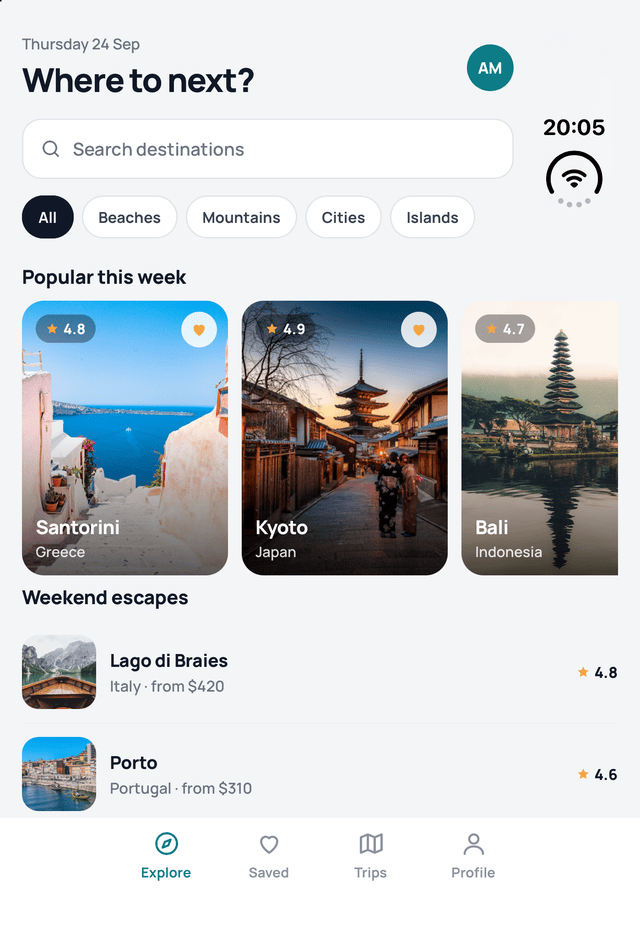
That last region was the first problem the Duo showed it. The iPhone Duo keeps its status bar in a block at the top trailing corner of each screen, and Atlas’s top-right controls, the Share button on the destination photo among them, sat underneath it. The obvious fix was the safe area, and the agent measured why it would have been wrong: the safe-area insets reported that block as a full-height 84-point inset down the whole right side (insets=0,84,34,0), for something 120 points tall. Trusting it would waste a strip the height of the screen.
So Atlas uses the occlusion region instead. A small hook works out how much of each pane’s top edge is covered, only the rows beside the block make room, the photo in the destination pane runs underneath a light status bar, and Share moves to the left when the corner is taken. The agent pushed the revision into the running session and checked it by screenshot.
Then continuity. On the cover it tapped Santorini and unfolded, and Santorini was in the pane. Picking a destination in the pane is where it hit the one VibeView gap of the run. On the unfolded screen, the agent’s tap on Bali came back as "result":"unchanged" with a warning that the screen looked the same, although the UI tree’s coordinates were right and a click the agent sent through the Devices page worked. Taps on the cover worked. The agent reported it at the end with the exact request and response. It was a launch-day gap in how agent taps reached the Duo’s inner screen, and it was fixed the same day; the verification pass below taps the inner screen throughout, including picking in the pane and then folding.
At 17:54 the two-pane work was committed: “Two panes on iPhone Duo’s inner display” (dd76e3a).
The second problem the Duo showed it came with rotation. Open and rotated, the fold runs across the screen and the destination pane ends in the middle of the display. The full-width booking bar at the bottom of that pane now sat mid-screen and read as a stray toolbar, and the tall photo pushed the rating, tags and description out of the short pane.
The fix was a design change, not a constraint tweak. Above a horizontal fold, the booking row floats as a card over a fade instead of a bar, the photo becomes a wide banner sized to leave the text in view, and the list below the fold drops the top padding it only needs at a screen edge. The agent tuned the banner height and the fade over six revisions, each installed into the live session and checked on a screenshot, and committed “Stacked panes: a banner photo and a floating booking card” (277e292).
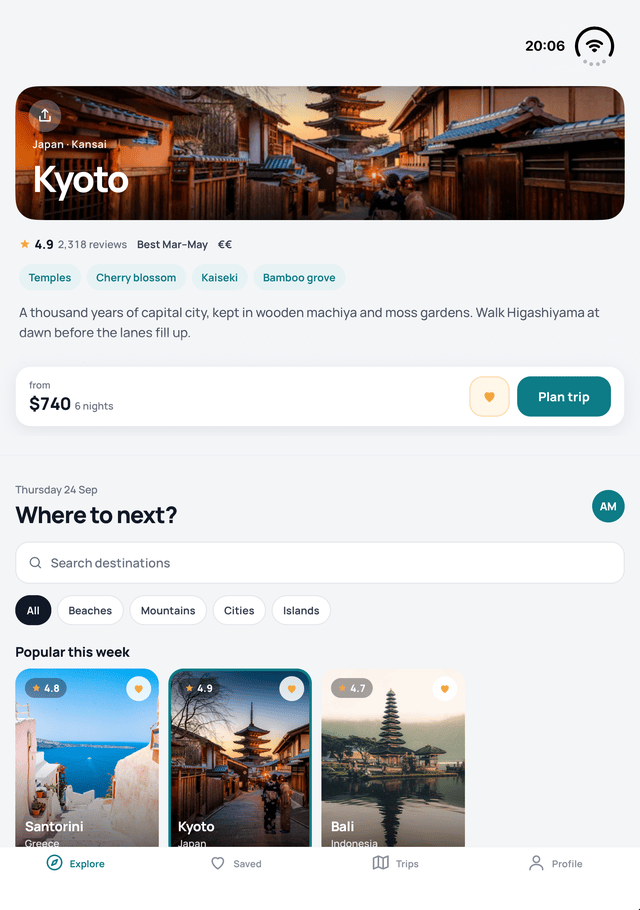
At 18:10 that version was on VibeView as Atlas 1.1.0 (3), the one this article is about.
The agent’s checks were real, but they were its own, made while it was still changing the code. So half an hour later a second agent session, started fresh with no memory of the first, ran a separate pass on production against exactly that version, with everything after session start driven from the vibeview CLI (0.23.0), asserting each state from the UI tree and looking at a screenshot of each.
A session pinned to Atlas 1.1.0 (3) on an iPhone Duo was up and the app installed; it starts closed. (vibeview dev cannot pin a build, so that one session was created through the REST API.)
vibeview set-posture open --session 41e27b04-…ok (set_posture)
posture: open at 180° (2007x2853)
Screen size changed — use the next screenshot and UI tree, old refs are stale.vibeview ui-tree --session 41e27b04-…@e51 view "pane-divider" (1368,0,120,2008)
@e60 text "Kyoto" (1592,816,1160,160)
@e10 text "Where to next?" (48,128,512,96)The divider sits exactly on the fold: 1368 to 1488 pixels is x 456, 40 points wide. Explore on the left, Kyoto on the right. Then the hinge:
vibeview set-posture --angle 110 --session 41e27b04-…
vibeview set-posture --angle 75 --session 41e27b04-…
The divider and the Kyoto title reported the same rectangles at 180°, 110° and 75°, and the three screenshots are byte-for-byte identical: the split does not move. Only the log changed, to fold=456,0 40x669 active.
Rotated open, the tree put the Kyoto banner at the top, Plan trip above the fold, a horizontal divider at (0,1368,2008,120) and “Where to next?” below it, and the log said layout split column window=669x951 fold=0,456 669x40.
Then the tap that had failed on launch day, on the Santorini card in the list pane:
vibeview tap @e34 --session 41e27b04-…ok (tap)
UI Tree changed (+23 added, -23 removed, ~2 changed; 47 of 72 unchanged):
+ @e138 [StaticText] "Caldera views"
+ @e130 [StaticText] "Santorini"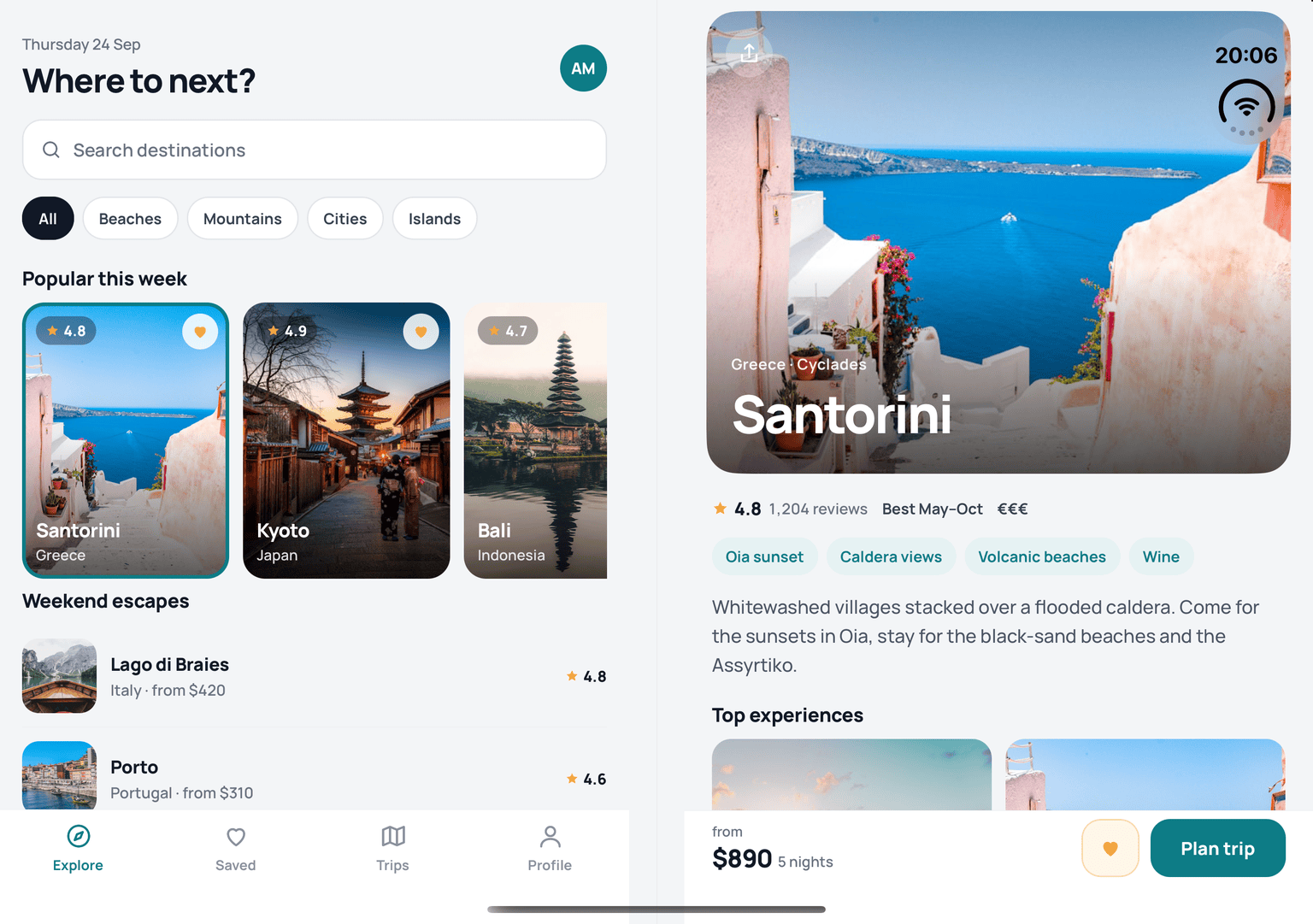
Folded, Santorini stayed on screen as the phone page, with a Back button. On the cover it went back, opened Bali, and unfolded: Bali was in the pane. On the open Duo it switched to the Saved tab and folded; the cover came up on the destination that had been in the pane, with Saved still selected underneath, and after going back, one more open-and-close cycle came back to the Saved tab.


| State | How it was checked | Result |
|---|---|---|
| Closed, cover screen | tree: Explore only, no divider; screenshot | pass |
| Open: Explore left, Kyoto right | divider on the fold, Kyoto in the right pane | pass |
| Partly folded at 110° | same rectangles as open | pass |
| Partly folded at 75°, from 110° | same rectangles; identical screenshot | pass |
| Open and rotated: stacked | banner above the divider, list below | pass |
| Rotated and partly folded at 110° | split column … active in the log | pass |
| Tap on the inner screen (Santorini) | tree diff, pane shows Santorini | pass |
| Picked in the pane, then folded | Santorini page on the cover | pass |
| Opened on the cover, then unfolded | Bali in the pane | pass |
| Folded after open keeps your place | Saved tab still selected | pass |
Wrote the brief. After the run, started a fresh agent session to run the verification pass above, and then another to fix what that pass found. There was no message to the agent between the brief and its report.
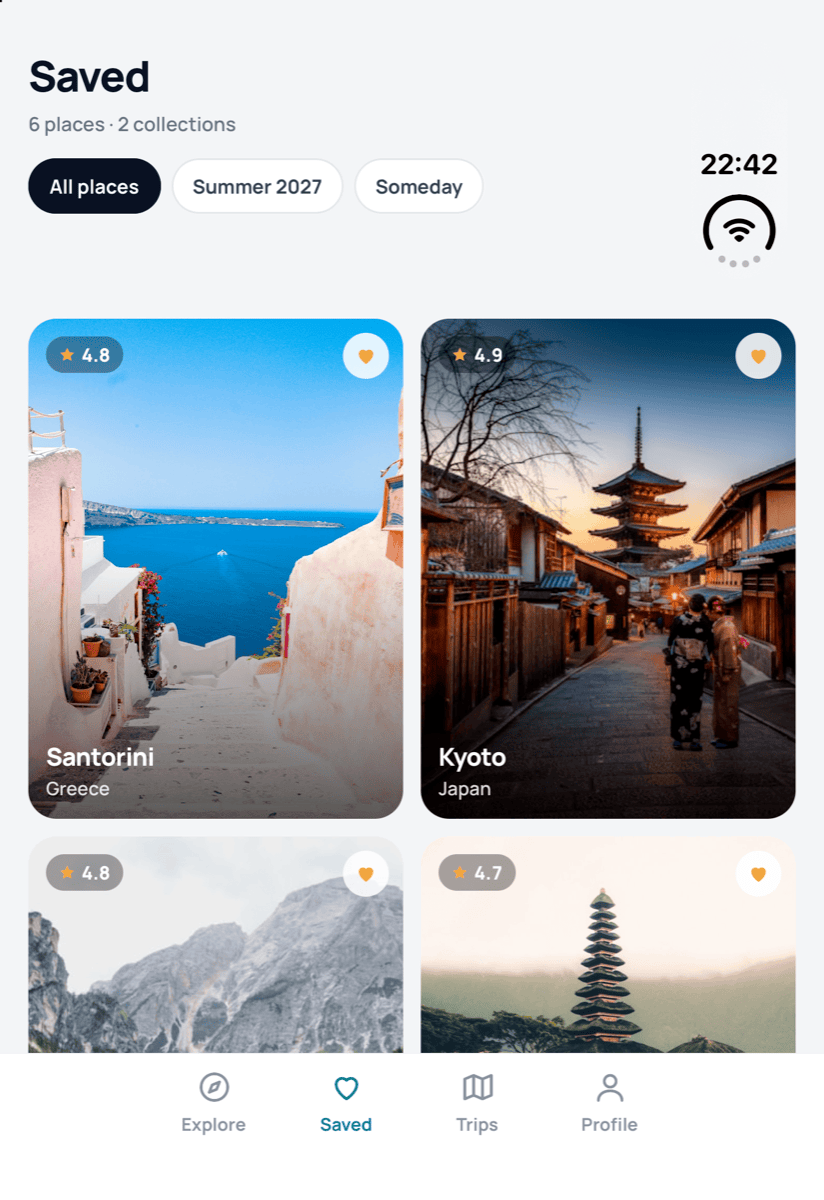
The pass found one bug, in a screen the agent never opened. On the Duo, the Saved tab’s grid of places rendered blank, on the cover and in the list pane: the grid was laid out at the right size but its cards were neither drawn nor in the UI tree. The run had exercised Explore, the destination page and the pane; nothing in its log shows it opening Saved, so it had no reason to see it. A fair reminder that an agent verifies what its brief points it at.
A fresh agent session took it from there. The cause had nothing to do with the fold: each card had a percentage width and an aspect ratio, and on the React Native release candidate under the SDK 58 preview that combination came out zero points tall. The grid was just as blank on an ordinary iPhone and on Android. The grid now measures its own width and gives each card an explicit size (d04fb76).
Checking an ordinary iPhone turned up a second bug. On iOS 27.2 the regular status bar is reported as a reserved region too, a full-width one across the top, and Atlas took it for the Duo’s corner block and made room for the whole width: the Explore header disappeared and the search field shrank to a sliver. Only a block that leaves the leading edge free counts as a corner block now (6e91018). And with the grid visible, the Duo’s corner block on the cover sat over the first card’s heart button, as it did over the first row of Trips; those tab headers now reach below the block (79e0cc6). All three fixes were checked on a live iPhone Duo and are in Atlas 1.1.2, the version in the repository today.
Everything here ran on Apple’s iPhone Duo simulator on the iOS 27.1 beta runtime, streamed by VibeView. Layout, postures and rotation behave as on the device; hinge feel, sensors and performance are not simulated, so a pass on hardware before a release still stands. The fixes were checked on an ordinary iPhone and on Android for the screens they touch, not across the whole app, and nothing was checked on an iPad. And the SDK 58 preview’s legacy-peer-deps workaround is still in the repository until SDK 58 is stable.
| Agent time | 41 minutes, from the first file read to the final version on VibeView |
| Commits | 3: 77e29b0, dd76e3a, 277e292 |
| Versions on VibeView | 1.1.0 (1), (2) and (3) |
| Revisions installed into a live session | 9, six of them for the rotated layout |
| Duo sessions | 2 while building (each ready in 35 s); 1 for the verification pass |
| Fold as reported by UIKit | 40 pt at x 455.5 on a 951×669 pt screen |
| Project problems fixed | 5: dependencies, types, a lint rule, the status bar corner, the rotated layout |
| Verification pass | 10 of 10 states, about 8 minutes of streaming |
| App bugs found afterwards | 3: the Saved grid, the Explore header on ordinary iPhones, the corner block over the cover’s first row; all fixed in 1.1.1 and 1.1.2 |
| VibeView gap hit in the run | agent taps on the inner screen, launch day, fixed the same day |
No. Neither has a fold API. Atlas reads the fold from UIKit’s reserved regions (iOS 27.1) through a small local Expo module, about 180 lines including its podspec and types. It is in the Atlas repository, and you can copy it.
Because the system knows better. The fold has a width and a position of its own, and it is reported flat and partly folded alike, so a split that follows it stays in the same place at 180°, 110° and 75°. The safe area was measured and rejected: on the Duo it reports the status bar’s 120-point block as a full-height 84-point inset down one side.
No. It is Apple’s iPhone Duo simulator on the iOS 27.1 beta runtime, streamed to the browser and the CLI by VibeView. Layout, postures and rotation behave as on the device. See the iPhone Duo simulator page.
With vibeview set-posture closed|partial|open, or an exact angle with --angle 0-180, and
vibeview rotate in any posture. Each reports the posture it settled in and which screen is
lit. The hinge angle guide covers scripts
and CI.
The iPhone Duo simulator not showing guide walks through the usual causes. You can also upload your build to VibeView and fold a Duo in the browser.
Install the CLI and run vibeview agent-setup, which gives your agent a skill with a section on foldables. vibeview list-devices --models shows the Duo as the row marked foldable, and vibeview dev --platform ios --model "iPhone Duo" streams your app on one. Then ask your agent to make a change and prove it closed, open, partly folded and rotated. Atlas is the worked example: the fold module, the adaptive shell, and a README that describes each layout.
Published 24 September 2026 · Every command and figure above is taken from the agent’s run log and the verification pass of the same day
Open a live iOS simulator, Android emulator, Apple TV, Android TV or Roku in your browser.
Start free