Agentic development · iPhone Duo
An AI agent adds iPhone Duo support to an Expo app
Rokas Kašinskas — Co-founder, VibeViewPublished 2026-09-24Updated 2026-09-24
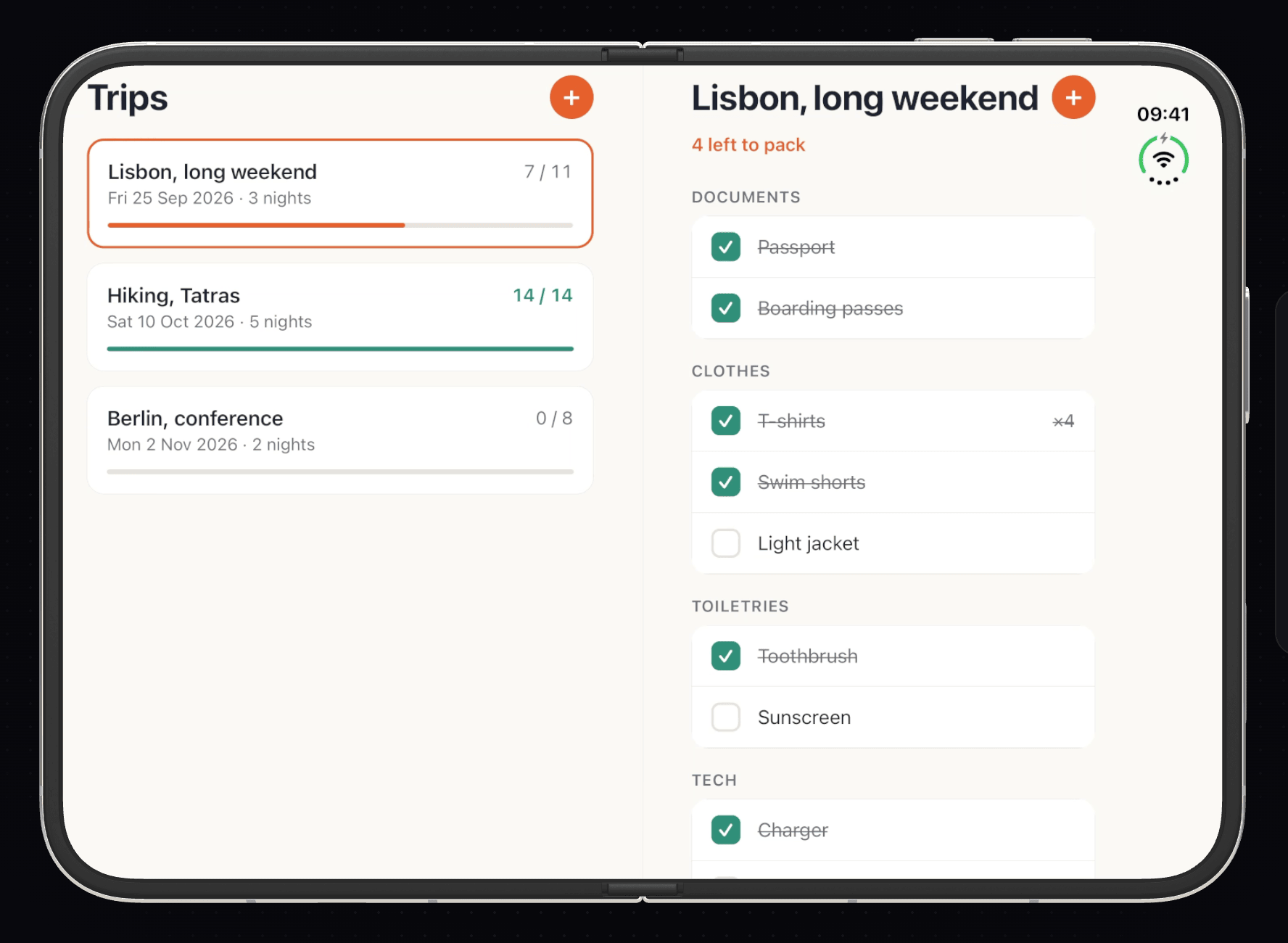
Agentic development · iPhone Duo
I run VibeView, so read this with that in mind. A week earlier an agent built Kitlist and shipped it to TestFlight in 43 minutes. Then Apple announced the iPhone Duo, its first foldable, and the obvious question for anyone with a React Native app was: what does my app do on it, and how would I even check? Folding a simulator is a mouse gesture in Xcode’s Device Hub; nothing in Apple’s command-line tools does it. So I gave the same app to a fresh agent with one job: make Kitlist good on the Duo, and prove it on the device. This run deliberately stays small: no native code, a layout driven by window size alone, and stable Expo SDK 57. A companion run on our showcase app, Atlas, went further and reads the fold’s exact position through a native module.
The rules were the ones from the earlier runs. The vibeview CLI, its agent skill and the public docs are the only source of truth about VibeView. Keep a timestamped run log. Fix your own project’s problems and write them down. The agent updated the CLI to 0.23.0 and refreshed its skill with vibeview agent-setup, which now carries a section on foldables. That gave it two verbs and two flags it had not had in the first run:
vibeview list-devices --models                 # the Duo is the row marked "foldable"
vibeview dev --detach --json --platform ios --model "iPhone Duo"
vibeview set-posture closed|partial|open        # or: set-posture --angle 0-180
vibeview rotate                                 # a quarter turn clockwise, in any posture
A Duo session starts closed, on the cover screen. Every session in the run was ready in 23 to 24 seconds.
The iPhone Duo in VibeView is Apple’s own iPhone Duo simulator on the iOS 27.1 beta runtime, streamed to the browser. It is a simulator, not hardware: layout, posture and orientation behave as on the device; hinge feel, sensors and performance are not simulated. See the iPhone Duo simulator page.
The agent read before it wrote. Apple’s guidance for the Duo boils down to three things: size your layout to the window, not the device; a split view should collapse to one pane on the small outer screen and expand on the large inner one; and keep content off the fold, which runs down the middle of the inner screen. Apple gives native apps an API for the fold’s exact position.
React Native has no fold API, no posture API and nothing for that reserved region. The agent checked the Expo SDK 58 preview too: its iOS 27 work is the scene life cycle and scene-aware geometry, and its changelog promises deeper Duo integration “as soon as the iPhone Duo SDK is available to developers”. Expo’s display-features module was an unpublished draft. So it stayed on stable Expo SDK 57 and wrote down why: SDK 58 would add a preview Expo on a React Native release candidate and give Kitlist nothing Duo-specific today.
What React Native does have is enough, if the layout follows the window:
useWindowDimensions() re-renders on every fold, unfold and rotation, so one small useLayout() hook decides everything. Two panes when the window is at least 600 points on its short side and 640 on its long side; side by side when the window is wider than tall, stacked when it is taller than wide. The cover screen is about 466×678 points, so it always gets one pane. The inner screen is about 951×669, so it gets two./trip/[id], not in the view tree. With one pane that route is the packing list with a ”‹ Trips” button; with two it is the list on one side and the packing list on the other. Folding mid-task keeps the same trip on screen because nothing about the selection depends on which layout is showing.One piece of configuration was needed beyond layout: iOS 27 requires UIKit’s scene life cycle. Expo SDK 58 does that by default; for SDK 57, Expo backported it as a first-party switch, ios.enableSceneSupport in expo-build-properties. One plugin entry in the app config.
The first surprises were on the cover screen.
The cover’s safe area reserves an 84-point strip down the whole right edge for a status bar that sits only at the top. Kitlist’s content respected that inset, but its round + button did not: the tree put it at x 1168–1336 of a 1398-pixel-wide screen, inside the reserved strip, and the screenshot agreed. An absolutely positioned view ignores its parent’s padding, and the button only ever added the bottom inset. The fix was one line, right: 20 + insets.right: a simple, conservative choice that keeps the button clear of the whole strip (the Atlas run reads the exact status-bar region instead).
The second bug was in the Add item sheet. The cover screen is under 680 points tall, and with the keyboard up that is not much. The sheet’s Save button (“Add to …” and the trip’s name) lived inside the sheet’s scroll view, so the keyboard pushed it out of sight: the tree put it at y 1200–1344 while the sheet itself ended at 1264, and a tap on it saved nothing. The agent moved Save into a footer outside the scroll view that always sits above the keyboard, and re-ran the flow: Save now at y 1008–1152, inside the sheet, and “Sunscreen lotion” added under Toiletries. The same bug would have hit anyone on an iPhone SE-sized phone. The Duo’s cover just made it obvious.
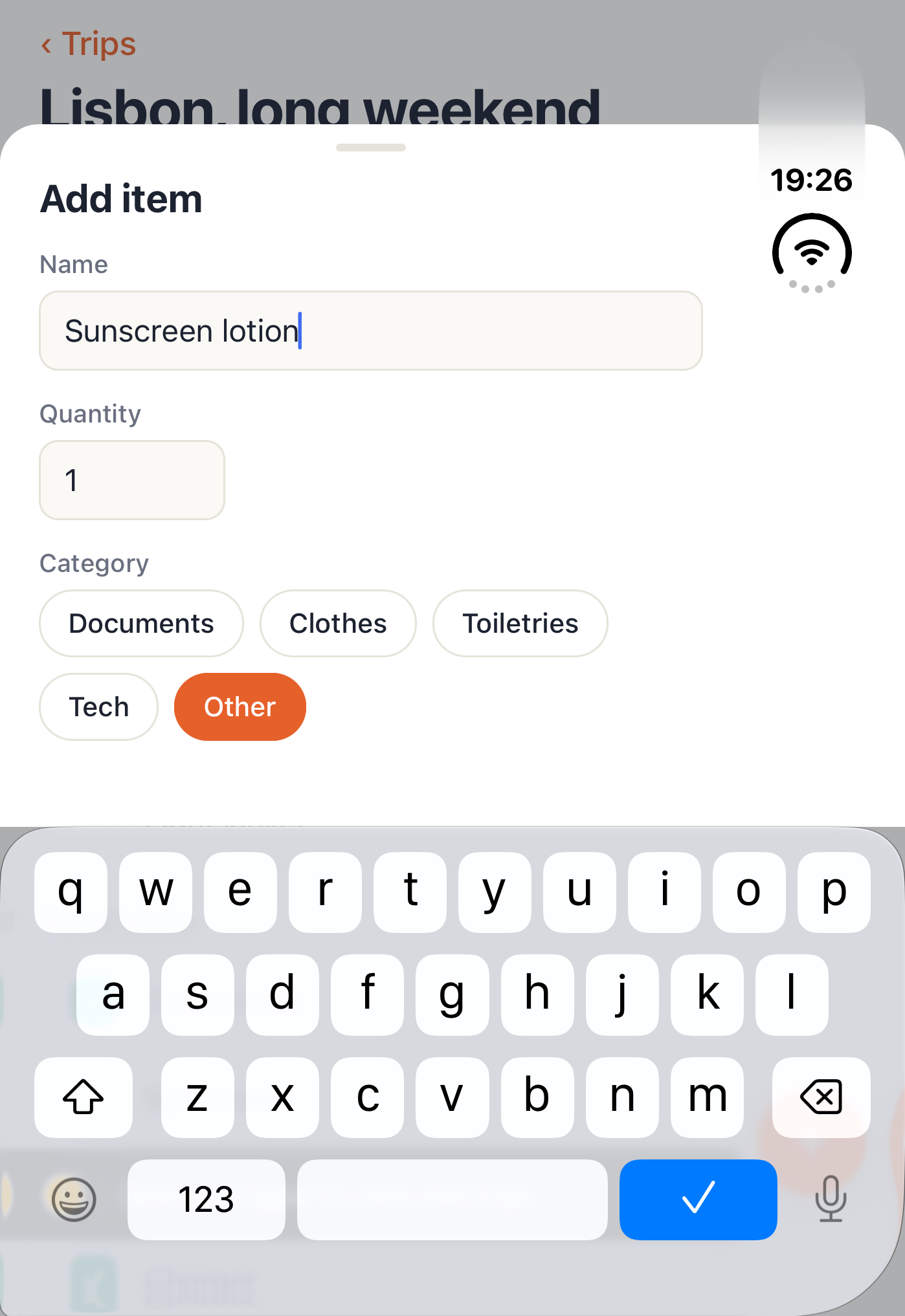
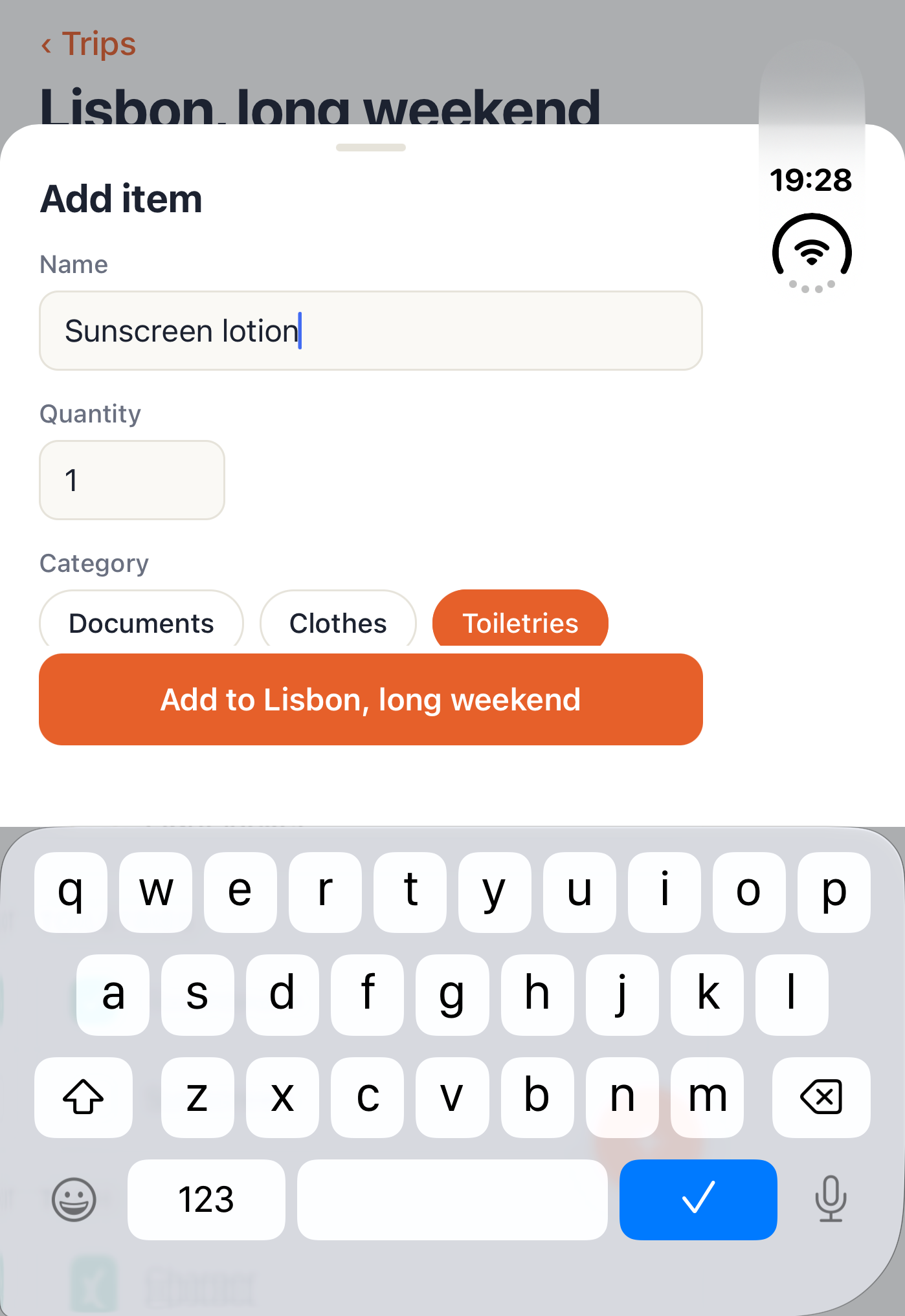
With the fixes in, the agent ran the flow it cared about: pick the Lisbon trip on the cover, add an item, then unfold.
vibeview find "trip.row.lisbon" --session <id>    # → @e3
vibeview tap @e3 --session <id>
vibeview set-posture open --session <id>
vibeview ui-tree --session <id>
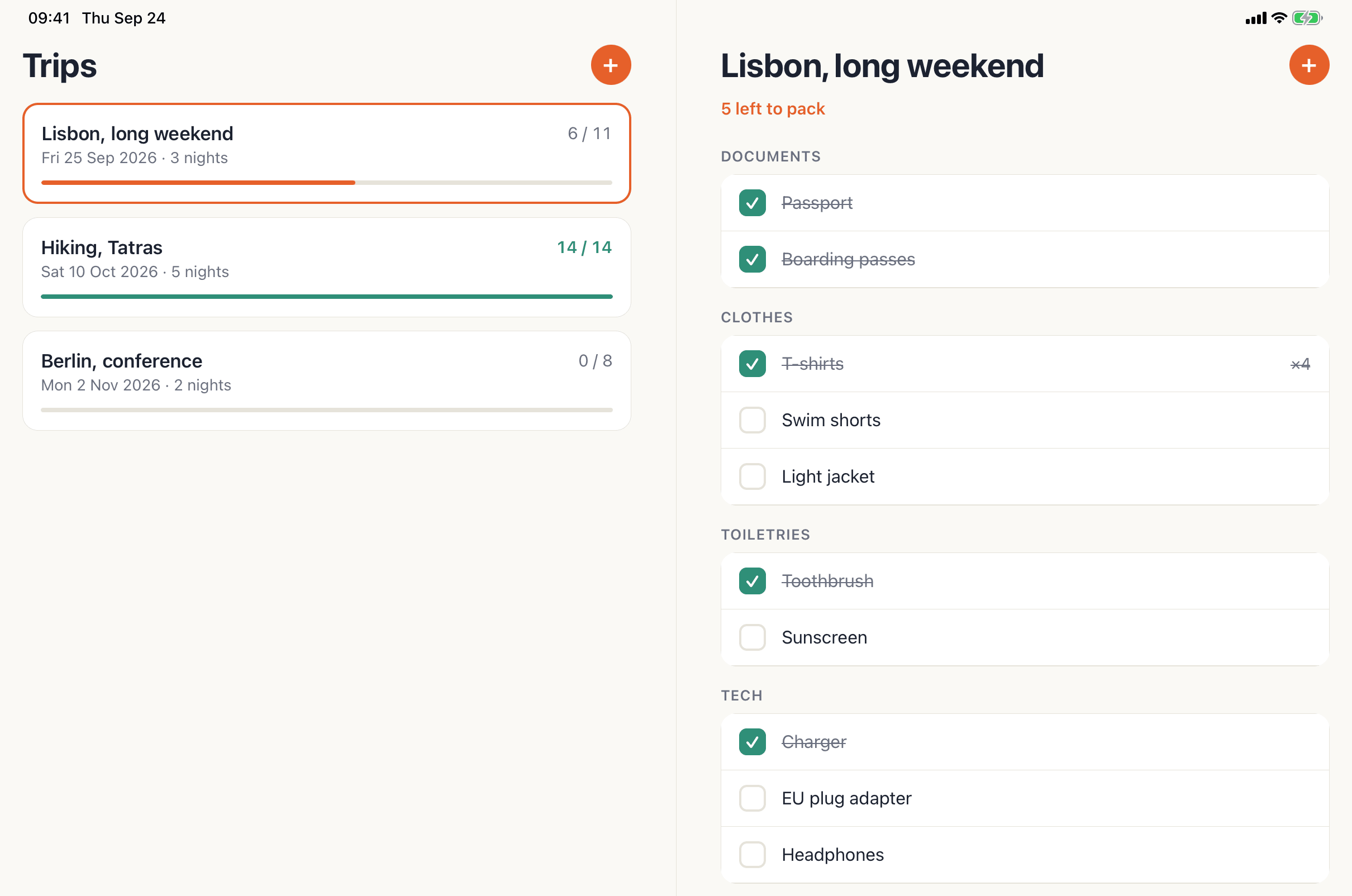
The tree after set-posture open covered the whole inner screen, and it described exactly the layout the code intended: the trips list from x 0 to 1368, the packing list from 1488 to 2856, and the 120-pixel gutter between them centred on 1428, half the window, which is where the hinge is. The Lisbon row was marked [selected], its count read 6 / 12, the right pane read 6 left to pack with “Sunscreen lotion” in it, and there was no back button, because with two panes there is nothing to go back to.
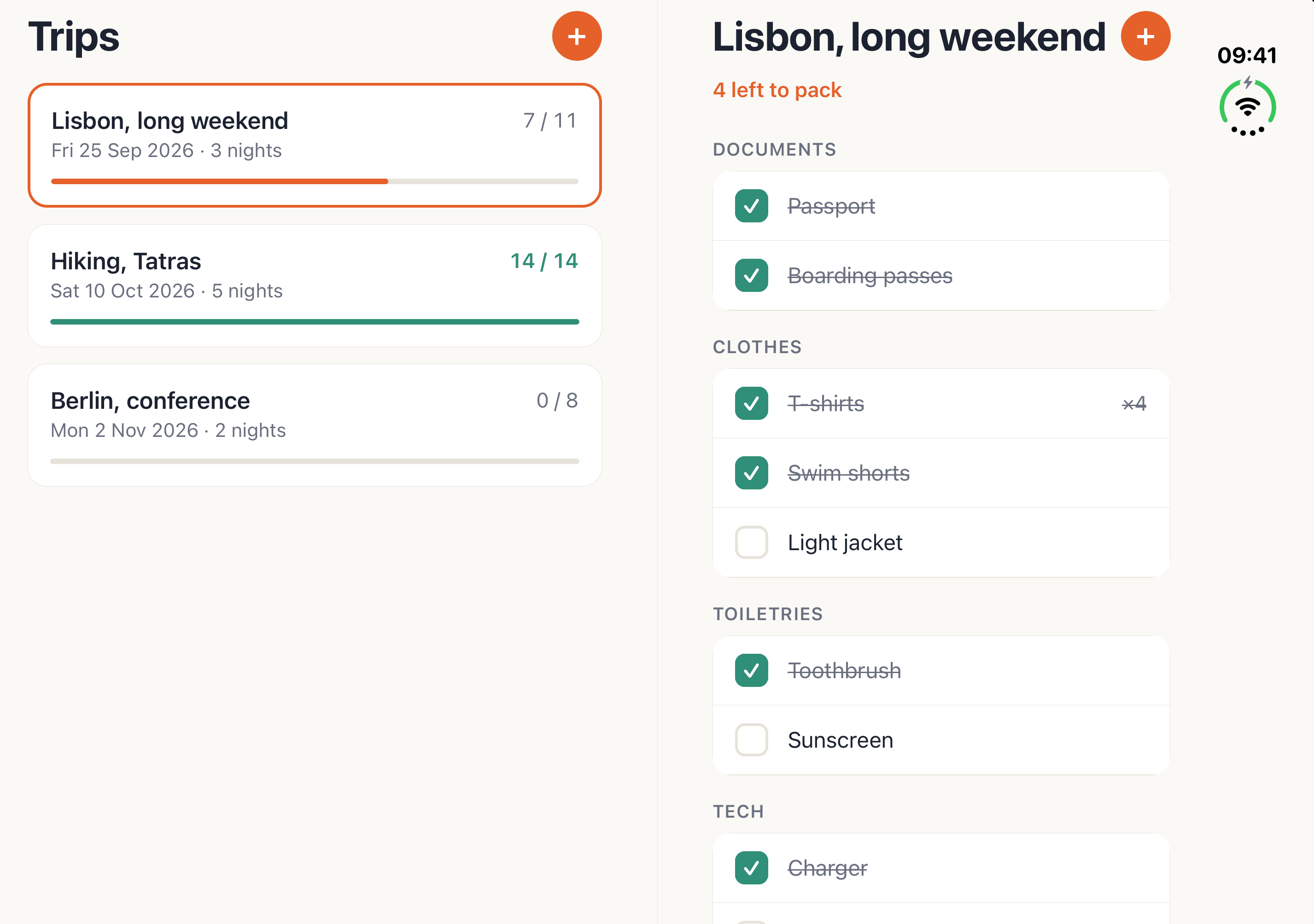
That tree was the only view the agent had of the unfolded Duo during the run. The Duo was a brand-new kind of device for VibeView, and one piece was not finished: its inner screen. The agent’s taps did not reach it and its screenshots came back black. tap @e3 on the Lisbon row with the Duo open answered that the screen looked visually similar, and nothing had changed when the agent checked the tree. It went into the log as a VibeView bug, with the commands, the responses and the sizes.
It did not stop there. The tree on the inner screen was complete and exact, so it made every assertion from the tree, where a pane’s rectangle, a row’s [selected] state and a label’s text are exact numbers and strings, and it did its tapping and typing on the cover. That happens to be the question that matters most for a foldable anyway: does what you did folded survive unfolding?
The gap was fixed the same day. Screenshots of an open or partly folded Duo now capture the screen that is lit, and an agent’s taps go to the unfolded screen when the Duo is open. It was confirmed on a fresh Duo session running the same build; the inner-screen screenshots in this article were taken after that fix.
Then it walked the Duo through every posture and orientation it could reach, reading the tree after each step. Each set-posture response names where the device ended up, posture, hinge angle and lit screen, so the agent always knew which state it was asserting against:
vibeview set-posture --angle 110 --session <id>   # partial, 110°, inner screen
vibeview set-posture --angle 75 --session <id>    # partial, 75°, inner screen
vibeview set-posture open --session <id>
vibeview rotate --session <id>                    # a quarter turn, still open
One thing it learned on the way is worth knowing if you script this yourself. The device decides which screen to light, with hysteresis, the way the hardware does. Opening to 75° from closed leaves the Duo on the cover, and the response says closed. Coming down to 75° from 110° keeps the inner screen lit, and the response says partial. The agent reached 75° from 110° for that reason, and read the response every time rather than assuming. The hinge-angle guide covers this in detail.
The second pass, the one the table records, took under six minutes of device time:
| # | Posture and orientation | How | Layout from the tree | Selection and state |
|---|---|---|---|---|
| 1 | Closed, portrait | session start | 1 pane; + inside the safe area | — |
| 2 | Closed | open Lisbon, add “Sunscreen lotion” | 1 pane; Save inside the sheet | 6 left to pack, item under Toiletries |
| 3 | Open, 180° | set-posture open | side by side, gutter centred at half the window | Lisbon [selected], 6 / 12, no back button |
| 4 | Partial, 110° | set-posture --angle 110 | side by side | same |
| 5 | Partial, 75° | set-posture --angle 75 | side by side | same |
| 6 | Open, rotated 90° | set-posture open, rotate | stacked, window 2008×2856, gutter y 1368–1488 | same |
| 7 | Partial 110°, rotated | set-posture --angle 110 | stacked | same |
| 8 | Partial 75°, rotated | set-posture --angle 75 | stacked | same |
| 9 | Partial 75°, rotated back | rotate --degrees 270 | side by side again | same |
| 10 | Closed, from partial | set-posture closed | 1 pane, ‹ Trips present | Lisbon, 6 left to pack |
| 11 | Back to the list, then open | tap ‹ Trips, set-posture open | side by side; right pane “No trip selected” | nothing selected |
| 12 | Closed, rotated 90° | set-posture closed, rotate | 1 pane, landscape | — |
Twelve of twelve. An earlier pass in the same run covered ten layout and state checks, including ticking Swim shorts on the cover and finding it still ticked after a partial fold and a close.
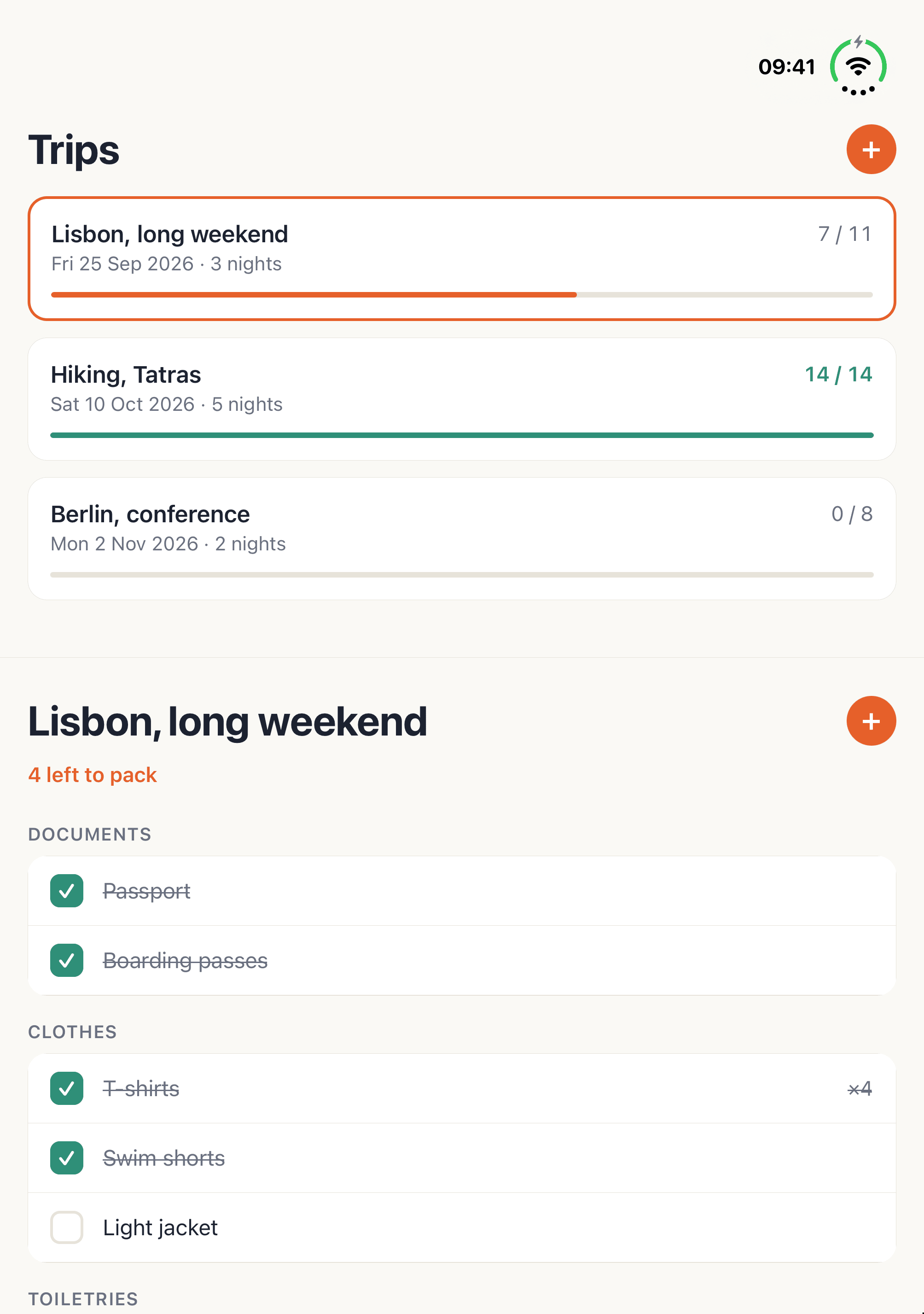
The screenshots caught one more bug after the run, one the tree-based checks had passed. In the stacked layout the top pane is only about 450 points tall, and its floating + button sat on top of the last trip row and hid its count. The list had bottom padding for the button, but padding only helps once you scroll to the end; at rest the row was still under it. In a pane that short, a floating button always covers a row, so Kitlist 1.0.2 moves the + into each pane’s header, beside the title, whenever there are two panes, and the lists run the full height of the pane. With one pane (the cover screen, a phone) the floating + stays in the corner. The open, rotated, no-trip and iPad screenshots in this article are from 1.0.2.
State 10 is the easy one to get wrong. Folding a two-pane app back to one pane has to decide what that one pane shows. Because the selection lives in the route, the answer falls out: a trip is selected, so the cover shows that trip’s packing list, with ”‹ Trips” to get back. And when nothing is selected, state 11, unfolding shows the list next to “No trip selected. Pick a trip to see its packing list.”
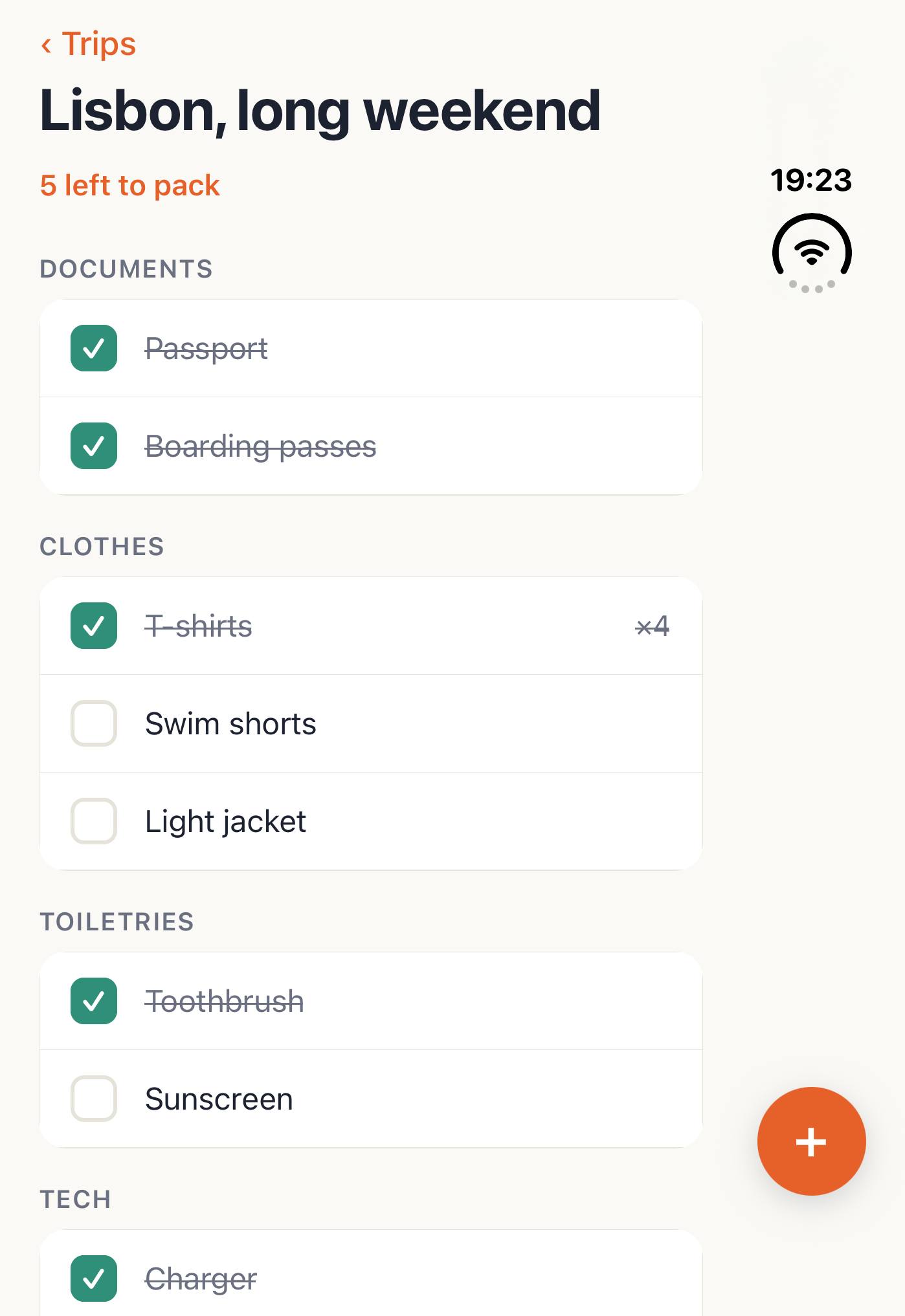
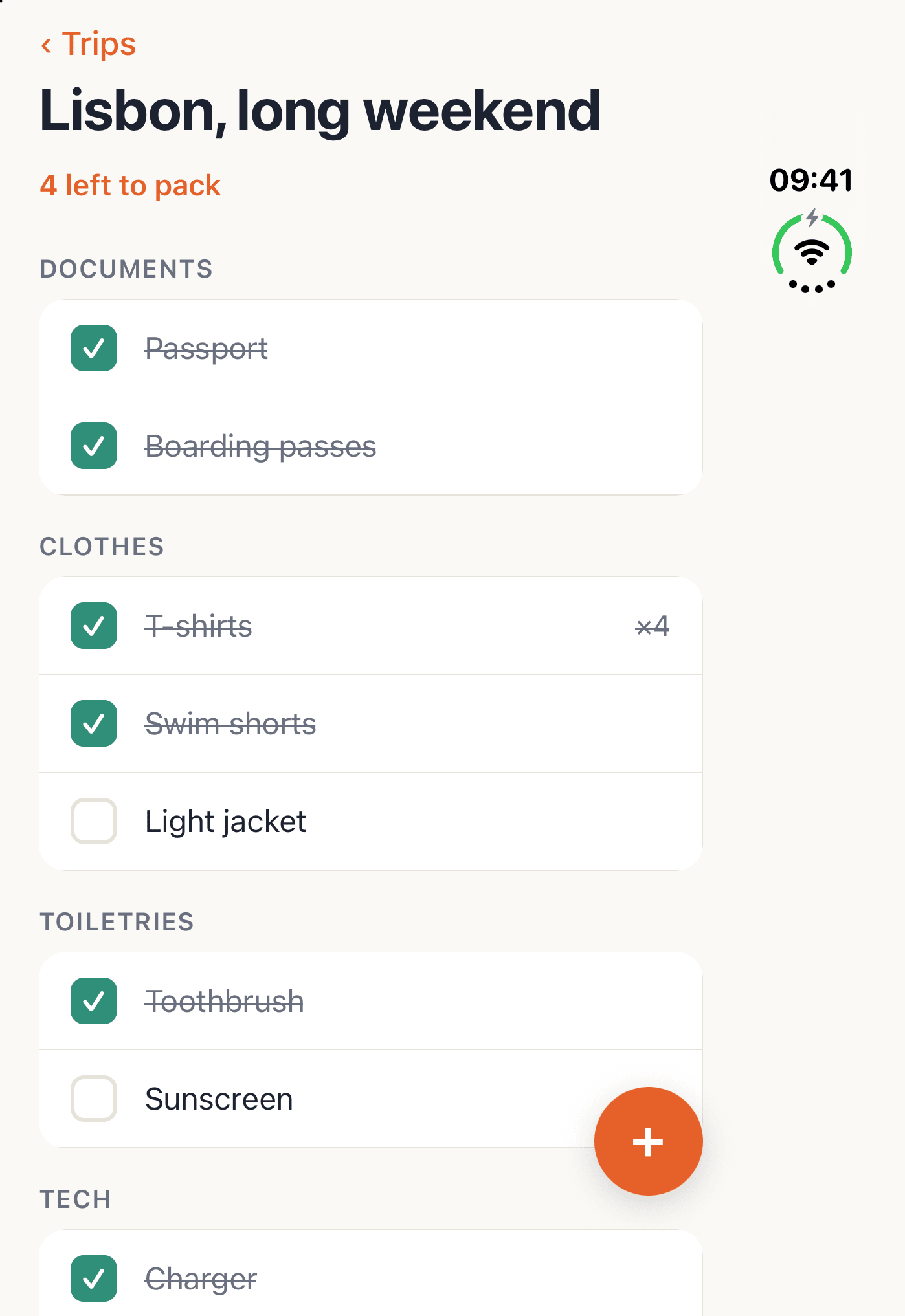
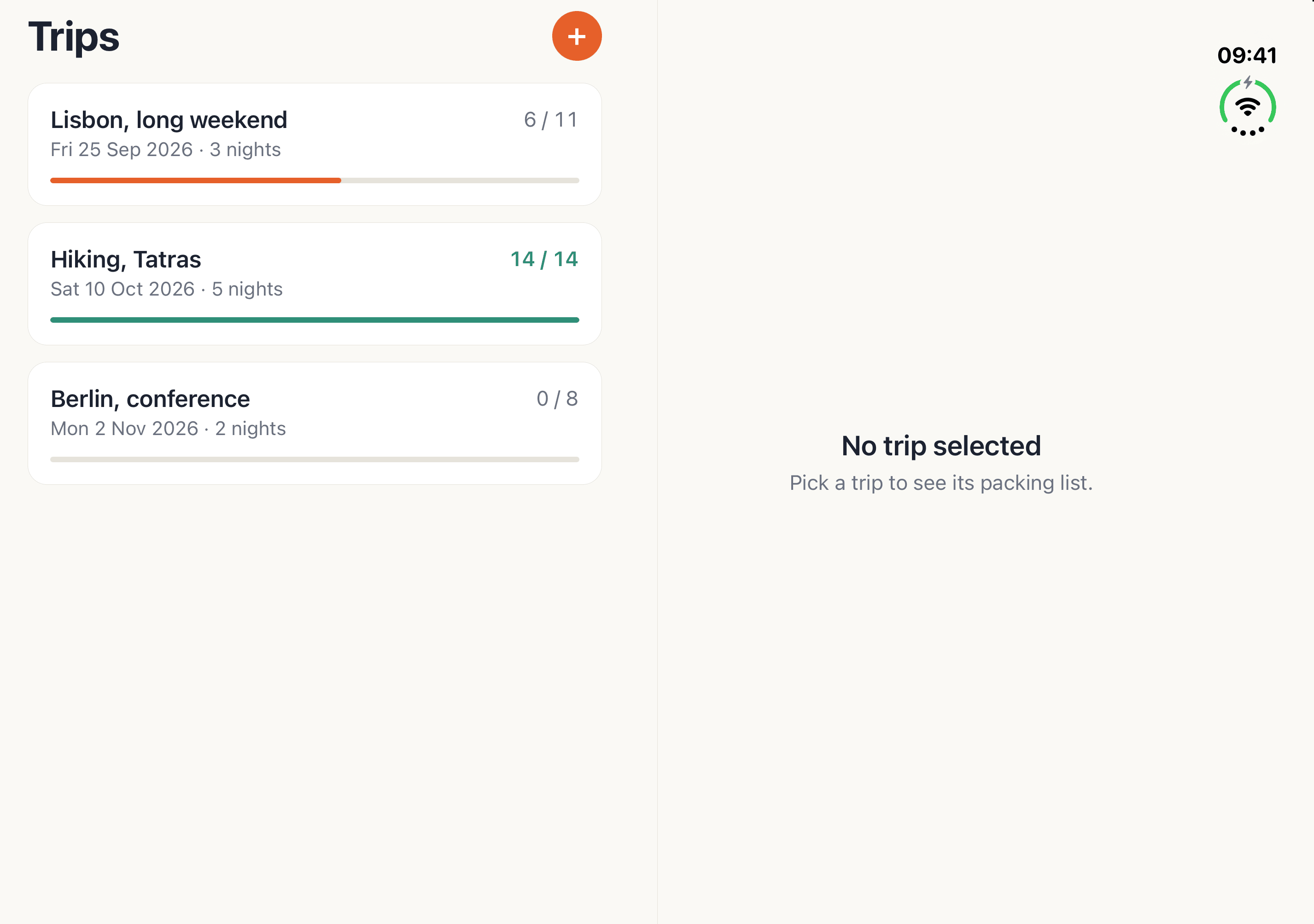
A layout driven by window size is not Duo-specific code, so the agent checked that it had not broken the phone and turned on iPad support while it was there, since Apple’s own advice is that an iPad-ready resizing layout is most of the Duo work. On an iPhone 17 Pro the app stayed one pane in portrait and in landscape, where the window is 875×403 points and too short for two. On an iPad Pro 11-inch it showed stacked panes in portrait and side by side in landscape, and the Add item sheet opened inside the right pane only.
Store submission was skipped this time. The path from a production build to TestFlight and Google Play is the same as in the first Kitlist run, which covers it command by command.
The 50/50 split is an approximation of the fold, not a reading of it. It holds because the fold is at the centre of the inner screen in both orientations, and the tree confirmed the gutter sits there. When Expo or React Native ship a fold API, the split can be refined to the fold’s exact frame without changing anything else.
And this is a simulator on a beta runtime. It answers layout, posture and orientation questions well. Hinge feel, sensors and performance need hardware.
During the run, two messages: a change of plan that dropped store submission for this run, and a request to decide, with evidence, whether Kitlist should move to the Expo SDK 58 preview. After it, we fixed the inner-screen gap, rolled it out and confirmed it on a fresh session. A review of the screenshots then found the + button bug in the stacked layout, fixed in Kitlist 1.0.2 and retaken above.
| Wall clock | about an hour |
| Session start on the Duo | 23 to 24 seconds |
| Posture change | 3 to 4 seconds; the first unfold of a session took longer |
| Duo states asserted | 22 across two passes, all passed |
| App bugs found on the Duo | 2 in the run, both on the cover screen, both fixed; 1 more from the screenshots afterwards, fixed in 1.0.2 |
| New dependencies | 1, expo-build-properties, for the scene life cycle switch |
| Native code written | none |
| VibeView gap that blocked the run | inner-screen taps and screenshots, launch day, fixed the same day |
| Commits | 9, pushed to the public repository |
Not to get the basics right. A layout that follows useWindowDimensions() re-renders on every
fold, unfold and rotation, and a 50/50 split keeps content off the fold because the fold sits at
the centre of the inner screen. A fold API would let you place the split exactly; Expo’s is not
published yet.
Not for the Duo alone, as of this run. The Duo-relevant part of SDK 58 today is the scene life
cycle, and Expo backported that to SDK 57 as ios.enableSceneSupport in
expo-build-properties. SDK 58 was a preview on a React Native release candidate. The Atlas
run took the upgrade instead and wrote down what
it cost.
Yes. The same set-posture and rotate commands work from a terminal or a CI job, and in the
browser the Device tab folds the Duo to a preset or an exact angle. The hinge-angle
guide has the details.
Claude Code, running the vibeview CLI in a shell, with the public agent skill installed by
vibeview agent-setup. The same verbs are available as MCP tools for agents without a shell.
Install the CLI, run vibeview agent-setup, start a session with --model "iPhone Duo", and ask your agent to fold it. Kitlist is public, and its README has an iPhone Duo section with the layout rules above and the commands to try each posture by hand.
Published 24 September 2026 · Every command and figure above is taken from the run log of 24 September 2026
Open a live iOS simulator, Android emulator, Apple TV, Android TV or Roku in your browser.
Start free