Testing · Deep links
Test deep links, universal links and App Links
Rokas Kašinskas — Co-founder, VibeViewPublished 2026-10-30Updated 2026-10-30
Testing · Deep links
A deep link has two jobs. The system has to hand the link to your app, and your app has to turn it into the right screen. Most bugs sit in one of those two places, so it helps to test them one at a time.
| Kind | Example | Who decides it opens your app |
|---|---|---|
| Custom scheme | myapp://orders/42 | Your app declares the scheme. No website is involved. |
| Android App Link | https://example.com/orders/42 | Android, after checking assetlinks.json on your domain. |
| iOS universal link | https://example.com/orders/42 | iOS, after reading apple-app-site-association from your domain. |
Custom schemes are not verified. Google notes that another app can register the same scheme, which can bring up a chooser (Android deep links, checked Oct 30, 2026). Apple accepts custom schemes but strongly recommends universal links. It also asks you to validate every URL parameter and to test malformed URLs (Defining a custom URL scheme, checked Oct 30, 2026).
Google’s test command starts a VIEW intent for one URI and one package (Android deep links, checked Oct 30, 2026):
adb shell am start -W -a android.intent.action.VIEW \
  -d "myapp://orders/42" com.example.myapp
-W waits until the launch finishes, so the output shows whether it worked. In our runs, a link that no activity in the package handles failed with an error. It did not fall back to the app’s home screen. Use this command to check your intent filters and the screen each link opens.
Naming the package skips one question: which app Android would pick for the link. For a web link, ask Android the way a browser would. Google’s App Links page uses this command, with no package and the BROWSABLE category (Verify App Links, checked Oct 30, 2026):
adb shell am start -a android.intent.action.VIEW \
  -c android.intent.category.BROWSABLE \
-d "https://example.com/orders/42"On Android 12 and later, a web link reaches your app only if your app is approved for that domain. Otherwise it opens in the default browser (Android deep links, checked Oct 30, 2026). Verification approves your app without anyone touching settings. A person can also approve a domain by hand, in the app’s settings (Verify App Links, checked Oct 30, 2026). Verification needs two things:
android:autoVerify="true".https://<host>/.well-known/assetlinks.json.To re-run verification on a device or emulator with Android 12 or later, Google lists these commands (Verify App Links, checked Oct 30, 2026):
Reset the link state. This puts the device back to how it was before anyone chose a default app for your domains.
adb shell pm set-app-links --package com.example.myapp 0 allVerify again.
adb shell pm verify-app-links --re-verify com.example.myappRead the result. A domain that passed shows verified.
adb shell pm get-app-links com.example.myappA state of none means nothing is recorded yet: wait a few minutes and verify again. A number of 1024 or higher is an error code from the device’s verifier. Google’s advice is to check the network connection and run verification again.
xcrun simctl openurl booted "myapp://orders/42"booted targets the running simulator. With several running, simctl picks one of them, so pass a UDID instead (xcrun simctl help). If no app on the simulator claims the scheme, the command fails with an error that it could not open the URL.
For a custom scheme, the app declares it under URL Types on the target’s Info tab in Xcode. Expo apps set a scheme in the app config. After you add one, Expo says you need a new development build (Linking into your app, checked Oct 30, 2026).
A universal link needs two parts: an entitlement in the app and a file on your site. The app needs the Associated Domains capability with an entry such as applinks:example.com. Your site serves https://example.com/.well-known/apple-app-site-association over HTTPS, with a valid certificate and no redirects (Supporting associated domains, checked Oct 30, 2026).
Apple’s debugging technote adds the details that trip people up (TN3155, checked Oct 30, 2026):
applinks:example.com and the wildcard applinks:*.example.com. A named subdomain such as applinks:www.example.com needs its own file on that subdomain.applinks:example.com:8080 will not open your app.curl -v https://example.com/.well-known/apple-app-site-association shows the headers. Save a copy with curl -o aasa.json https://example.com/.well-known/apple-app-site-association, then sudo swcutil verify -d example.com -j ./aasa.json -u https://example.com/orders/42 checks a path against it.On iOS 14 and later, Apple’s CDN fetches and caches your association file. Devices download it from the CDN when the app is installed, then check about once a week. To get a newer file, reinstall the app; the CDN has no purge (TN3155, checked Oct 30, 2026). So a file you just fixed can work on one install and not another.
While you develop against a server the CDN cannot reach, add ?mode=developer to the entitlement entry. Apple limits that mode to apps signed with a development profile, on devices where the user opted in (Associated Domains Entitlement, checked Oct 30, 2026).
Apple’s on-device check is the Associated Domains Development diagnostics, under Settings > Developer once Developer Mode is on. Its deeper check, the swcutil_show.txt report, comes from a sysdiagnose taken on a device. Each device also stores a person’s choice between the app and the browser. Use a simulator to test your routing quickly, and confirm a universal link on a physical iPhone before release.
| What you see | Likely cause |
|---|---|
| adb: “unable to resolve Intent” | No activity in the package has an intent filter for that scheme and host. |
| An https link opens Chrome, not the app | The domain is not verified. Run pm get-app-links and check assetlinks.json. |
| simctl: “failed to open” the URL | No installed app declares the scheme, or the build predates the change. |
| A universal link opens Safari | A wrong entitlement or file path, a redirect, an old cached file, or a stored choice for the browser. |
| The app opens on the wrong screen | The link reached the app, so the bug is in your router: the path, the parameters, or a screen behind sign-in. |
| The app shows a “not found” screen | The router has no route for that path. Check how your router reads the host and path of the URL. |
The last row is easy to miss. In our run on VibeView’s Atlas sample app, atlas://saved opened the Saved tab. atlas://home reached the app but matched no route. Expo Router showed its Unmatched Route screen, which lists the URL as it read it. Both links “opened the app”. Only one opened the right screen.
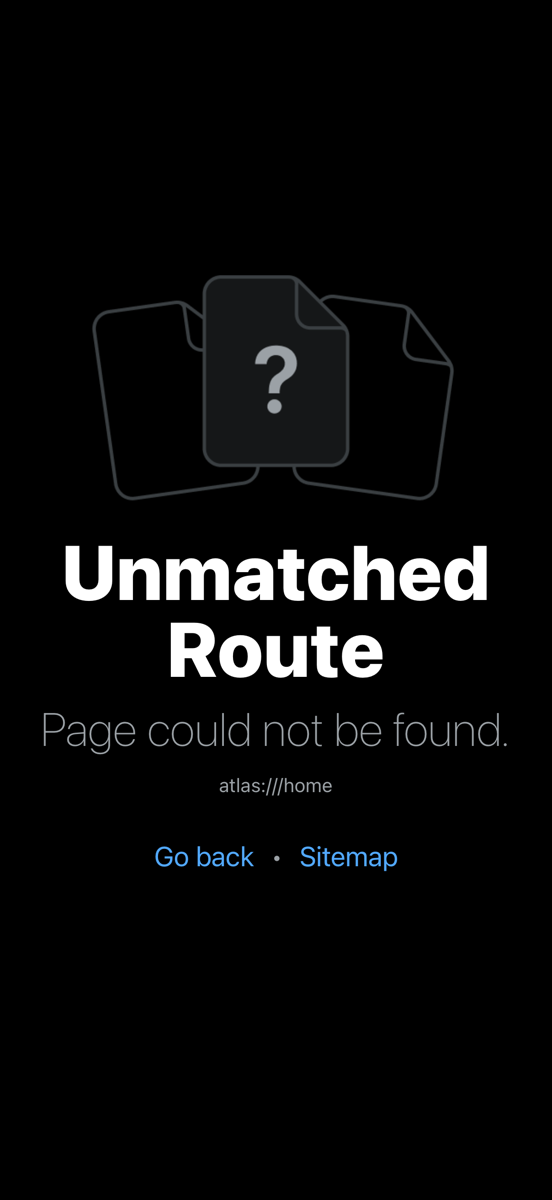
Also test links while the app is already running, not only from a cold start. Many apps read the first URL at launch and handle later URLs in a different place.
VibeView runs your app on cloud iOS simulators and Android emulators, and on Apple TV, Android TV and Roku. On iPhone, iPad and Android phones and tablets, you can open a deep link in four ways: the command line, an MCP client, the Devices page, or an AI test step (beta). On Apple TV and Android TV, the same works except the Devices page. Roku works differently, as described below.
From the CLI, start a session with your app and open the link:
vibeview dev --detach --platform ios --app <app-id> --standalone
vibeview open-url "atlas://saved"
vibeview screenshot --out saved.png
vibeview dev-stop
open-url prints ok and a summary of what changed on screen, so you can confirm the link worked without a screenshot. The same command is available as an MCP tool for coding agents. See AI Agent Control.
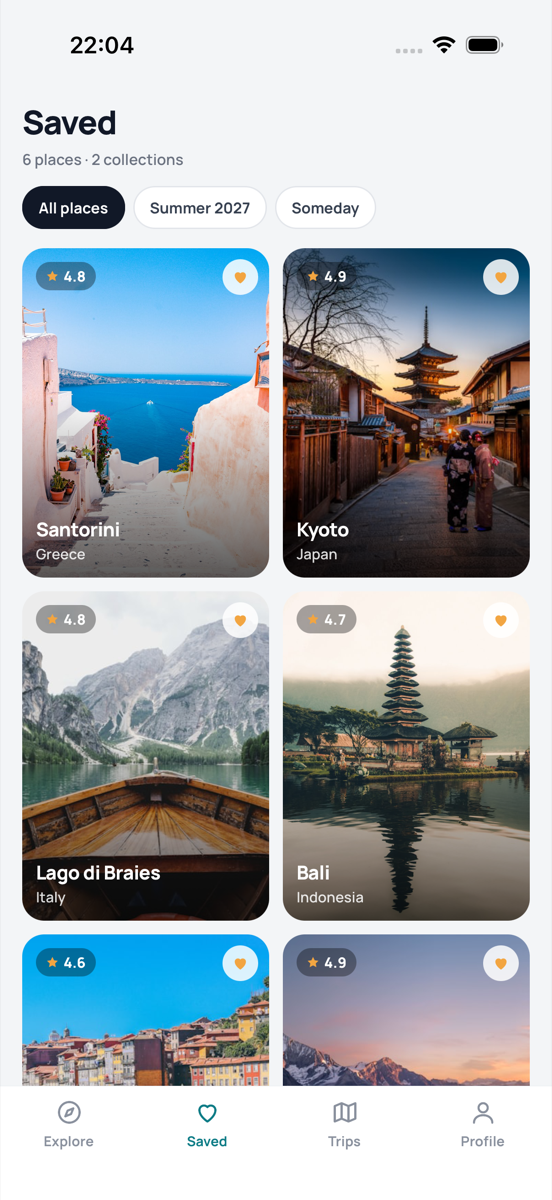
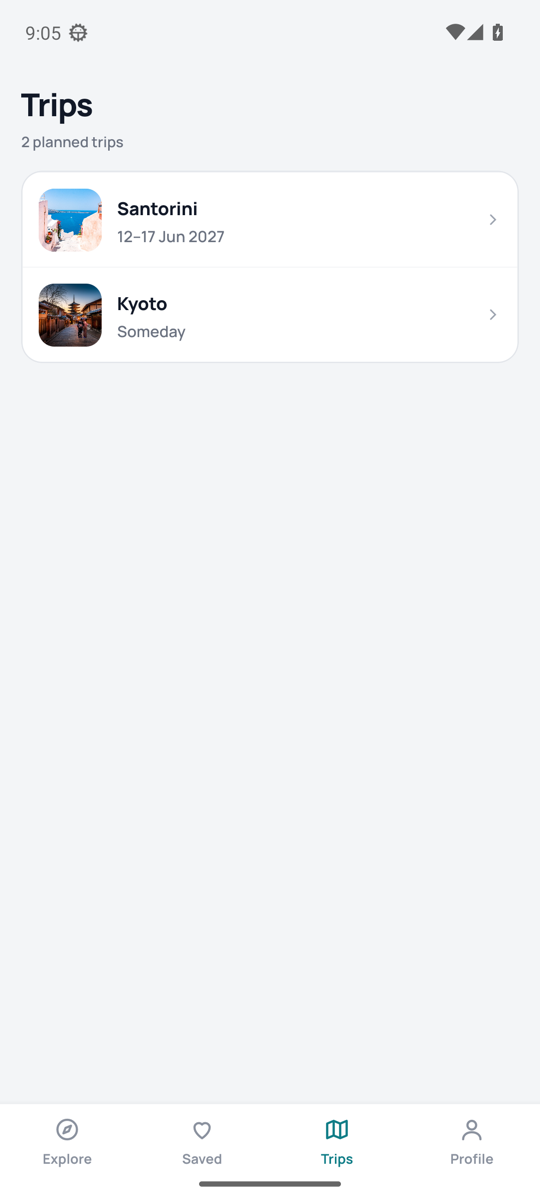
What each platform accepts:
tel:, and so does the Device tab on iPhone and iPad, so a link does not end up in Safari. Test universal links with the local steps above. The first time a link goes to your app, the system asks to open it in the app. VibeView answers Open when the prompt names your app.open-url. A Roku deep link is a launch with contentId and mediaType, which the channel reads in Main(args) (Roku deep linking, checked Oct 30, 2026). VibeView’s launch params arrive in the same args, so you can start a channel with those two keys through the REST API or an embed URL.On a phone or tablet, the Device tab of the tools panel has an Open link field for custom-scheme links. It is not available while you record a test. See The Device tab.
In a test, a step such as “Open atlas://saved and check that the Saved tab shows” lets the AI agent open the link and check the screen. On iPhone and iPad, keep these steps to your app’s own scheme: an https link in an AI step can open Safari instead of your app. AI testing is in beta. See AI testing.
No. Naming the package sends the link straight to your app, so it tests the intent filter and the screen. To see what Android does with a web link, run the command without the package and with the BROWSABLE category, then check the state with pm get-app-links.
You can open one with simctl openurl and check your routing. The sysdiagnose report comes from a device, the association file is cached per install, and a person’s choice is stored per device. Confirm on a physical iPhone before release.
Devices get the file through Apple’s CDN when the app is installed and check about once a week. Reinstall the app to fetch the new file, or add mode=developer to your entitlement entry while you work.
Not from the CLI or MCP. On iPhone, iPad and Apple TV they refuse web links, as does the Device tab on iPhone and iPad. An AI test step can send an https link, but on iOS it may open Safari instead of your app. Test universal links with the local steps above. On Android and Android TV, https links your app declares are delivered to your app.
Yes. On Android TV the same intents and adb commands apply. On Apple TV, custom schemes work, and tvOS asks the first time a link opens the app. Roku uses launch parameters instead, with contentId and mediaType.
Upload your build, start a session, and open your own links. Plans include a free tier, so you can check a few links before you pay for anything.
Open a live iOS simulator, Android emulator, Apple TV, Android TV or Roku in your browser.
Start free